%20(1)-B86R08ZzwhPzS6UZbG3mSxRWPCwGwn.png)



You've exported competitor keywords, opened a crawler, and collected enough screenshots to fill a presentation. You still can't tell your client which page to fix first, who should fix it, or how you'll know whether the work helped.
I would build the competitor website audit around decisions, not domain scores. Match competing URLs, inspect the templates behind them, and turn each defensible finding into an assigned task. Keep conventional rankings, rendered HTML, user journeys, and AI citations in the same evidence trail without pretending they measure the same thing.
Table of Contents
- Competitor Audit Checklist at a Glance
- How to Run the Audit in Six Steps
- Metrics to Collect and the Benchmarks I Use
- Tools for Each Stage of the Audit
- Reporting Template for Stakeholders
- Mistakes That Skew Audit Results
- Start Your First Audit on One Market
Competitor Audit Checklist at a Glance
Start with the shape of the audit before choosing software. I'd organize the core work into six areas: scope, keyword mapping, content, technical crawlability, performance, and backlinks. Track AI citations as a separate visibility layer, rather than burying them inside organic rankings.
Keep the competitor set to three to five domains per market and device. Choose sites that compete for relevant queries, not just companies your sales team recognizes. If you're separating product competitors from search competitors, Zee Palm's guide to find competing SaaS products provides useful context before you validate the shortlist against search results.
| Audit area | Question it answers | Output you record |
|---|---|---|
| Scope and competitor set | Who am I really competing with in each market? | Fixed list of three to five domains per market and device |
| Keyword and URL mapping | Which exact page wins each query? | Keyword-to-URL map with volume and difficulty |
| Content and on-page | Where do competitor top pages beat mine? | Title, main heading and topic coverage gaps per template |
| Technical crawlability | Can search engines reach and render their key pages? | Index status, rendered link list and canonicals |
| Performance | Do they deliver a faster experience on mobile? | LCP, INP and CLS per template and device |
| Backlinks | Who links to them and not to me? | Unique referring domains and a gap list |
| AI citations | Which of their URLs do AI answers cite? | Cited query list with URL, intent and citation status |
Make the page the unit of comparison
A strong domain score doesn't tell you whether a competing category page answers a buyer's question better than yours. You need the exact ranking URL, its intended task, and the template responsible for any repeatable advantage.
Separate language and device views. Don't put German mobile results and US desktop results into the same comparison and call the differences actionable.
Practical rule: If you can't name the affected page and the change you'd test, you haven't finished the finding.
The finished deliverable is a prioritized backlog containing the affected URL, query cluster, observed advantage, evidence, owner, expected KPI, and validation date. Use the table as your working map, not as another checklist to mark complete.
Schedule this work before quarterly planning, after a competitor relaunches an important template, and before your own redesign. Those are moments when you can still change priorities rather than document decisions already made.
How to Run the Audit in Six Steps
Run the work in sequence so you don't spend development time investigating pages that target the wrong audience. This workflow keeps collection, diagnosis, and implementation separate.
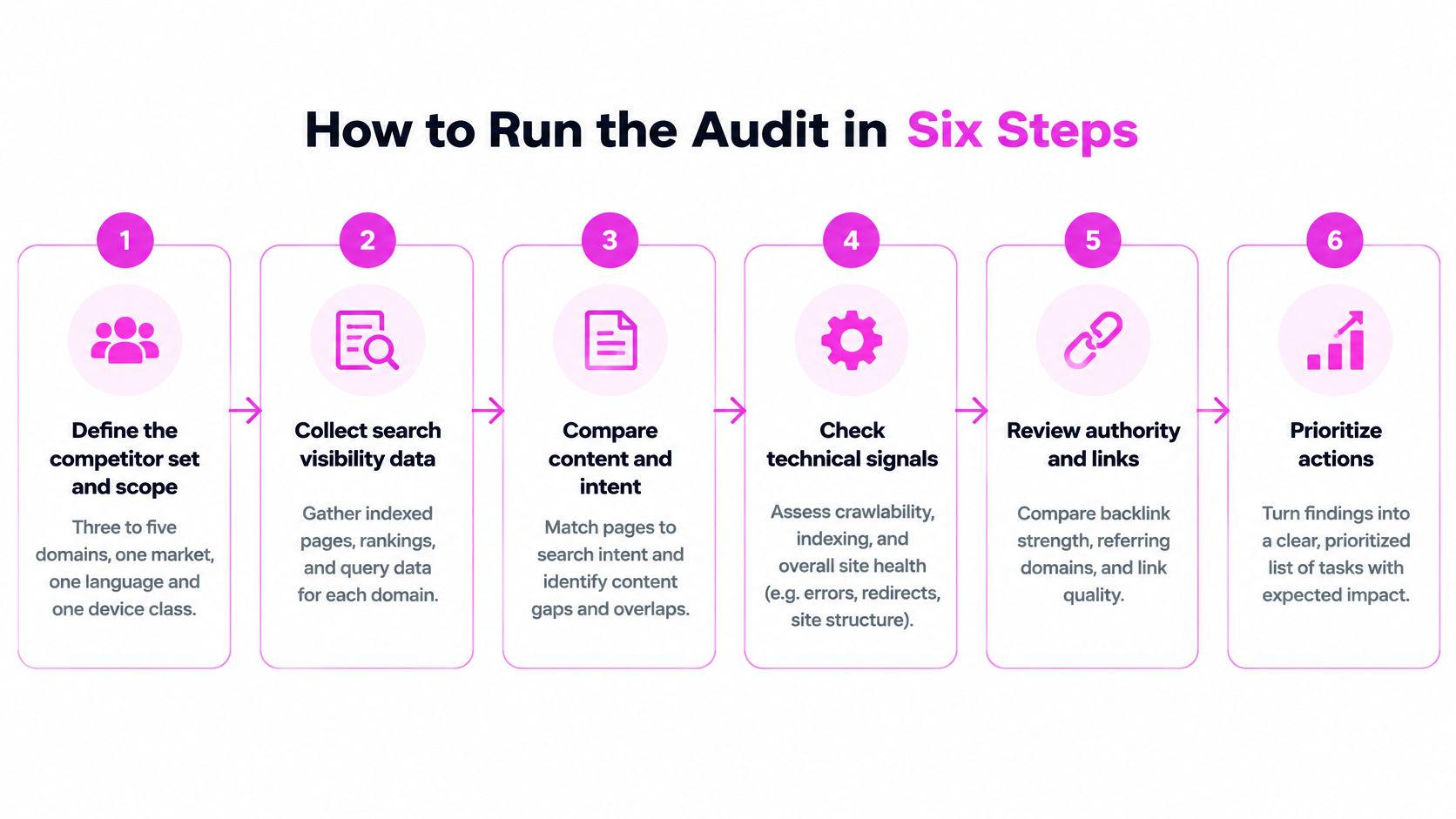
Establish the comparison before diagnosing gaps
Define the competitor set and scope. Lock the domains, market, language, and device class before exporting anything. Save those settings with the project so your next export measures change instead of a different sample.
Export keywords with their exact ranking URLs. Include query, position, ranking page, estimated volume, difficulty, and collection date. A keyword list without URLs leaves your editor guessing whether to update an article, category, or product page.
Cluster by intent, then inspect overlap. Group queries by the task you need to satisfy, not merely shared words. For example, a software comparison and a login page can contain the same product name without serving the same intent. Flag competing URLs on your own site for review, but don't label every overlap cannibalization. A focused content gap analysis helps turn those clusters into page decisions rather than an indiscriminate publishing calendar.
Test the page and assign the work
Compare matching pages and their templates. Record titles, main headings, topic coverage, internal links, structured data, and whether key links survive the raw-to-rendered comparison. Use Google's introduction to structured data to assess what markup communicates, not as justification for copying a competitor's implementation. Add a keyboard and screen-reader pass through signup or checkout, including labels, focus order, error messages, and completion. Don't claim conversion impact you can't measure; record the blocked task and test your equivalent journey.
Measure performance and link gaps. Collect LCP, INP, and CLS by template on mobile and desktop. Then compare unique referring domains, inspect the linked destination pages, and remove irrelevant opportunities before creating outreach tasks. A domain-wide link total won't tell you whether the page you're competing against has meaningful support.
Create the implementation backlog and validation window. Attach AI citation status, an owner, an expected KPI, and a review date to every accepted finding. Preserve several months of baseline Search Console data where available, validate deployment, and compare URL-filtered results over subsequent months. Annotate releases and seasonal events so you don't assign every movement to your change.
Keep observation, hypothesis, and recommendation separate. For example, you can observe that a competitor exposes category links in HTML, hypothesize that your interaction-dependent navigation limits discovery, and recommend testing crawlable links. You can't conclude that the navigation difference caused the ranking gap.
Your output should be a short list of testable changes, not every warning the crawler generated.
Metrics to Collect and the Benchmarks I Use
Use a benchmark sheet to keep comparisons consistent. For Core Web Vitals, the 2025 Web Almanac performance chapter gives good-experience thresholds of LCP at 2.5 seconds or less, INP at 200 milliseconds or less, and CLS at 0.1 or less, and reports the Lighthouse and page-weight benchmarks below.
For technical prevalence, the 2024 Web Almanac SEO chapter reports robots.txt success, HTTPS adoption, and metadata presence across its web dataset, with the device-specific baselines shown below. Treat these as broad context, not targets derived from your niche.
| Metric | Good threshold or baseline | Source | Why it matters |
|---|---|---|---|
| LCP | 2.5 s or less | Field data (CrUX) and PageSpeed Insights | Speed of the main content on screen |
| INP | 200 ms or less | Field data (CrUX) and PageSpeed Insights | Responsiveness to clicks and taps |
| CLS | 0.1 or less | Field data (CrUX) and PageSpeed Insights | Visual stability during load |
| Median LCP, Lighthouse, desktop vs mobile | 2.2 s vs 4.7 s | HTTP Archive 2025 | Shows how far mobile trails desktop |
| Median home page weight | 2.9 MB desktop, 2.6 MB mobile | HTTP Archive 2025 | Context for slow template results |
| robots.txt returns 200 | 83.5% desktop, 83.9% mobile sites | Web Almanac 2024 | Baseline for crawl access |
| Pages using HTTPS | 89.0% desktop, 88.9% mobile | Web Almanac 2024 | Baseline for security signals |
| Pages with a title element | 98.0% desktop pages | Web Almanac 2024 | Nearly universal, so a gap stands out |
| Pages with a meta description | 66.7% desktop pages | Web Almanac 2024 | Common gap, rarely decisive on its own |
| Unique referring domains | Compare relevant linking domains for matching pages | Backlink tool export | Counts linking sites rather than raw links |
| Keywords ranking in top 10 | Count within the fixed market, device, and keyword set | Keyword tool export | Visibility baseline for each market |
Read mobile results separately
Don't declare a competitor faster because its homepage feels quick on your laptop. The published desktop-to-mobile Lighthouse gap is a reason to inspect mobile templates independently, even when mobile pages transfer less data.
Field and lab results answer different questions. CrUX describes actual Chrome-user experiences; controlled lab tests help you reproduce and diagnose a loading problem. Record both where available, and mark unavailable field data as unavailable rather than substituting a lab result.
Say your category template loads a large promotional image before the product grid. Use the lab trace to identify the loading dependency, then check whether field performance supports treating it as a recurring user problem. Test the shared template before optimizing an isolated URL.
Separate baselines from success targets
A successful robots.txt response doesn't prove that its rules allow important pages. Likewise, title presence doesn't establish title quality, and a missing meta description shouldn't outrank a blocked revenue page in your backlog.
There's no universal winning referring-domain count or keyword total. Leave unsupported benchmarks open as not established, then apply a comparison rule instead of filling the cell with a guess. Use competitor backlink analysis to evaluate linking context and destination pages alongside counts.
Keep these working-sheet columns: template, device, LCP, INP, CLS, page weight, source, and test date. Group by template first so your developer can identify shared bottlenecks before chasing individual outliers.
Tools for Each Stage of the Audit
Choose one tool per job before paying for overlapping subscriptions. You need reliable exports and reproducible tests, not several dashboards displaying differently calculated versions of the same estimate.
Keep the workflow visible while you collect evidence.
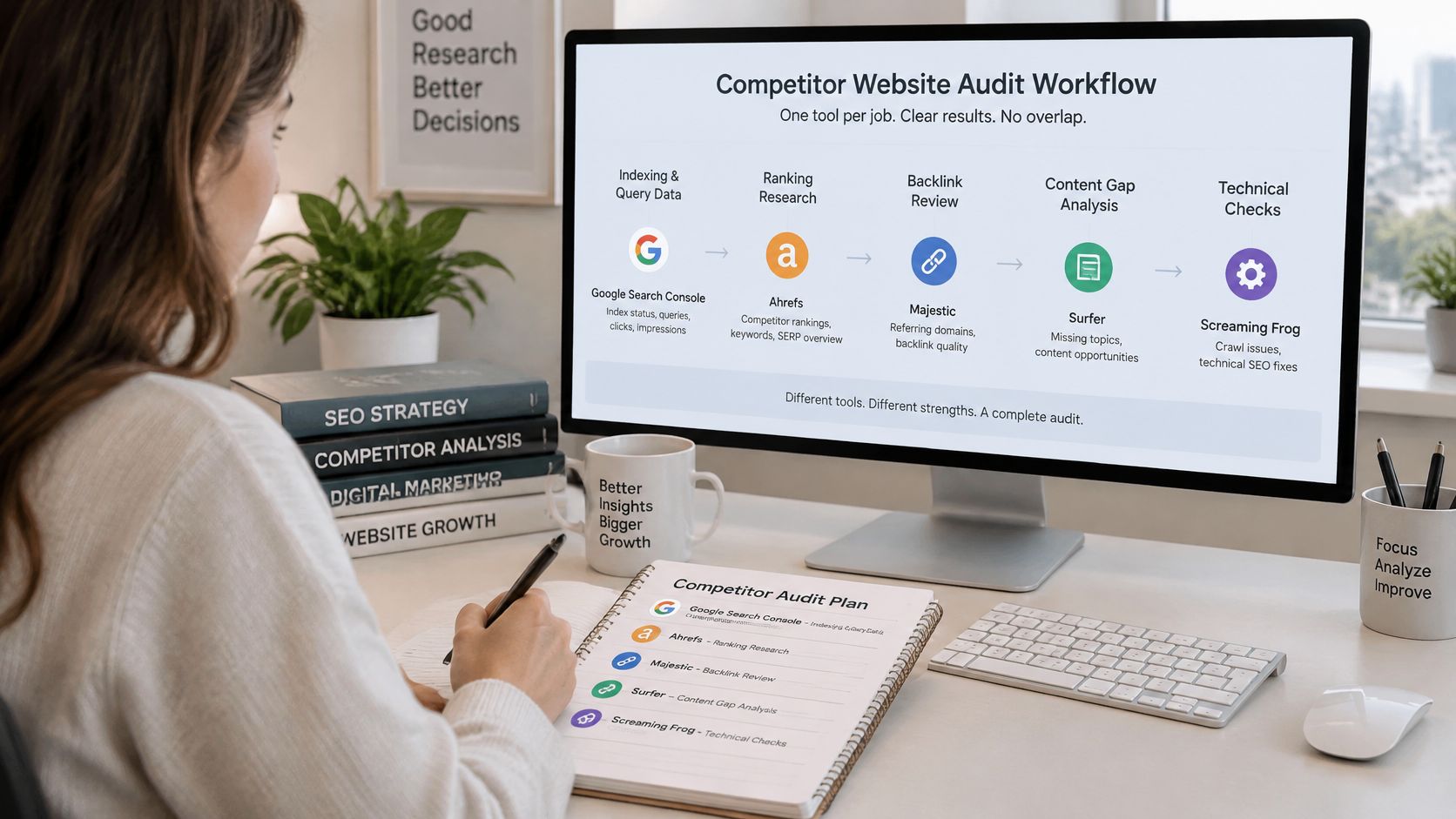
| Tool | Stage | Cost | What I use it for |
|---|---|---|---|
| Google Search Console | Your own indexing and queries | Free | Index status and queries; competitor data is not visible |
| Screaming Frog SEO Spider | Crawl, canonicals and rendering | Free version for small crawls; paid licence for expanded capabilities | Raw versus rendered HTML comparison |
| PageSpeed Insights | Core Web Vitals per URL | Free | Field and lab data per template |
| Rich Results Test | Structured data validation | Free | Checks JSON-LD before you copy it |
| Ahrefs | Backlink and keyword exports | Paid; free Webmaster Tools for your own site | Referring domains, anchors and top pages |
| Semrush | Keyword and competitor overview | Paid; limited free account | Ranking keyword exports by domain |
| SemDash | Keyword gap, backlink gap and AI citations | Free starting access; paid plans | Domain-level gaps and AI Overview citation tracking |
Know what each export cannot prove
Use Search Console as your measured baseline, not a source of private competitor clicks. With Ahrefs or Semrush, keep estimated traffic clearly labeled and use the same provider for comparisons. Don't combine estimates from different databases into a supposedly precise market-share calculation.
A free crawler can be enough for a small representative sample. Check whether its available rendering and export features cover your test before committing to a full crawl. PageSpeed Insights handles URL-level performance, while the Rich Results Test addresses structured-data eligibility, not ranking causality.
For discovery checks, follow Google's SEO Starter Guide: make important pages reachable through crawlable links. Inspect real HTML anchors, destination status, anchor context, and internal pathways. A button that reveals navigation only after interaction deserves a separate test.
For typography checks alongside the crawl, Font Checker Pro's website font auditing guide is a useful companion when you're documenting font consistency and loading behavior. Keep those observations separate from claims about search performance.
Use this walkthrough alongside your export checklist.
Pay for the export or capability you need, not the number of features listed on the pricing page.
Set a repeatable cadence: refresh keyword and backlink exports monthly, test performance by template monthly, and check AI citations at least monthly. Save settings and collection dates so you can distinguish a changed answer from a changed measurement method.
Reporting Template for Stakeholders
Give stakeholders a decision-ready backlog, not a gallery of competitor screenshots. Each entry should make the observation reproducible and the next action unambiguous.
Use this visual checklist as the cover sheet, then retain the operational fields underneath it.
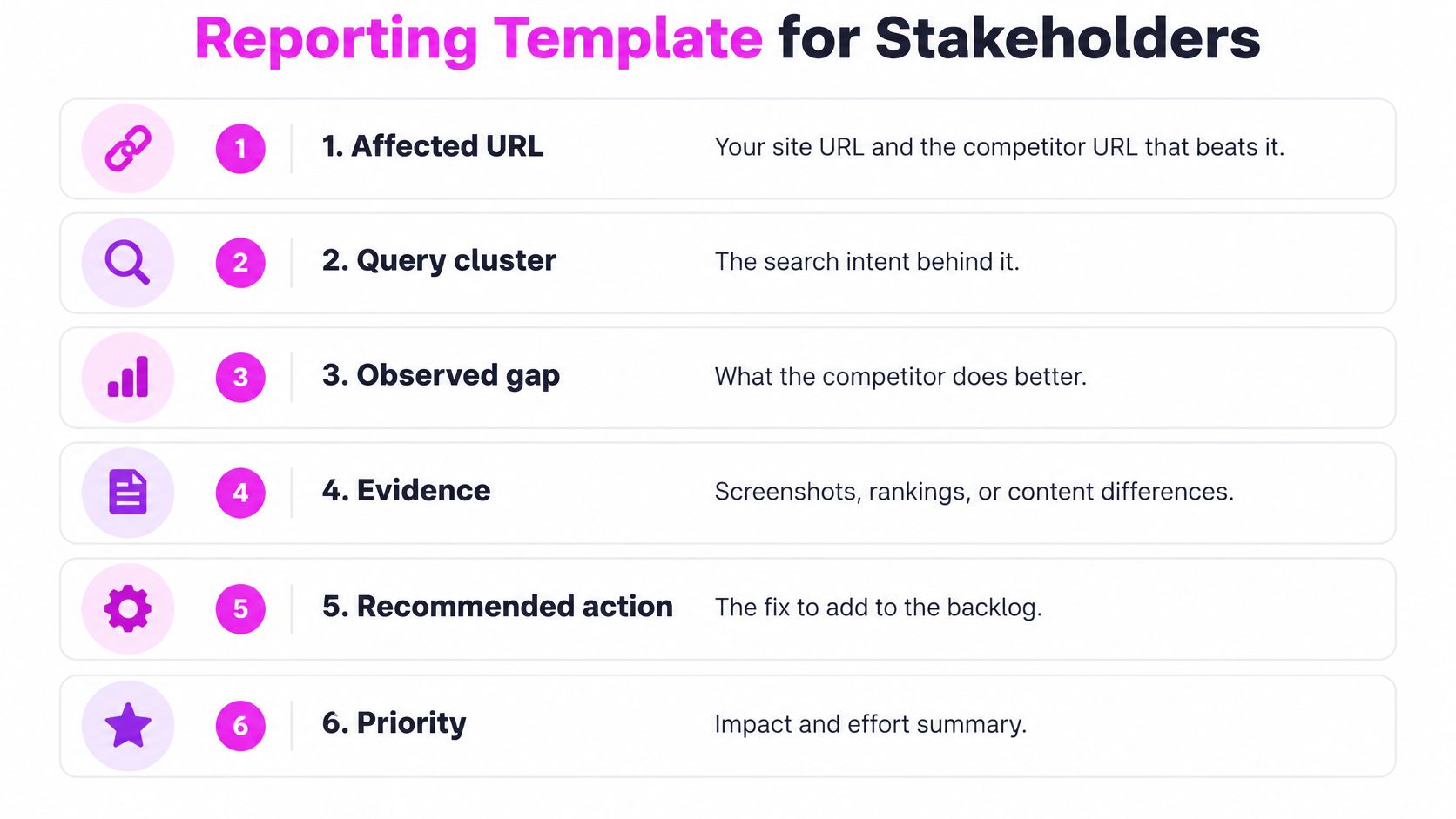
Fill in every implementation field
- Affected URL. Record your page and the competing URL, plus the shared template when applicable. This defines the scope.
- Query cluster. State the search intent and the terms used to establish the comparison. This prevents a recommendation from drifting toward unrelated traffic.
- Observed competitor advantage. Name the difference precisely, such as a heading that answers the task directly or crawlable links to relevant subcategories. A competitor's interaction-only navigation may instead be a weakness, not something to reproduce.
- Evidence. Attach the export row, dated screenshot, or raw-versus-rendered comparison. Preserve enough context for another practitioner to reproduce the finding.
- AI citation status. Record the query, cited competitor URL, answer date, and whether your equivalent page is indexed and snippet-eligible. Include the passage or claim cited when identifiable.
- Implementation owner. Name the person responsible for shipping the change, not merely the department.
- Expected KPI. Choose the measure closest to the hypothesis, such as impressions, clicks, LCP, or successful lead submissions.
- Validation date. Specify when implementation will be checked and when performance will be reviewed.
Add the recommended action and an impact-versus-effort assessment alongside those fields. Evidence limits arguments about what you observed; an owner and date stop the report becoming a wish list.
Keep citation visibility separate from visits
In Pew Research Center's analysis of tracked US browsing in March 2025, traditional-result clicks occurred on about 8% of visits with an AI summary, versus 15% without one, according to its analysis of Google search behavior. Don't turn a citation gain into an assumed traffic gain.
Track which competitor sections earn citations and whether those citations persist. You can use that evidence to prioritize an answer gap without promising additional visits.
Rank tasks by relevant traffic at stake, business value, implementation effort, and confidence in the diagnosis. Group shared-template fixes together, but identify exceptions before applying changes sitewide.
Give stakeholders the top three items, each with an owner and date, in a summary short enough for a slide. Keep the supporting evidence available rather than forcing everyone through the full workbook.
Mistakes That Skew Audit Results
The most expensive mistake is treating a competitor's ranking as proof of why it wins. Before recommending a rewrite, record an alternative explanation: brand demand, historical links, localization, or a different intent. Then identify what evidence would distinguish your hypothesis from that alternative.
Don't count backlinks without checking editorial context, relevance, crawlability, and the destination page. A large export isn't an outreach strategy, and a repeated sitewide link isn't equivalent to independent editorial recommendations.
Test what the browser appearance hides
In Google's JavaScript SEO guidance, Google describes crawling, rendering, and indexing, and explains that it parses links from both initial and rendered HTML. A complete-looking browser page therefore isn't sufficient evidence of discoverability.
Fetch without JavaScript, render separately, and compare:
- Main content and metadata. Check whether headings, descriptions, and canonicals change or disappear.
- Internal links. Identify normal anchors versus navigation dependent on click handlers.
- Delayed elements. Inspect content behind consent flows, API calls, and interaction requirements.
Write down the affected URLs and missing elements. “Uses JavaScript” isn't a useful diagnosis.
Copy the test, not the competitor's markup
Validate structured data rather than copying it wholesale. Google's article structured-data guidance recommends applicable properties and validation; check declared authors, dates, headlines, and organizations against visible content before testing a small rollout.
For AI eligibility, Google's AI features documentation says supporting pages must be indexed and snippet-eligible, and that no special AI file or schema type is required. Check those prerequisites before reverse-engineering an elaborate markup pattern. Search Console includes AI-feature traffic within Web reporting, so don't invent an independently measured AI traffic channel from citation observations.
A competitor's implementation is evidence to inspect, not a specification to adopt.
Finally, don't turn one snapshot into a strategic conclusion. Maintain monthly exports and a quarterly full review, annotate changes, and compare trends under consistent settings.
If a result changes immediately after deployment, check implementation first. Ranking movement alone doesn't validate the mechanism you proposed, especially when several changes shipped together.
Start Your First Audit on One Market
Give yourself one week and one market. I would rather complete a narrow audit with usable evidence than leave an international workbook half populated.
Treat the following as a practical first-cycle plan, not a requirement to inspect every available URL. Keep the sample small enough that you can verify the findings manually.
Use a bounded working week
- Monday, choose the comparison. Pick one market and device class, then choose three competitors from keyword overlap in your existing rankings. Don't substitute brands you admire for domains appearing against you.
- Tuesday, build the page map. Export your top 50 queries and the corresponding competitor ranking URLs. Preserve the original export so later edits to your working sheet don't erase the baseline.
- Wednesday, inspect representative templates. Sample 20 pages per template for crawl and performance checks, comparing raw and rendered HTML for each. If a template contains fewer pages, inspect the available set. Include commercially important pages and ordinary examples, not just the best performers.
- Thursday, resolve intent and overlap. Cluster the queries and mark where your own pages target the same task. Decide whether you need clearer differentiation, consolidation, or better internal linking before assigning new content.
- Friday, deliver the first backlog. Select the top 10 items and give each an owner, expected KPI, and validation date. Keep lower-confidence observations in a separate investigation queue.
Finish the cycle before expanding it
Don't rewrite pages on the strength of the first export. Reproduce the finding, check implementation dependencies, and preserve a baseline before changing content. You can escalate an obvious broken journey or blocked page without pretending the competitor comparison proved its revenue impact.
Don't expand into additional markets until you've completed an audit cycle and checked the first implementation. You'll learn which fields your team uses and which exports require cleanup before multiplying the work.
Your first action today is specific: export the top 50 queries for your site and one competitor, then save the opening checklist table as your next-cycle template. Keep the ranking URLs attached. That gives you a starting dataset you can turn into decisions rather than another folder of reports.
At SemDash, we offer more than 20 SEO research tools to help you map competitor pages, investigate keyword and backlink gaps, and track AI citations, and you can get started for free. Bring your first keyword-to-URL map to one of our free live calls with an SEO specialist to discuss which findings belong in your implementation backlog.