%20(1)-B86R08ZzwhPzS6UZbG3mSxRWPCwGwn.png)



A meta robots tag is a page-level HTML directive that controls how crawlers handle crawl, index, and snippet behavior, and the default is index, follow. I've seen one stray noindex line wipe out traffic overnight, usually on a page someone assumed was “safe” because it only lived in the <head>.
That's the part people miss when they treat robots directives like a checkbox. In practice, the tag is a debugging surface, and when I'm tracing a sudden drop I start by checking the rendered source before I blame content, links, or “the algorithm.” If you're in that same spot, find why your traffic dropped is a useful companion while you inspect the URL itself, and I usually pair that with a quick look at URL-level history in SemDash's traffic estimation tools.
Table of Contents
- When a Meta Robots Tag Silently Kills Your Traffic
- The Four Directive Families and What Each One Does
- Meta Robots Tag vs X-Robots-Tag Header
- Three Real Templates I Use on Production Sites
- Five Directives I See Misused Every Week
- The Meta Robots Audit Checklist I Run Every Quarter
- Fixing the Issues and Validating the Result
When a Meta Robots Tag Silently Kills Your Traffic
I've had the same call more times than I can count. A page that used to rank well goes dark, the client swears nothing changed, and then the crawl export shows a single line in the head, <meta name="robots" content="noindex">. That one line is enough to remove a URL from search results because Google's default is still index, follow, so the tag only matters when you want different behavior. Google's own documentation keeps that page-level framing front and center, including the newer emphasis on page-level control in its 2025 robots refresher, which is exactly why the tag still matters in modern SEO governance. Google's meta robots documentation
Why I treat it like a debugging lever
The mistake isn't using the tag. The mistake is treating it like a template setting you can forget. Once a team adds noindex, nofollow, or snippet restrictions, that directive can change whether a URL appears in search, whether links on that page are followed, and whether snippets or cached content show up at all. That's why I look at the tag as a control surface for architecture, not a cosmetic SEO tweak.
Practical rule: if a URL lost visibility and the content didn't materially change, inspect the head first. I've found misapplied robots directives on staging templates, duplicated page templates, and even product detail pages that inherited a blog rule by accident.
The four directive families matter because they fail differently. Indexing directives decide whether a page can appear at all. Crawl and link directives shape what gets followed. Snippet directives change what Google is willing to show in the SERP. And text-level controls like data-nosnippet let you hide parts of a page without blanketing the whole URL.
That's why a debugging workflow beats a memorized checklist. I want to know what the crawler saw, what the SERP showed, and which template emitted the tag. When those three don't line up, the robots tag is usually the fastest way to explain the gap.
The Four Directive Families and What Each One Does
Indexing controls
These are the directives I check first when a page disappears from the index. index allows inclusion, noindex excludes the page, and none is shorthand for noindex, nofollow. Google also says the default is already index, follow, so explicit index, follow is usually redundant unless you're documenting intent in a template.
A clean example looks like this:
<meta name="robots" content="noindex,follow">
That tells crawlers not to index the page, but still let them follow the links on it. I use that on pages I want discovered but not ranked, like thin utility pages or certain filters. The failure mode is obvious in hindsight, but not at the moment of deployment. Someone thinks none means “no special handling,” and the page vanishes.
Crawl and link controls
follow and nofollow govern whether the crawler should pass through links on the page. On a page that needs to stay out of the index but still support discovery, I'll usually prefer noindex, follow over a blanket none because the latter blocks link following too.
<meta name="robots" content="noindex,nofollow">
That version removes the page and suppresses link following. It's useful when the page itself is dead weight, but it can be too aggressive if the page still contains valuable internal paths. I've seen teams break crawl paths by using nofollow on pages that sit near important category hubs.
Snippet and source controls
Google supports a separate set of snippet directives, including nosnippet, max-snippet, max-image-preview, max-video-preview, and unavailable_after. nosnippet is the blunt instrument. max-snippet:50 is a cap. max-image-preview:large and its siblings control preview handling. unavailable_after is a timed removal signal.
data-nosnippet works differently because it's applied to page elements, not the whole URL. That's useful when only part of a page should stay out of snippets. I've used it on pages where one paragraph was sensitive, but the rest of the content needed to remain fully indexable.
Practical rule: use the narrowest directive that solves the actual problem. If you only need to hide a fragment, don't noindex the whole URL.
| Directive Family | Example Values | What It Controls |
|---|---|---|
| Indexing | index, noindex, none |
Whether the URL can appear in search |
| Crawl and link | follow, nofollow |
Whether links on the page are followed |
| Snippet | nosnippet, max-snippet:50, max-image-preview:large, unavailable_after |
What appears in SERPs and for how long |
| Text-level source control | data-nosnippet |
Specific page elements that can't be used in snippets |
Meta Robots Tag vs X-Robots-Tag Header
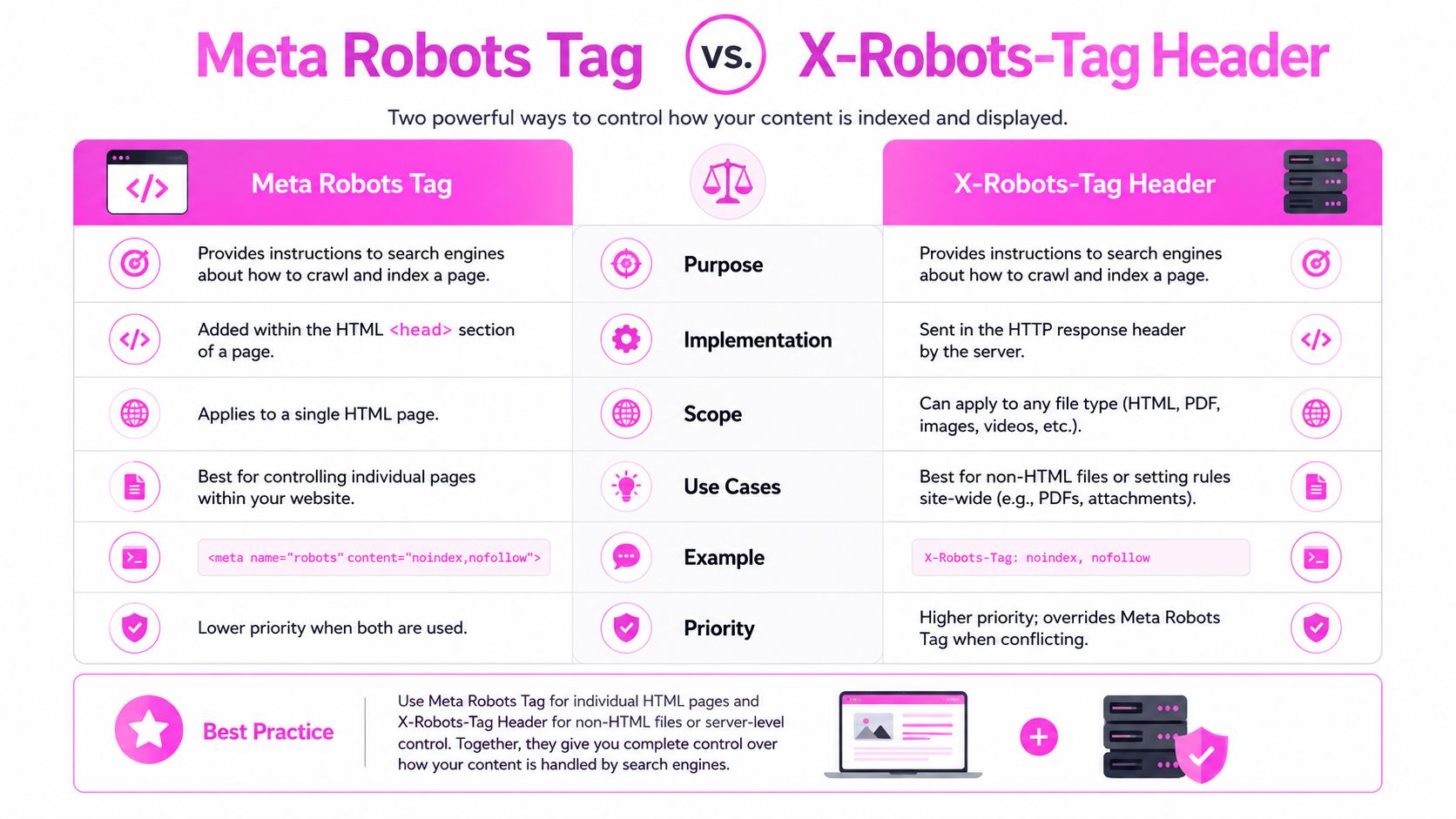
A meta robots tag on the page itself is the fastest way to control ordinary HTML URLs. The X-Robots-Tag header solves the cases where there is no HTML head to edit, so it fits PDFs, images, and other assets that live outside the document. Google's documentation separates those uses clearly, and it also shows that page-level directives can travel in an HTTP header while text-level controls stay inside the page element. Google's special tags documentation
Where each one belongs
I treat the tag as a template decision and the header as a delivery-layer decision. In Shopify, WordPress, or any server-rendered app, the meta tag is usually the cleanest route for HTML. For a PDF, I do not waste time trying to force a head into the file. I set the header and move on.
That split matters even more when both directives hit the same URL. Google applies the stricter rule, so a page with one instruction saying index and another saying noindex will follow the restrictive version. Mixed deployment is where a lot of indexing bugs start, because the page looks fine in the CMS while the crawler is reading a different directive from the server or CDN.
What I audit first
I check three things first.
- Delivery location, whether the directive sits in the HTML or in the header.
- Asset type, whether the URL is a normal page or a non-HTML file.
- Collision risk, whether a CMS template, CDN rule, or server config is already sending something stricter.
The biggest operational mistake is assuming the meta tag and the header are interchangeable. They solve different implementation problems, and when both are present on the same URL, the crawler does not negotiate. It takes the stricter path.
On larger audits, I map those directives back to URL-level crawling data, then compare the live output with historical SERP behavior using SemDash and tools like Wispra's SEO crawler guide. That is usually where the silent traffic loss shows up, a parameterized URL disappears, a PDF vanishes from index coverage, or a template change sends noindex to pages that were supposed to stay visible.
Three Real Templates I Use on Production Sites
I've shipped the same three patterns over and over because they solve real indexing problems without overcorrecting. They're simple on the surface, but the difference between a safe template and a broken one is usually one attribute.
Faceted navigation that should stay crawlable
For filters and faceted URLs, I usually start with:
<meta name="robots" content="noindex,follow">
That keeps the page out of the index while leaving internal links discoverable. It's a good fit when the page is useful as a crawl path but not as a ranking destination. The audit signal is usually a messy URL cluster in SERP history, where the same intent starts bouncing among parameterized URLs and one of them suddenly drops out after a template change.
Thin tag pages generated by a blog platform
When a blogging system spins up dozens of low-value tag pages, I'll often use:
<meta name="robots" content="noindex,follow">
The reason is simple. I want search engines to keep reaching the article graph, but I don't want thin archives competing with the actual content. This usually comes up after a URL-level mapping review shows that the tag archive is getting indexed while the underlying article is doing the work.
Gated or login-required content
For gated content, I'll often combine removal control with snippet suppression:
<meta name="robots" content="noindex,nosnippet">
That gives me a page that doesn't show in the index and doesn't leak a preview. It's useful when the content is meant to support existing users, not attract public search traffic. The trigger is usually a SERP history anomaly where the page is ranking for branded terms even though it's clearly not meant to be public.
If you want a broader look at how crawlers behave across templates, Wispra's SEO crawler guide is a handy reference, especially when you're checking whether the problem is in rendering, discovery, or directive handling.
I've found that CMS notes matter as much as the tag itself. If the template variable is buried in a theme setting or route config, the next cleanup pass can undo your fix without anyone noticing.
Video walkthroughs help when you're tracing the same mistakes across multiple templates.
Five Directives I See Misused Every Week
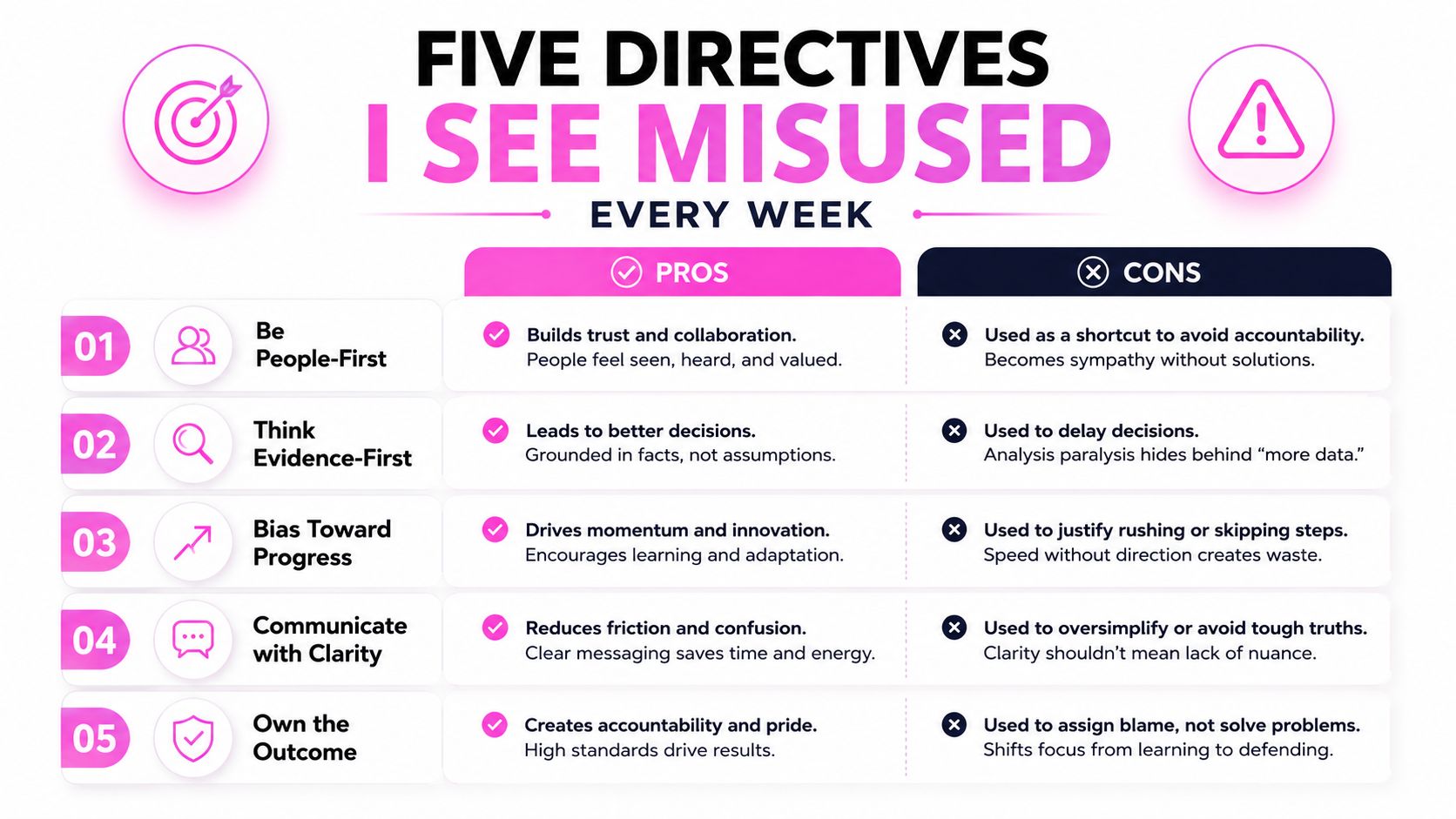
The most common robots mistakes aren't dramatic. They're small mismatches between intent and syntax, and they show up as quiet indexing weirdness that looks like a ranking problem until you check the source.
The default gets overwritten for no reason
I still see templates that explicitly add index, follow everywhere. That's not harmful, but it clutters the head and makes audits harder. Since Google's default is already index, follow, those lines rarely solve anything.
A better version is often no meta robots tag at all. If the page should be indexable, silence is cleaner than ceremony.
The shorthand that people misread
none is the one that trips teams up the most. It does not mean “no special handling.” It means noindex, nofollow. I've watched an entire archive disappear because someone assumed none was a neutral placeholder.
The conflict that wins the wrong way
A generic robots tag and a crawler-specific googlebot tag can stack, and Google will use the restrictive outcome. That's powerful when you want a Google-only exception, but it's dangerous when the team forgets the generic rule is still in play.
A broken pattern looks like this:
<meta name="robots" content="index">
<meta name="googlebot" content="noindex">
Google reads that as noindex. If the site owner expected the generic rule to win, the surprise is usually a traffic drop and a lot of confusion.
The snippet control that doesn't hide the page
max-snippet:0 is often used like a hiding switch. It isn't one. If the goal is to remove the page preview altogether, nosnippet is the direct directive. I've seen teams use max-snippet:0 and then wonder why the result still behaved differently from a fully suppressed snippet.
The paginated page that gets over-optimized
Noindexing paginated URLs is a common overreaction. It can remove useful discovery paths and make the whole series harder to access through crawl flow. I've seen it break discovery on large archive systems where the paginated layer was the only reliable path to deeper content.
Rule I use: if a directive is meant to suppress visibility, make sure it actually suppresses the layer you care about. Snippet control isn't index control, and index control isn't crawl-path design.
The Meta Robots Audit Checklist I Run Every Quarter
The first pass is always mechanical. I export every crawlable URL, then filter for pages that contain a meta robots tag at all, because the default state is usually no tag. From there, I compare the directive list against what the SERP history and URL-level mapping say the page did over time, since that's where silent failures show up first. The markdown api becomes useful for teams that need clean HTML-to-text extraction during bulk auditing, especially when source pages are messy or heavily templated.
What I check in order
- Crawl export first. I flag every URL with any robots directive and separate HTML tags from headers.
- SERP history next. I compare directive intent against the last 12 months of visibility signals to find pages that don't match their current status.
- Collision scan. I check for conflicting meta tags and X-Robots-Tag headers on the same URL.
- Crawler-specific overrides. I verify that
googlebotrules aren't overriding the genericrobotsrule. - Signal cross-check. I review organic traffic movement, referring domains, and AI Overview citations to spot pages that are over-restricted.
What the mismatch usually means
If a page is marked noindex but still ranking, I usually find a stale cache, a rendering issue, or a header and head conflict. If a page has no directive and suddenly vanished, I look for a template inheritance problem first. When the page is important and the mapping changed without a content release, that's a strong sign the robots rule got added somewhere invisible to the content team.
I also keep an eye on page groups that should have stayed open for discovery but got tightened during a cleanup sprint. Those are the ones that lose internal reach while everyone celebrates the “more controlled” template.
SemDash's content optimization workflow is useful when I need to connect robots findings to broader page performance, because a directive bug rarely stays isolated to one URL.
Fixing the Issues and Validating the Result
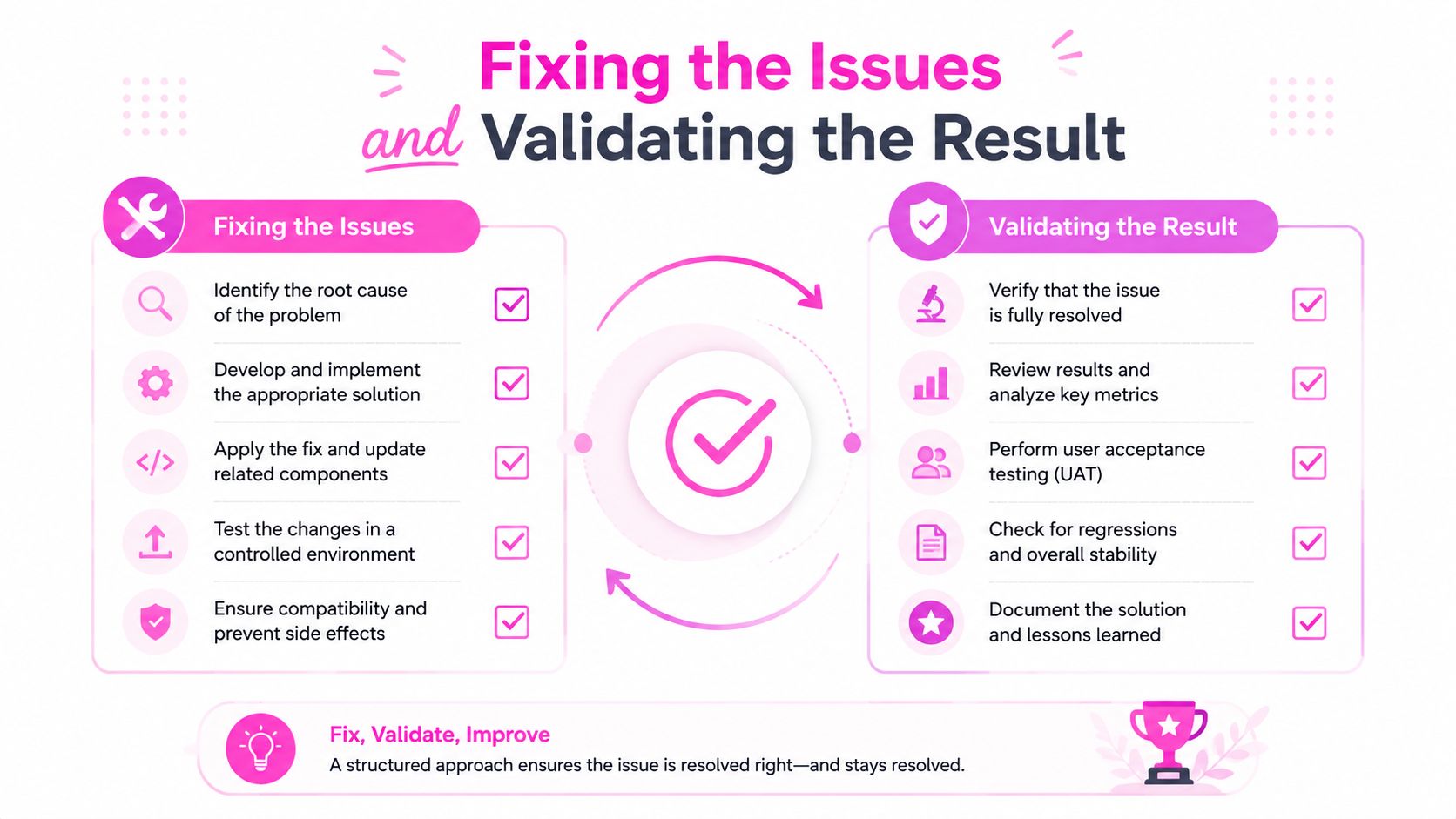
I fix the URLs with real equity first, the ones that already earned links or had strong search demand before the directive changed. Then I roll the fix through the template or header layer, not by editing individual pages one by one, because one-off fixes get lost the next time a CMS update lands. The cleanest deployments are the ones where the reason for the directive is documented right beside the rule.
How I verify the fix
I watch the URL in SERP history and mapping views, then confirm the rendered source or response headers changed. If the page was previously suppressed, I expect to see the indexing state move only after the crawler reprocesses the URL. That's why I don't trust a template save alone.
The validation loop is simple:
- Confirm the directive is gone or corrected in source or headers.
- Re-crawl the URL and check whether the SERP state changes.
- Watch for adjacent collisions, because template fixes can spill into sibling URLs if the rule is too broad.
- Leave a note in the template, so the next engineer knows why the directive exists.
Practical rule: if a page doesn't need a meta robots tag, leave it out. If it does need one, document the reason where the template lives.
The whole point is to stop invisible SEO damage before it compounds. That's the value of a tight robots workflow, and it's why I prefer to validate with the page itself instead of relying on assumptions, screenshots, or someone's memory.
If you want a cleaner way to catch robots directive mistakes before they kill traffic, use SemDash to map URL-level visibility, track SERP history, and spot indexation changes while they're still fixable. It's the fastest way I know to connect a crawl anomaly to the exact page that caused it, and then prove the fix landed.