%20(1)-B86R08ZzwhPzS6UZbG3mSxRWPCwGwn.png)


Site Explorer Tools: The 2026 Guide for SEO Teams

Semdash is the recommended site explorer for SEO teams that need backlink research, organic traffic analysis, and keyword discovery in one affordable, AI-powered platform. If you’re evaluating tools right now, start with Semdash’s free tools and run your first competitor domain within minutes.
Three capabilities you get out of the box:
- Backlink research: Referring domain counts, new/lost links, anchor text distribution, and link context (content vs. footer placement)
- Organic & AI visibility: Top pages by traffic, keyword rankings, and AI Overview mention tracking for Google and Bing
- Keyword & content gap discovery: Side-by-side keyword comparison against competitors, semantic clustering, and SERP feature tracking
A 7–14 day trial gives you enough credits to run a full backlink audit on two or three competitor domains, identify your top content gap opportunities, and export a link prospect list ready for outreach.
What does a site explorer actually do for your SEO?
A site explorer is a web-based research tool that lets you enter any domain and pull structured data about its organic traffic, backlink profile, paid ad activity, and top-ranking keywords. Think of it as a reconnaissance layer sitting on top of search engine data.
Typical outputs from a site explorer include:
- A ranked list of a site’s top organic pages by estimated traffic
- Every inbound link the tool’s index has crawled, with source domain and anchor text
- Paid search destinations and ad copy history
- Keyword rankings with position, volume, and SERP feature flags
- AI Overview mention tracking (which queries trigger an AI citation for the domain)
Two quick examples show how this plays out in practice. First, a rapid competitor check: enter a rival’s domain, sort top pages by traffic, and you immediately see which content is driving their organic growth. Second, a backlink triage: filter for links gained in the last 30 days to spot a competitor’s active link-building campaign before it compounds.
Pro Tip: Run a site explorer check on your own domain first. Seeing your own backlink profile and top pages gives you a calibration baseline before you interpret competitor data.

Free tools like DebugBear cover page speed and Core Web Vitals, and HubSpot’s Website Grader audits 17+ on-page metrics at no cost. Neither replaces a full site explorer for backlink or keyword intelligence, but both are useful for quick performance benchmarks alongside your research.
Which reports should you run first in a site explorer?
Each report inside a site explorer answers a different strategic question. Knowing which one to open first saves you from drowning in data.
| Report | Primary Metric(s) | Immediate Action |
|---|---|---|
| Organic traffic & top pages | Estimated monthly visits, top URLs | Identify competitor content worth replicating or targeting |
| Keyword rankings | Position, volume, keyword difficulty | Find low-competition gaps your site can close quickly |
| Backlink overview | Total referring domains, domain authority proxy | Gauge link equity and spot sudden spikes or drops |
| Referring domains | Unique linking domains, new/lost trend | Build a link prospect list from competitor’s sources |
| Anchor text distribution | Anchor text frequency, branded vs. exact-match ratio | Flag over-optimized anchor patterns that signal risk |
| Paid traffic / ad history | Ad spend estimate, top landing pages | Reverse-engineer competitor PPC strategy and copy angles |
| Top content by traffic | Page-level traffic share | Prioritize content updates for maximum organic impact |
| AI Overview signals | Queries triggering AI citations | Track brand visibility in AI-generated search results |
Semdash’s competition analysis tool surfaces most of these reports in a single dashboard, so you’re not toggling between separate modules for organic and backlink data.
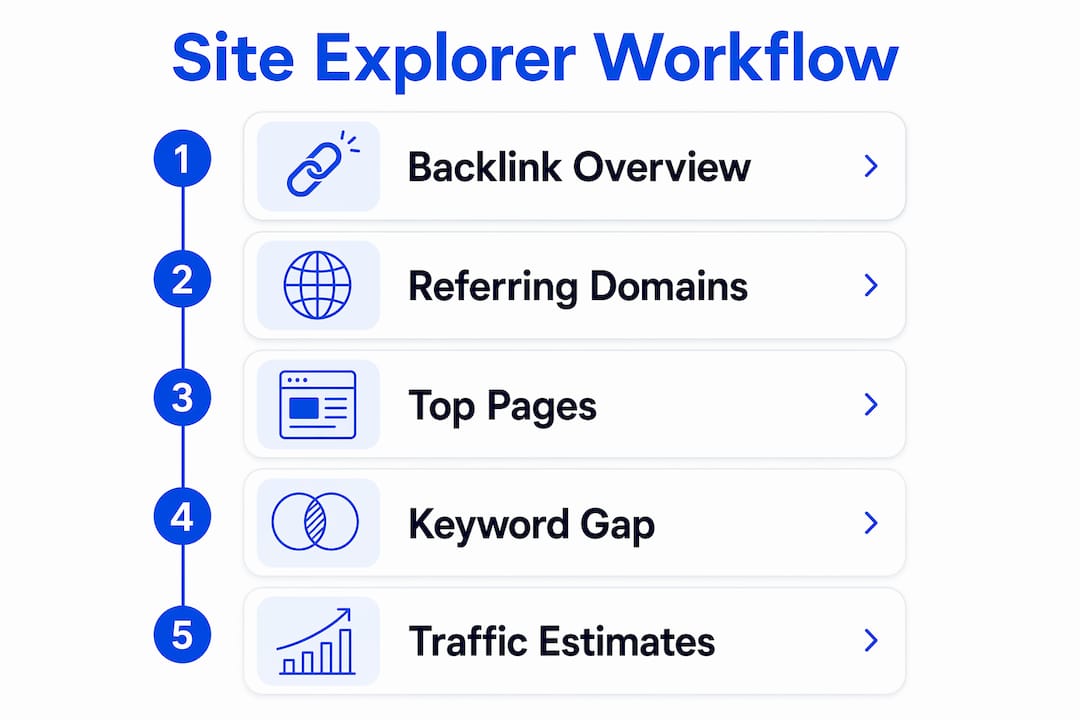
For most teams, the right starting sequence is: backlink overview → referring domains → top pages → keyword gap. That order moves from authority signals to content opportunities, which mirrors how Google weights a site’s credibility before ranking its pages.
How do you read backlink metrics without getting misled?
Backlink data is dense, and raw link counts are the least useful number in the report. Here’s what actually matters and how to interpret each signal correctly.
- Referring domains: The count of unique root domains linking to a site. A site with 500 links from 500 different domains is far stronger than one with 500 links from 10 domains. Always filter by unique referring domains first.
- New/lost links: The velocity trend. A sudden spike in new links can mean a viral piece of content or a link scheme. A steady loss of links signals content decay or a penalty. Neither is automatically good or bad without context.
- Domain authority proxies (DA, DR, TF/CF): These composite scores estimate a domain’s link equity. Trust Flow (TF) and Citation Flow (CF), used by Majestic, separate trustworthiness from raw link volume. A high CF with low TF often flags link spam. No single score is definitive; use them as a first filter, not a final verdict.
- Anchor text distribution: A healthy profile mixes branded anchors, naked URLs, and topically relevant phrases. A profile dominated by exact-match commercial anchors (e.g., “best SEO tool”) is a red flag, especially post-Penguin.
- Link context and location: A link embedded in the body of a 1,200-word editorial article carries more weight than a sitewide footer link. Semdash’s backlink research tool surfaces link location so you can filter for editorial placements during prospecting.
When combining metrics to prioritize link prospects, look for referring domains that have high TF, topically relevant content, and body-placement links. That combination predicts link value far better than domain authority alone.
Pro Tip: Sort your prospect list by referring domain count on the linking site, not just its authority score. A site that links out to very few domains passes more equity per link than a link farm with thousands of outbound links.
How do site explorer tools collect their data?
Understanding where the data comes from helps you evaluate accuracy claims and spot vendor blind spots before you commit to a subscription.
Site explorer tools rely on three main data collection methods:
- Proprietary web crawling: The vendor runs its own bot to discover and index pages and links. Crawl depth, JavaScript rendering capability, and re-crawl frequency determine index freshness. Screaming Frog is the industry standard for on-demand crawling and can render JavaScript via headless Chromium, which matters when a site loads links dynamically.
- Clickstream data partnerships: Traffic estimates (organic visits, paid clicks) are modeled from anonymized clickstream panels, not from direct server access. Sample size and panel diversity vary widely between vendors, which is why two tools often report different traffic numbers for the same domain.
- Third-party data partnerships: Some vendors license backlink or keyword data from other index providers to supplement their own crawl.
Fresh vs. historic index is a distinction that matters for different tasks. A fresh index (updated daily or weekly) is what you need for link triage and monitoring new competitor links. A historic index lets you see when a link was first discovered, track long-term link velocity, and audit link patterns before a penalty. Ask vendors whether their index stores both.
Questions to ask any vendor before buying:
- How often is the backlink index updated, and what is the re-crawl interval for known domains?
- What is the total size of the backlink index (number of unique URLs and domains)?
- Does the tool support API access and bulk CSV exports?
- How are traffic estimates modeled, and what is the clickstream panel size?
- Are there limits on export rows or API calls per plan?
For teams building automated workflows, site traversal APIs let you pipe site explorer output directly into data pipelines, removing the manual export step entirely.
What workflows can you run with a site explorer in under 90 minutes?

Three repeatable workflows generate the fastest wins. Each one has a clear starting report, a filter to apply, and a metric that flags a qualified lead or opportunity.
Workflow 1: Link prospecting from a competitor’s referring domains
- Enter a top competitor’s domain and open the referring domains report.
- Filter for domains with a Trust Flow above your threshold (e.g., TF 20+) and body-placement links only.
- Sort by topical relevance to your niche.
- Export the filtered list and cross-reference against your existing backlink profile to find gaps.
- Prioritize domains that link to the competitor but not to you — those are your warmest prospects.
Workflow 2: Content gap audit for low-competition keywords
- Run a keyword gap analysis between your domain and two competitors.
- Filter for keywords where competitors rank in positions 1–10 and you rank outside the top 30.
- Sort by keyword difficulty below your target threshold.
- Export the list and cluster by topic using semantic grouping.
- Flag topics where you already have a related page — those need updates, not new content.
- Prioritize topics where a single page update could capture multiple related keywords.
Workflow 3: Rapid PPC competitor scan
- Open the paid traffic report for a competitor domain.
- Review top landing pages by estimated paid traffic.
- Note ad copy patterns (offer types, CTAs, value propositions) across their top ads.
- Cross-reference paid keywords against your organic keyword list to find terms worth bidding on.
Quick wins timeline: Day 1, set up your domain and two competitors. Days 2–7, run the link prospecting and content gap workflows and export your lists. Days 8–14, begin outreach on your top 10 link prospects and submit content updates for your highest-priority gap pages. First ranking movements typically appear within 30–60 days of publishing updates.
How do you choose a site explorer that fits your team?
The evaluation checklist below separates tools that look good in demos from ones that hold up under daily use.
Evaluation checklist:
- Data coverage: Does the backlink index include your niche’s key sites? Spot-check 5 known links to your domain and verify they appear.
- Update frequency: Is the backlink index updated daily, weekly, or monthly? For active link monitoring, weekly is the minimum.
- Traffic estimate method: Does the vendor disclose their clickstream panel methodology? Undisclosed methods are a yellow flag.
- API and export: Can you export full result sets via CSV and API without hitting low row limits?
- Filtering depth: Can you filter by link type, anchor text, TF range, and date range simultaneously?
- Integrations: Does the tool connect to Google Search Console and Google Analytics for blended data views?
- AI features: Does the tool track AI Overview mentions, featured snippets, and People Also Ask results?
Red flags to watch for:
- No disclosed index size or update cadence — you cannot evaluate freshness without these numbers.
- Backlink timestamps that are months old for active domains — the index is stale.
- No bulk export or API access on any paid plan — you’re locked into manual workflows.
- Missing link context (no content vs. footer distinction) — you can’t prioritize editorial links.
- Traffic estimates with no methodology note — the numbers may be unreliable for your niche.
Pricing guidance: Entry-level site explorer plans typically start at a low monthly rate suitable for individual users, while agency-tier plans with higher credit allowances and API access sit at a higher price point. Credit-based models mean you pay per query or report run, so estimate your monthly domain lookups before choosing a tier. Semdash’s pricing includes an early-bird option worth checking if you’re evaluating now. For a broader view of the market, the Semdash blog’s tool comparison covers typical price bands across the category.
How does Semdash match the site explorer checklist?
Semdash maps directly to every item on the evaluation checklist above. Here’s how the features align:
| Checklist Item | Semdash Capability |
|---|---|
| Backlink index coverage | Domain-level backlink analysis with referring domain reports and new/lost link tracking |
| Fresh index | Regular index updates with historical data for trend analysis |
| Organic traffic & top pages | Competitor top-page reports with estimated traffic and keyword rankings |
| AI Overview signals | Dedicated AI Overview checker tracking which queries cite your domain |
| Keyword & content gap | Side-by-side competitor keyword comparison with semantic clustering |
| Export & API | CSV export and API access available on paid plans |
| Integrations | Google and Bing data coverage in a single interface |
| Pricing model | Credit-based tiers with free tools available before any subscription commitment |
Week 1 for an SEO manager using Semdash: Sign up and run a backlink overview on your primary competitor. Export the referring domains list filtered for TF 20+ and body-placement links. Then run a keyword gap report between your domain and two competitors and export the filtered gap list. By day 7, you have a link prospect list and a content update queue ready to act on.
Month 1 checklist:
- Set up rank tracking for your target keyword clusters
- Configure link monitoring alerts for new competitor links
- Run a full content gap audit across your top three competitors
- Review AI Overview mention data for branded and non-branded queries
- Export and review anchor text distribution for your own domain
Semdash’s credit model means you can run all of these tasks within a standard monthly plan without hitting unexpected overages, which is a common pain point with per-seat enterprise tools.
Key Takeaways
A site explorer that combines fresh backlink data, organic traffic estimates, and AI visibility signals gives SEO teams the fastest path from research to ranked pages.
| Point | Details |
|---|---|
| Start with backlink overview | Referring domain diversity and link context matter more than raw link counts. |
| Run a content gap audit early | Exporting competitor top pages and filtering by keyword difficulty finds quick wins in days, not weeks. |
| Verify index freshness before buying | Ask vendors for index size, re-crawl cadence, and export limits before committing to a plan. |
| Watch for red flags | Missing timestamps, no API access, and undisclosed traffic methodology are disqualifying for serious teams. |
| Semdash covers the full checklist | Backlink research, AI Overview tracking, keyword gap, and free tools are all available in one platform. |
The metric most SEO teams overweight
There’s a pattern worth naming directly: most teams spend the first week of a new site explorer trial fixated on domain authority scores. It’s understandable. The number is clean, it’s comparable, and it feels like a verdict. The problem is that domain authority proxies (DA, DR, TF) are composite scores built from the same backlink data you’re already analyzing. They compress nuance into a single digit and, in doing so, hide the signals that actually predict whether a link will move rankings.
What matters more is the combination of referring domain diversity, topical relevance, and link placement. A link from a DR 40 site in your exact niche, placed in the body of a relevant article, will outperform a DR 70 link from a general news site in a sitewide footer. Site explorer tools surface all of this data. The discipline is in using it instead of defaulting to the composite score.
The same logic applies to traffic estimates. Clickstream-based estimates are models, not measurements. Two tools will give you different numbers for the same domain, and both can be right within their own methodology. Use traffic estimates for directional ranking (this competitor gets roughly 3x our traffic) rather than as precise figures to report upward. The relative comparison is reliable; the absolute number is not.
Semdash gives you a real site explorer without the enterprise price tag
Most teams evaluating site explorer tools hit the same wall: the tools with the deepest backlink indexes and the cleanest UI are priced for enterprise budgets, while the affordable options cut corners on data freshness or export capabilities. Semdash closes that gap. You get backlink research, organic traffic analysis, AI Overview mention tracking, and keyword gap discovery in one platform, at a price point that works for agencies, in-house teams, and solopreneurs alike.
The fastest way to evaluate Semdash is to use the free SEO tools before committing to a plan. Run a backlink lookup on a competitor domain, check your own referring domain profile, and pull a keyword gap report. If the data quality holds up against what you’re currently paying for, the decision is straightforward. When you’re ready to go deeper, start your Semdash trial and work through the Week 1 checklist above.
Further reading and useful sources
- Semdash Backlink Research Tool — Product page covering domain-level backlink analysis, referring domain reports, and anchor text distribution; the primary reference for backlink metric interpretation.
- Semdash Free SEO Tools — Lists all no-cost utilities and explains the credit model; start here before choosing a paid plan.
- Semdash Competition Analysis — Covers competitor keyword and traffic workflows; useful for setting up content gap audits.
- Semdash AI Overview Checker — Tracks which queries trigger AI citations for your domain; relevant for teams monitoring AI search visibility.
- Screaming Frog SEO Spider — Industry-standard crawler for technical SEO audits; complements site explorer data with on-page and crawl-level diagnostics.
- DebugBear Website Analysis Tool — Free page speed and Core Web Vitals diagnostics; useful alongside backlink and keyword research for a complete site picture.
- Site Traversal API Explained for Developers in 2026 — Technical guide on integrating site explorer output into automated data pipelines via API.
- Semdash Blog: Best SEO Research Tools — Covers pricing bands and feature comparisons across the site explorer category.
FAQ
What is a site explorer in SEO?
A site explorer is a tool that lets you enter any domain and retrieve its backlink profile, organic traffic estimates, top-ranking keywords, and paid ad history. SEO teams use it to analyze competitors, find link prospects, and identify content gaps.
Is there a free SEO site explorer tool available?
Yes. Semdash offers free SEO tools that let you run backlink lookups and keyword checks before committing to a paid plan. HubSpot’s Website Grader also provides a free audit covering performance, mobile, and basic SEO metrics.
What is Trust Flow (TF) in SEO backlink analysis?
Trust Flow is a metric developed by Majestic that estimates how trustworthy a domain’s backlink profile is, based on proximity to a set of seed sites considered highly authoritative. A high TF relative to Citation Flow (CF) generally indicates a cleaner, more editorially earned link profile.
How accurate are site explorer traffic estimates?
Traffic estimates are models built from clickstream panel data, not direct server measurements. Two tools can report different numbers for the same domain and both be methodologically valid. Use estimates for directional comparison between competitors rather than as precise figures.
How long does it take to get results from a site explorer?
You can generate a qualified link prospect list and a content gap report within your first week of using a site explorer. Ranking improvements from acting on that data typically appear within 30–60 days, depending on your site’s authority and how quickly you publish or update content.