


There's no fixed number of keywords a page should target. The working range that holds up against real search results is one primary keyword plus two to four close variants that all lead to the same answer.
Most advice on this question is a quota dressed up as strategy: five keywords per page, ten, twenty, one mention every hundred words, a 2% density target. Google publishes none of those numbers, and the pages I audit that chase them end up repetitive and flat. The keyword count isn't the thing you optimize. It's the thing that falls out once you've decided what the page is for.
That reframing changes the work. The number that matters isn't how many phrases fit on one URL, it's how many pages a topic cluster needs, and that answer comes from the search results and, increasingly, from AI Overviews.
Table of Contents
- One Primary Keyword and Two to Four Close Variants
- How to Test Whether Two Keywords Share a Page
- Where Keyword Repetition Turns Into Stuffing
- Page Architecture and AI Overview Scope
- A Real Page Plan From Start to Finish
- Set Your Keyword Count Before the Next Brief
One Primary Keyword and Two to Four Close Variants
Start with the roles, because nearly every bad keyword count comes from treating four different jobs as one job.
| Role on the page | Target count | Job it does | Example for this keyword |
|---|---|---|---|
| Primary keyword | 1 | Defines the page's main topic and goes in title, H1 and opening paragraph | how many keywords per page SEO |
| Close variants | 2-4 | Same-intent phrasings that fit headings and body copy naturally | keyword count per page, how many keywords should a page target |
| Supporting subtopics and entities | As the answer needs | Questions and named concepts the answer must cover | keyword stuffing, AI Overviews, keyword clustering |
| Terms with a different intent | 0 on this page | Belong to a separate URL because the page format or goal differs | keyword density percentage |
You won't get a universal count from anyone, Google included. The SEO Starter Guide tells publishers to prioritize content that's compelling, useful, readable, well organized and original rather than optimizing for a fixed keyword quota. It also notes that varying wording naturally can create opportunities to appear for more searches. That's the mechanism most writers miss: a page earns extra queries by explaining the topic in the reader's different phrasings, not by repeating one phrase.
What Each Role Does
One primary term. It goes in the title, the H1 and the first paragraph, not because of a density rule but because a reader and a crawler should both know within a line what the page covers. Everything else on the page supports it.
Two to four close variants. These are phrasings that return the same kind of answer. "Keyword count per page" and "how many keywords should a page target" are the same question in different words, so they belong in the same headings and paragraphs. In 2025, Vrid.ai's keyword guide recommended targeting 1 primary keyword and 2-4 secondary keywords per page, which sits inside the range I'd write on a brief.
Subtopics and entities. Stuffing, clustering, cannibalization and AI Overviews aren't targeting terms. They're the concepts the answer has to touch to be complete, and they're what makes a page read as expert rather than thin.
Different-intent terms get zero space here. A density percentage question is a measurement question with a calculator-shaped answer on the SERP. Give it its own URL.
If you've seen a much larger number quoted, it probably came from a ranking study, not a targeting rule. A 2024 SheKnows SEO article reported that first-page Google results averaged 1,890 organic ranking keywords per page, based on a cited study. That figure counts the queries a page already ranks for. Reading it as a target is the most common mistake in this debate, and it pushes people to bolt hundreds of phrases onto a URL that answers none of them well.
Working rule: if two terms would produce the same paragraph in the same order, they're one page. If one needs a table and the other needs a step-by-step, they're two.
Here's the test you can run today. Write the primary term at the top of a document, list every variant you're considering underneath, then ask of each one: would someone typing this be satisfied by the same answer, in the same format? Keep the ones that pass. Move the rest into a separate page plan.
How to Test Whether Two Keywords Share a Page
Keywords belong on the same page when searchers expect the same answer, not because the phrases share a word. Research on query-intent detection, including a study of clustering queries by Google result features, describes grouping queries by what their results have in common. Use that principle to check each proposed cluster before drafting.
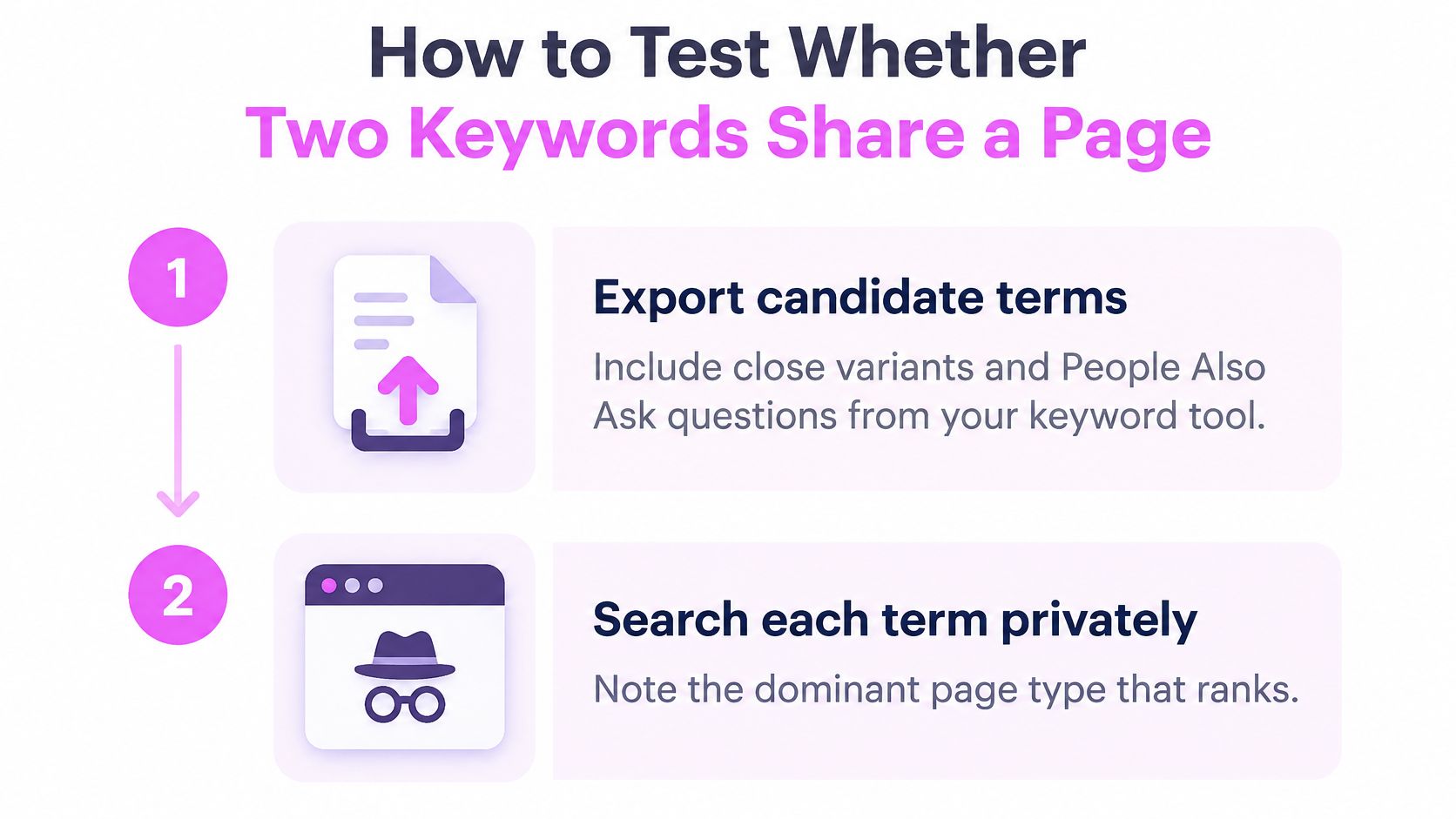
- List the candidate terms. Include the main query, close variants, and relevant People Also Ask questions. Questions often reveal needs that a volume-sorted list misses.
- Search each term in a private browser window. Record the dominant page type in the top results: a how-to guide, tool list, calculator, or product page. A clean window reduces the influence of logged-in history and personalization.
- Compare the top ten results for each pair. Mark the URLs that appear for both terms. Six or seven shared URLs are a strong signal to consider one page; two or three usually point toward separate pages.
- Compare the expected answers, not just the URLs. If both queries call for the same format and depth, group them. If one needs a process and the other needs a measurement, separate them.
- Assign one primary term to each group. Treat the remaining terms as variants. If a cluster has no clear primary term, check whether it combines queries with different intent.
- Map each cluster to a URL and record the reason. That makes the decision easy to review when the page plan changes.
| SERP pattern | Decision | Example pair |
|---|---|---|
| Same page type and same answer | Merge into one page | How many keywords per page SEO and how many keywords should a page target |
| Planning guide versus measurement tool or calculator | Split into two pages | How many keywords per page SEO and keyword density checker |
| Process guides versus lists of tools | Split by intent | Keyword research process and keyword research tools |
| Mixed guides and tools with overlapping results | Merge for now, then test rankings | Keyword cannibalization and keyword overlap |
A shared noun can conceal different jobs. Grouping every query that includes “keyword” together can put a planning question and a density question on the same URL, even though each calls for a different answer. A quick SERP comparison before writing the brief can catch that mismatch.
A semantic keyword clustering tool can group queries by SERP overlap, giving you a starting point to validate rather than a final page plan. Check the results and answer formats before assigning each cluster to a URL.
The final plan should make the reasoning clear: one URL per cluster, a primary term, and variants that fit naturally into the page. Record why terms with different intent belong elsewhere.
Where Keyword Repetition Turns Into Stuffing
The pattern turns up in drafts constantly. A subheading repeats the phrase three times, the image alt text copies the title word for word, and every internal link carries a different variant of the same query. The writer hit the target count and shipped.

The fix is never "fewer keywords." It's putting each one where it carries meaning. Compare the two versions of the same point.
Stuffed: "Looking for how many keywords per page SEO? Our how many keywords per page SEO guide explains how many keywords per page SEO for every website."
Rewritten: "How many keywords per page SEO depends on intent. A page that answers one question thoroughly can rank for dozens of phrasings of it. A page built to hit a count usually ranks for none."
The rewrite keeps the exact phrase and still reads like a person wrote it. Google's spam policies name keyword stuffing directly: unnaturally repeating words or phrases, producing keyword lists without substantial value, and inserting blocks of locations or numbers purely to manipulate rankings. That stance isn't new. The SEO Starter Guide appeared in November 2008 as a compact document covering roughly a dozen optimization areas, from title and description metadata to URL structure and anchor text, and even then the emphasis was broader than inserting more target phrases.
Here's the audit walkthrough I run when a page reads mechanical rather than written:
Two more checks catch most of it. The SEO Starter Guide states that Google's systems don't use the meta keywords tag, so counting terms there measures nothing, and it recommends putting the words searchers use in prominent, descriptive places: title, main heading, alt text and link text. Then apply the qualitative threshold. If removing a supporting term makes the answer less clear, keep it. If it exists only to raise a count, delete it.
Density percentages are the trap underneath all of this, because they convert a writing choice into a number nobody can defend. What keyword density does and doesn't tell you is worth reading before anyone puts a percentage target in a brief.
The habit generalizes past SEO pages. Boocoo's website content writing tips for Brisbane treat clarity as the primary editing rule, which is the same test wearing different clothes: if a sentence exists to satisfy a count rather than a reader, it goes.
Page Architecture and AI Overview Scope
The keyword count is an output of page scope, not a target to set in advance. First decide how many distinct tasks the cluster contains. Then check the SERP and AI Overviews to see whether one page can cover them well.
A Pillar Without Cluster Pages Answers Nothing
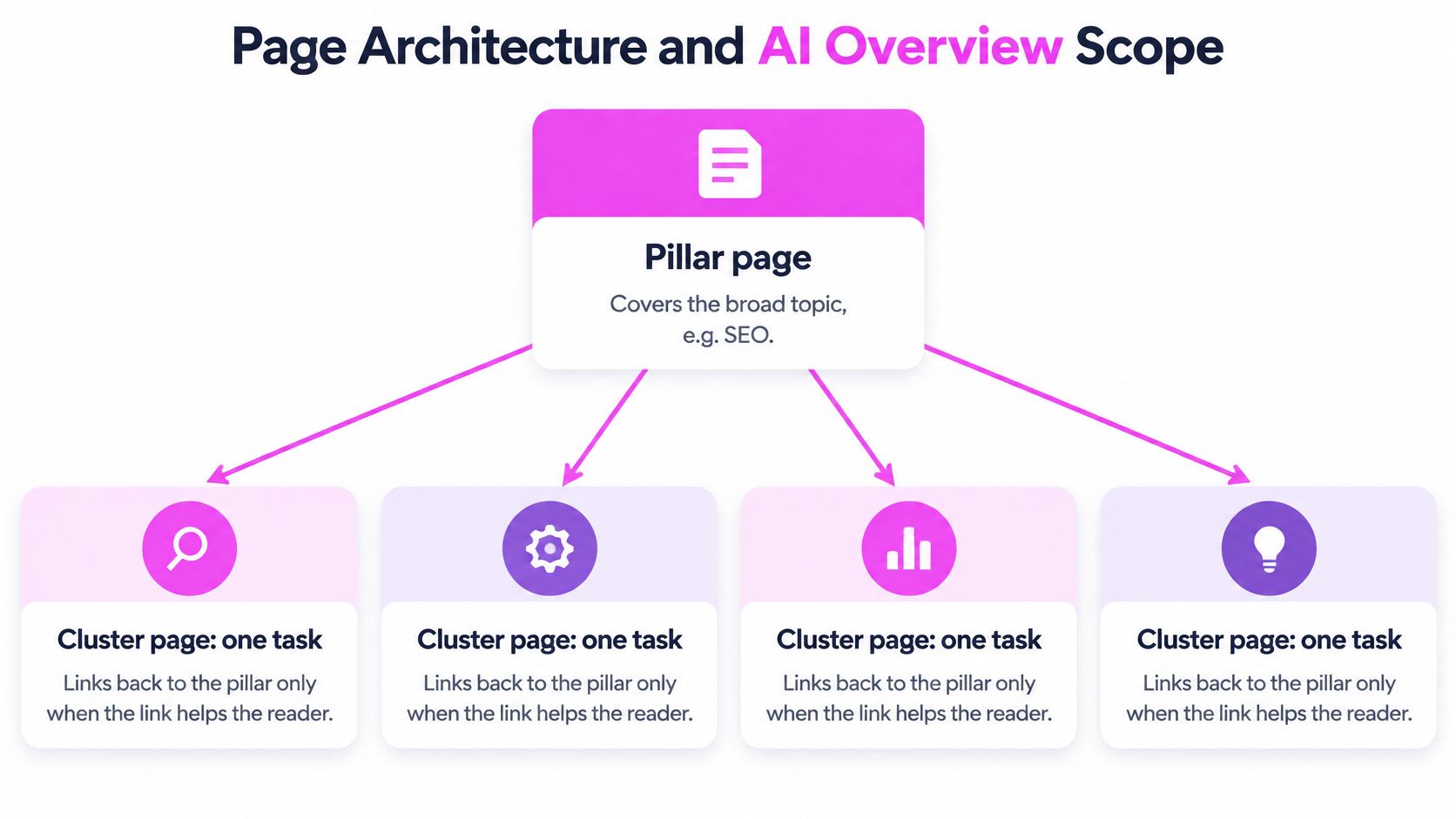
A pillar page covers the broad topic. Cluster pages handle specific tasks and link back to the pillar when that link helps readers. A template that forces the same number of internal links onto every page adds no value.
For example, a pillar on SEO keyword targeting could support separate pages on keyword research, keyword cannibalization, keyword density and content briefs. Combining all four into one URL makes it harder to answer each task in useful depth: a reader looking for cannibalization help needs an audit checklist, while someone researching content briefs needs a template. A 2025 implementation study of thematic content clustering on an educational website, published in the Eudoxus Press journal, used a pillar-and-cluster model with thematic grouping and internal linking. The study reported improvements in keyword rankings, organic traffic, engagement and crawl efficiency.
Use a practical test: can one page answer every query in the cluster without awkward topic shifts or repeated explanations? If the draft needs to refer back to earlier sections to avoid explaining the same thing twice, the scope may be too broad. The opposite risk is thin pages: splitting every minor wording variation into its own URL creates competing pages with little distinct value.
What AI Answers Do to Page Scope
In 2025, AI Overviews expanded into commercial, transactional and navigational queries. Semrush's AI Overviews study reports that the share of commercial queries triggering AI Overviews rose from 8.15% to 18.57%, transactional queries from 1.98% to 13.94%, and navigational queries from 0.84% to 10.33%. The study also notes that Google says AI Overviews lead people to ask longer, more complex questions.
| Query type | Earlier share | 2025 share |
|---|---|---|
| Commercial | 8.15% | 18.57% |
| Transactional | 1.98% | 13.94% |
| Navigational | 0.84% | 10.33% |
These changes make the exact-keyword-to-page rule a poor planning shortcut. A page should answer the main query and the relevant follow-up questions, rather than only matching one phrase. That does not mean combining every long-tail variation into one URL. Plan around the task, the entities and evidence the answer needs, and the subquestions a reader is likely to ask.
Before drafting, map the primary task, its supporting questions, the entities the answer needs to name, and the evidence that will support it. Also define the conversion intent. Split the content when the audience, outcome or SERP format changes materially. “How many keywords per page?” and “Do I need a separate page per keyword?” can share a page because both concern scope. Cannibalization fixes belong on a separate page because readers need a diagnostic checklist and a redirect plan.
A useful check: a page can be cited in an AI Overview without earning a top-ten click. Rankings alone cannot show whether the page covers the right scope.
Track conventional rankings and AI Overview citations for the cluster. If a page is cited but does not earn clicks, the content may answer the question while the result gives searchers little reason to visit. If it ranks but is not cited, check whether the answer is easy to find and extract from the page.
The same architecture principle applies to directories. Directoryeasy's guide to structuring directory sites for search visibility explains how to organize category pages around distinct user needs.
Deciding Scope Before the First Draft
A short scope check can prevent a substantial rewrite:
- State the task as a verb phrase. “Explain how to size a keyword set” describes a task. A list of phrases does not.
- Review related questions in the SERP. Keep the subquestions the page can answer without shifting into a different task.
- Name the evidence. Identify the study, policy document or worked example that supports the answer.
- Choose the ending. A page that leads to a download or demo may need different coverage from one that ends after answering the question.
The number of questions a page covers should follow the reader's next questions, not the number of phrases in a keyword export.
A Real Page Plan From Start to Finish
Here's the plan for the page you're reading, built in the order a writer builds it.
The primary term is how many keywords per page SEO. It goes in the title, the H1, the first paragraph and the slug. One placement each, and no repeats in subheadings for the sake of repetition.
The variants that stay are keyword count per page, how many keywords should a page target and one keyword per page. Each returns the same kind of answer, so each can appear once in body copy where it means something to the sentence.
The subtopics are why no fixed number exists, how to check intent against the SERP, what stuffing looks like in a draft, and how AI Overviews change scope. They get their own headings because a reader wants them in roughly that order, not because a tool listed them.
The terms that leave. Keyword density percentage belongs on a measurement page with a worked example. Cannibalization fixes belong on an audit page with a checklist. Both earn a link from the section where a reader would want them, and neither gets a paragraph here.
Google's Search Essentials frames placement the same way: use the words people would use to find the content in prominent locations such as the title, main heading, alt text and link text. Prominent means prominent. It doesn't mean repeated.
The mistake I'd flag hardest is writing the keyword count into every heading. A title built around a number, three subheadings asking the same question and a conclusion that restates it produce exactly the stuffing this page warns against. Headings describe what's underneath them. That's their job.
Small sites need different calibration. With twelve pages and little traffic, splitting a cluster into four URLs spreads signals across pages that will never rank. Combine adjacent clusters on one URL, keep the sections clean, and split later when impressions show two distinct question sets pulling in different directions.
The Two-Month Check
Two months after publishing, look at three things in Search Console: positions for the primary term, impressions for the variants, and whether density queries are landing on the density page instead of this one. If the variants pick up impressions but no clicks, the answer is probably too shallow. If the density query starts appearing here, the internal link to the other page needs to be stronger.
Set Your Keyword Count Before the Next Brief
A keyword count is the result of page planning, not a target to hit. Before the next brief goes out, write down the primary term, group close variants that share a SERP, and separate any query that calls for a different page format.
Check which queries already bring impressions to the URL. If the page covers those searches well, adding another phrase to the brief may add no useful coverage. Use the query report in Search Console to see what the page already ranks for, then decide whether a missing term needs a stronger section or a separate URL.
SemDash combines keyword research from a database of 6.6 billion keywords with page-level mapping that shows the specific page Google sends traffic to for every keyword. Use those inputs to assess candidates and ranking-page history; the writer still needs to judge whether the queries belong together.
Set the count by deciding how many pages the cluster needs. SemDash's keyword clustering groups queries into page-level topics, and its SERP history lets you review how results have changed over 12 months. Run the planned cluster through the same intent and page-scope checks, then assign each group to the URL that best answers it. Get started with SemDash for free.