



You search your main keyword, can't find your page, and open Search Console to see an average position that looks perfectly healthy. Meanwhile, organic leads are down. Before changing the page, you need to establish whether you're comparing the same query, URL, market, and search layout.
My recommendation for how to find site ranking is to build a repeatable measurement, not chase one website-wide score. Use Search Console to discover actual search exposure, verify commercially important queries in the live results, and separate visibility from the traffic and conversions you earn.
Table of Contents
- Pull Your Real Rankings from Search Console
- Verify a Keyword's Position with a Manual SERP Check
- Check Bing Rankings Separately
- Rank Bands and the Movements Worth Acting On
- Checking Rankings When AI Overviews Take the Click
- Set Up Your Ranking Baseline This Week
Pull Your Real Rankings from Search Console
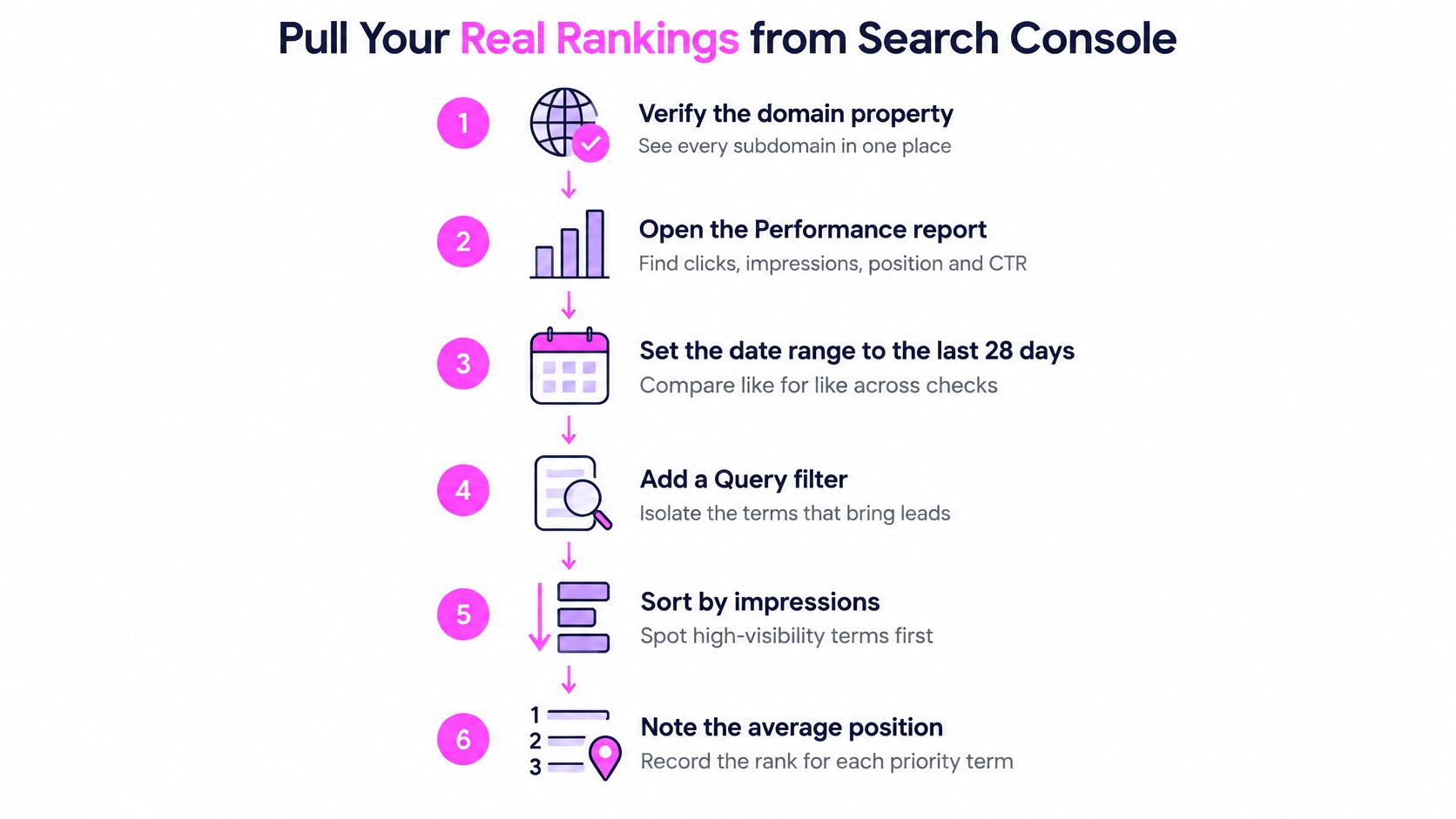
- Verify a Domain property. Complete ownership verification in Google Search Console so your analysis includes subdomains and protocols. If you use a URL-prefix property instead, make sure its scope matches the URLs you're auditing.
- Open Performance, select Search results, and choose the Web search type. Enable clicks, impressions, average CTR, and average position before exporting.
- Set your comparison window. Start with the last 28 days, compare against the preceding period, and repeat with a 90-day view for context, using the date controls described in Google's Performance report documentation.
- Export the Queries and Pages tables. Record country and device settings with each export, then create separate views for your priority markets rather than combining unrelated audiences.
- Resolve each query to its ranking URL. Apply an exact query filter and inspect the Pages tab. Reverse the process with a page filter when you want to understand the terms associated with a landing page.
- Sort by impressions and build your baseline sheet. Include the query, ranking URL, country, device, date window, clicks, impressions, CTR, and average position.
Keep this retrieval sequence beside your reporting sheet.
Why the headline position can mislead you
Average position isn't an exact rank check. Search Console records position when you receive an impression and averages the topmost position occupied by your property or page. At property level, you can therefore miss the distribution across different URLs.
Say your category page and an old buying guide both appear for a commercial query. A property-wide average won't tell you whether Google is sending buyers toward the category or the guide. Inspect the query's Pages tab before deciding which page needs work.
Don't combine branded navigational searches with non-branded acquisition terms when assessing content performance. You also shouldn't compare a mobile-heavy period against a desktop-heavy period without checking the device breakdown. Either change can alter the average without showing a like-for-like improvement.
Practical rule: Treat the sitewide average as a starting signal. Make editing decisions from a filtered query-and-page view.
Build a usable matrix
Give each target query a primary row for its ranking URL and market settings. When competing URLs appear, preserve them in a supporting tab rather than replacing the URL in your baseline.
Add an intended URL column beside the observed URL. That distinction exposes a problem a rank number alone can't: you may have visibility, but on the wrong landing page. Finish with a baseline position and impression count for every priority row, leaving unavailable values blank rather than inventing a rank.
Verify a Keyword's Position with a Manual SERP Check
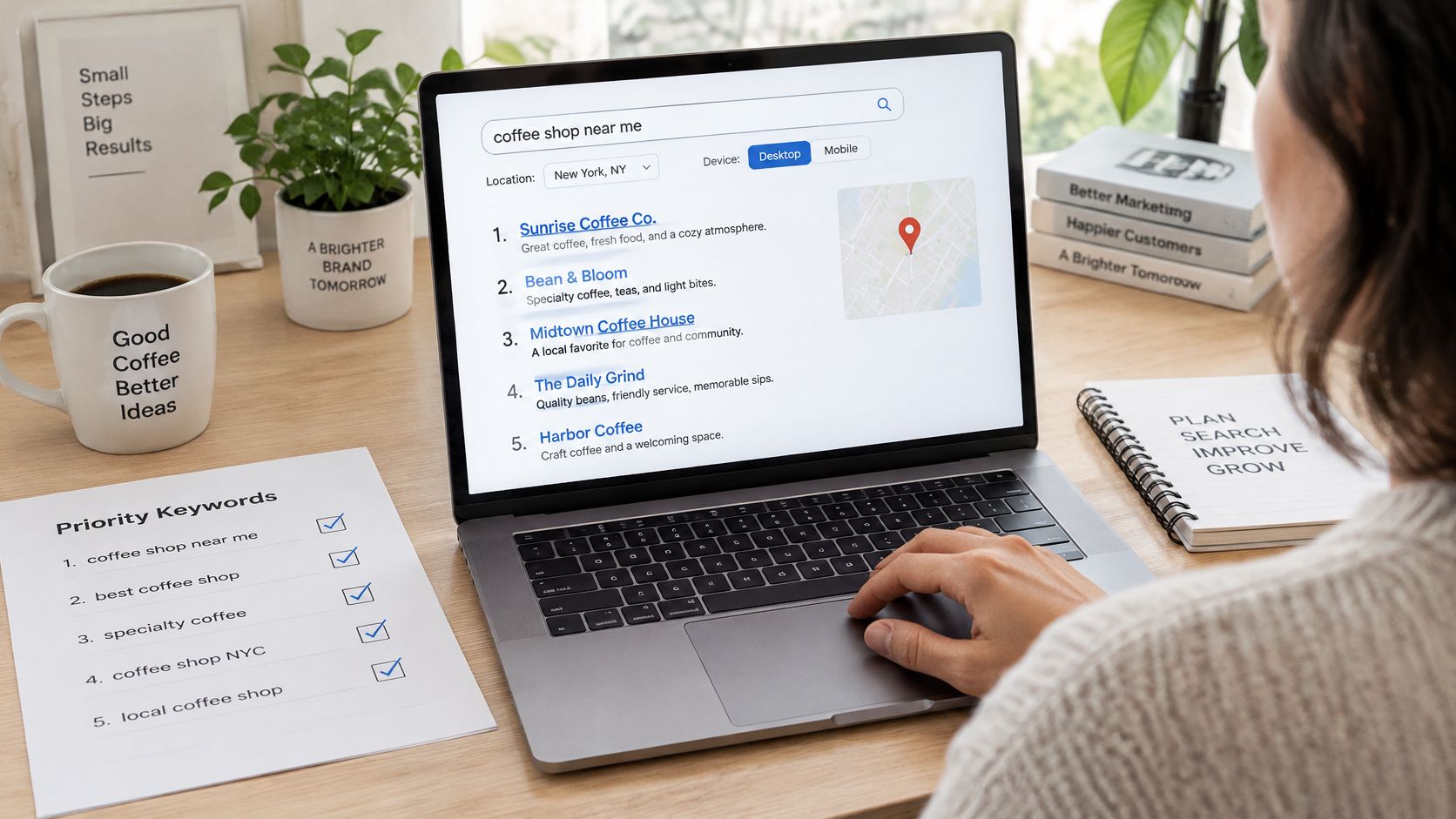
A manual search answers a narrower question than Search Console: what appeared under these settings at this moment? Don't use your everyday browser session as a definitive ranking report. You need a controlled check, especially when you serve buyers in a different city or country.
Choose a small set of lead-generating or revenue-relevant terms. For a local query, inspect the results in the buyer's market, not wherever you happen to be working.
Keep the query and market context visible while checking the results.
Settings that change a SERP result and what to record
| Setting | Why it changes the result | What to record |
|---|---|---|
| Location | Local packs and regional results reorder pages | City or country |
| Device | Mobile and desktop layouts differ and can reorder results | Position for each device |
| Language | The same term in another language returns other pages | Query language |
| Search history | Logged-in personalization can shift results | Clean session or rank tool used |
| Check date | Results rotate after updates and tests | Date and time of check |
Use a clean, signed-out session to reduce account-history effects, but don't assume incognito mode sets your location. For a market you can't reliably reproduce manually, use a rank-checking tool with explicit location, language, and device controls.
Record the exact ranking URL, not just whether your domain appears. Keep ordinary organic position separate from local packs, shopping results, video blocks, and AI answers. You can occupy a strong organic position while appearing well below the initially visible screen.
Make the check repeatable
For a local coffee query, distinguish a map listing from a conventional website result. If you count both as ordinary organic listings, you'll create a misleading baseline that another analyst can't reproduce.
Repeat your checks on a fixed weekday using the same settings. Save dated screenshots for priority queries when the layout changes, and note which competing pages appear above yours.
A manual check is a snapshot, not a verdict. Use it to explain the result layout and verify the landing page, not to overrule a longer reporting window.
Avoid editing after every snapshot. First establish whether you're seeing a persistent URL change, a different search feature, or a temporary ordering change.
Check Bing Rankings Separately
Give Bing its own engine field in your ranking matrix. Don't paste its positions over your Google rows or average the engines together. You're measuring exposure in different indexes and result layouts, not taking duplicate readings of the same system.
Use this sequence to make the comparison useful:
- Verify your site in Bing Webmaster Tools. Check that the verified scope covers the domain and landing pages you're reviewing.
- Open Search Performance and select the same completed date window you used for your Google analysis.
- Export the available query and page performance, including clicks, impressions, and position. Preserve the original export so you can check its definitions later.
- Add an engine identifier to every row. Match queries to landing pages without assuming that Bing chooses the same URL as Google.
- Compare trend direction and broad visibility bands before scrutinizing decimal differences.
For an additional live-result check, use the Bing SERP checker workflow to keep your query and market settings consistent.
Use cross-engine differences to choose your investigation
If you lose visibility only on Google, inspect the Google results and the affected query clusters. Look for changed intent, stronger competing pages, and different ranking URLs. Don't label the movement an algorithm update merely because Bing stayed steady.
If you lose visibility on both engines, move shared site changes higher on your investigation list. Check deployments, redirects, canonical tags, robots directives, server responses, and whether you've removed important content from the rendered page.
Follow the technical-first sequence in Google's site-maintenance guidance: verify access and indexing before treating the problem as a copywriting failure.
A simultaneous decline is a diagnostic clue, not proof of a technical fault. You still need to inspect the affected URLs. If you've redirected a valuable landing page to an unrelated destination, fixing that mapping is a better first move than rewriting the destination's introduction.
Keep engine-specific evidence alongside a shared change log. That lets you distinguish a site intervention from a search-engine-specific movement without forcing either explanation.
Rank Bands and the Movements Worth Acting On
I would usually investigate a well-exposed page approaching page-one visibility before polishing a low-demand query already near the top. Opportunity combines position, impressions, intent, and business value. A rank gain without meaningful demand can be a poor use of editing time.
Use the bands as triage rules, not guaranteed prescriptions.
| Rank band | Default action | What to inspect before editing |
|---|---|---|
| 1–3 | Protect the page | Accuracy, conversion paths, technical stability, emerging competitors |
| 4–10 | Improve competitiveness | Intent match, title promise, internal links, missing decision information |
| 11–20 | Assess near-page-one opportunity | Ranking URL, relevant demand, content gaps, link prominence |
| 21–50 | Reassess the page's role | Format mismatch, weak coverage, overlapping pages, relevant external references |
These bands follow the practical segmentation described in the Search Console workflow, but don't mistake a band for a diagnosis. A product category ranking for an informational question may need a different supporting page, not a longer category description.
Use click benchmarks without promising traffic
For 2024, Jedi Web Services reported average Google organic CTRs of 39.8% for the first result, 18.7% for the second, and 10.2% for the third. Use that steep gradient to understand why leading positions matter, not to forecast your next month's sessions.
Category differences are substantial: Advanced Web Ranking reported first-place desktop CTRs in Q4 2024 of 19.06% for Science and 38.45% for Law, Government, and Politics. Meanwhile, the 2020 analysis reported by Search Engine Journal estimated 28.5% for the first organic result.
Don't blend those benchmarks into a supposedly universal curve. Choose the closest context, then use your own query-level CTR to assess the actual opportunity.
Editing threshold: Require enough impressions to support the decision, a sustained change, and a plausible explanation before scheduling a rewrite.
Set that impression threshold according to your site's demand. For sparse commercial searches, use a longer window and evaluate lead quality; don't discard valuable queries because a high-volume publishing site would consider them small.
Checking Rankings When AI Overviews Take the Click
A stable organic position doesn't guarantee stable traffic. In Pew Research Center's analysis of Google searches by U.S. adults during March 2025, users clicked a traditional result in 8% of visits with an AI summary, compared with 15% without one, according to Pew's findings.
Inspect the answer surface as well as the ordinary listings.
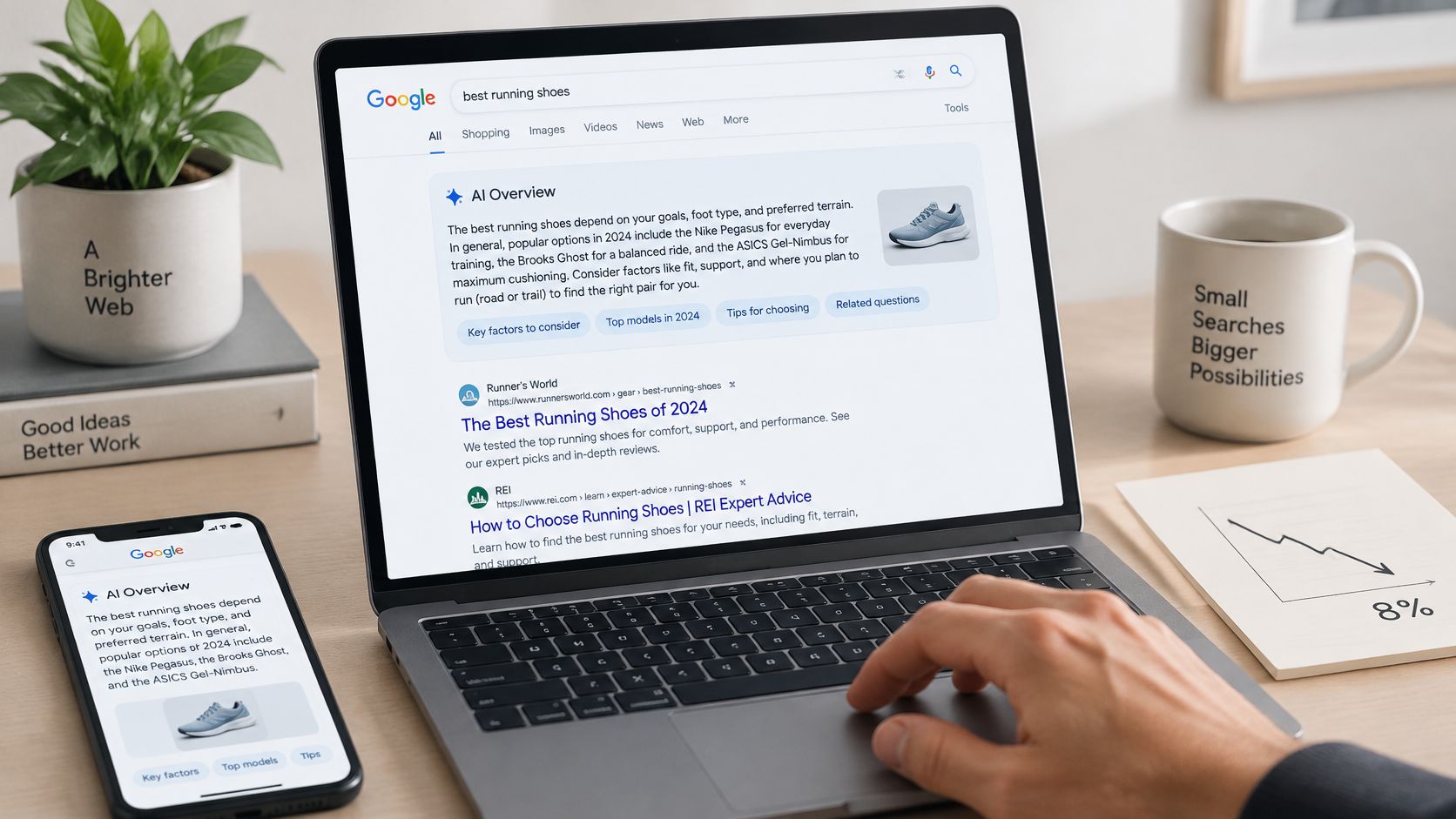
Use a short routine for priority informational queries:
- Record whether an AI Overview appears. Save the query, market settings, and observation date.
- Inspect its citations. Log the cited URLs and whether your intended landing page appears.
- Reconcile the observation with performance. Review clicks, impressions, CTR, and landing-page outcomes over comparable windows.
Google includes AI-feature traffic within overall Web search reporting, as explained in its AI features documentation. You won't get a separate conventional rank that cleanly isolates an AI Overview citation.
Separate citation visibility from commercial value
Don't label a citation a top organic ranking. Record it as a different search surface, then check whether you attract qualified visits or contribute to conversions.
Start with longer informational questions and comparison queries, where inspecting an answer can explain why a familiar position no longer produces familiar click behavior. Use the AI Overview tracking workflow to keep citation observations consistent rather than collecting unrelated screenshots.
Use this video alongside the query-level checks.
Say your buying guide maintains its ordinary position while clicks decline. Before changing its keyword target, inspect whether searchers now receive the basic answer directly in the results.
I would test improvements that justify a visit: a useful comparison, original evidence, clearer product selection criteria, or a stronger next step. Don't assume a shorter opening answer alone will restore lost clicks. Annotate the change and assess both search engagement and business outcomes before expanding the approach.
Set Up Your Ranking Baseline This Week
Build a sheet you can maintain, not a dashboard you'll abandon. I'd start with a deliberately limited keyword set, weighted toward pages you can improve and queries tied to leads, purchases, or subscriptions.
Create the baseline
- Choose your working keyword set. Include acquisition terms, commercially useful comparisons, and important brand queries, but label their intent separately.
- Map each query to one intended primary URL. Add any competing pages from your own site so you can investigate overlap instead of creating another near-duplicate.
- Export an unfiltered Search Console baseline before applying diagnostic filters. Preserve the original file, property scope, search type, and export date.
- Run controlled live checks on your highest-value terms. Log the observed landing page and result features beside your performance metrics.
- Assign an owner and proposed action to each priority URL. Separate measurement problems from technical fixes and editorial work.
Keep unfiltered totals because filtered query tables aren't a complete account of search demand. Google omits anonymized queries from query-filtered views while retaining them in overall totals, and its Performance report provides 16 months of history, according to Google's query-data documentation. A missing query row isn't evidence that you have no rankings.
For competitive expansion, enter any domain in SemDash to get its full ranking-keyword list with search volume, monthly traffic, Keyword Difficulty, and more. We show the specific page Google sends traffic to for every keyword and let you inspect 12 months of SERP history for any keyword, helping you distinguish an established competitor from a recent entrant.
Tracking cadence and comparison windows
Use this as a working schedule, adjusting your response speed to the commercial risk rather than checking every term every day.
| Cadence | Window | What to check | Why it matters |
|---|---|---|---|
| Weekly | Rolling 7-day average | Priority terms only | Catches sharp drops early |
| Monthly | Last 28 days vs prior 28 days | Full query-URL matrix | Basis for most decisions |
| Quarterly | 90 days vs prior 90 days | Trends, cannibalization, AI citations | Separates trends from noise |
| Yearly | Up to 16 months of history | Seasonal patterns | Prevents false alarms from seasonal dips |
Treat these as recommended review windows, not statistical guarantees. Investigate urgent indexing failures immediately, but reserve routine content decisions for changes that persist across your comparison window.
Choose the first URLs to improve
Prioritize a technically blocked commercial page first, a page receiving the wrong query intent next, and a competitive near-page-one landing page after that. Change one coherent set of elements per URL and record the implementation date so your review has a defensible starting point.
Choose your three starting URLs, assign the fixes, and schedule a 28-day review against the saved baseline. Judge the work by the intended landing page's visibility, qualified traffic, and outcomes, not by whether the sitewide average looks better.
Visit SemDash to inspect your domain's ranking keywords, identify the landing page attached to each term, and compare historical search results. Use those findings to fill your query-URL matrix and choose the pages worth improving first.