
Half of the people who ran a local search on a smartphone visited a related store within one day, compared with 34% after a local search on a computer or tablet. That finding comes from a May 2014 study by Google, Ipsos MediaCT, and Purchased, summarized by Site Audit Lint. In the diary part of the same study, 18% of local smartphone searches led to a purchase within a day, versus 7% of other smartphone searches.
That gap is why I treat local search engine optimization as a customer-action problem before I treat it as a ranking problem. A map pin that sends someone to a closed door, a wrong suite, or a homepage with no booking path wastes a person who was already moving. For a single site or a multi-location brand, I want calls, direction requests, and bookings per location. A prettier average rank is a side effect, not the scoreboard.
Table of Contents
- How Local Rankings Really Work
- Google Business Profile Fields That Decide Visibility
- Local Keyword Research and Location Page Mapping
- Citations and Local Links That Build Prominence
- Reviews, Responses and Trust Signals
- On-Page Signals and LocalBusiness Schema
- Measuring Local Visibility by Actions, Not Impressions
- Pick Your First Local Fix This Week
How Local Rankings Really Work
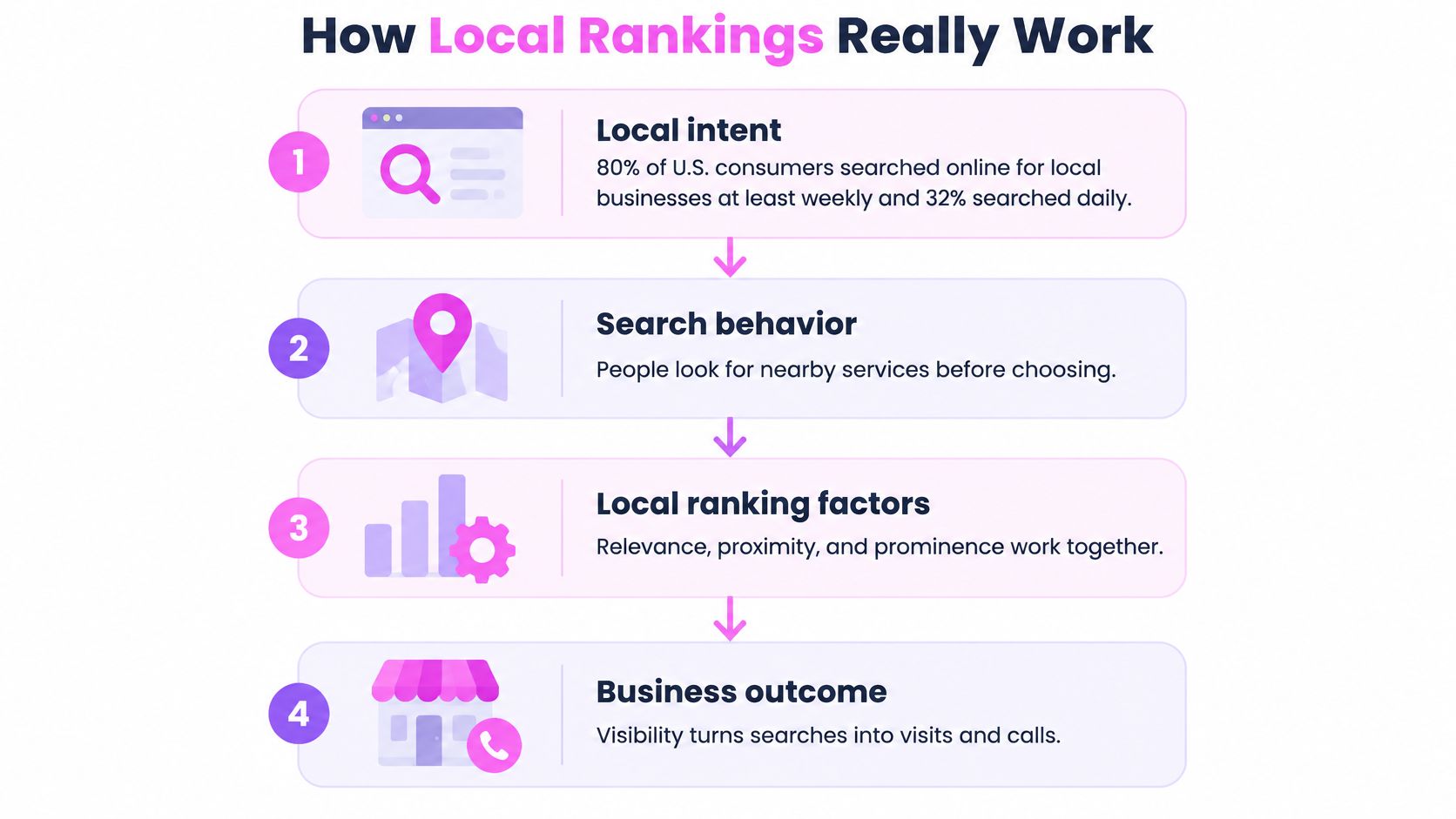
80% of U.S. consumers searched online for local businesses at least weekly in 2024, and 32% searched daily, according to SOCi's Consumer Behavior Index as reported by BrightLocal. Those searches are shortlists. Someone wants a business they can reach today, not a national article.
Google's local ranking guidance organizes the local result around three variables that interact. Relevance is how closely a Business Profile matches the query. Distance is calculated from the searcher, or from the place named in the query. Prominence is how established and recognized the business is online and offline.
I read that trio like a hiring shortlist. Qualifications are relevance. The commute is distance. Reputation is prominence. You can rewrite the résumé and collect better references. You cannot relocate the candidate for that one interview.
Distance is fixed for each search. Better categories and tighter copy can improve the match between query and profile, but they cannot cancel geographic decay, because distance stays its own factor. Google also says a business farther away can rank above a closer one when its relevance is stronger. Proximity is an advantage you might get, not a rule you can bank on. The work you can finish sits in relevance and prominence.
What each factor lets you change
| Factor | What it measures | What you control |
|---|---|---|
| Relevance | How closely the profile and site match the query | Primary and secondary categories, services, description, on-page content |
| Distance | Distance from the searcher or the location named in the query | Service areas and location pages you can genuinely serve; not controllable per search |
| Prominence | How established the business is online and offline | Review volume and quality, consistent citations, links and brand mentions |
Practical rule: Fix relevance and prominence first, then keep service areas inside the places the business can actually win.
Check the pack from several coordinates, not only the office pin. A city-center screenshot hides a neighborhood where a closer competitor owns the query.
Google Business Profile Fields That Decide Visibility
I start every new profile with the fields below, in this order, and I log the date of each edit. Later reporting is useless if you cannot say what changed.
- Primary category. This decides which queries the profile is eligible to enter. I pick the most specific category for the main revenue service. Water heater repair service matches the job that pays. Plumber pulls the profile into drains, remodels, and gas lines the crew does not sell. The failure mode is a broad category that matches many unrelated queries.
- Secondary categories. Add only services the business will deliver this month. Every unsupported category dilutes the match. The failure mode is ticking every related box because it “might help.”
- Business name. Enter the trading name exactly as it appears on the sign. Stuffing a city or a service into the name is the fastest route I know to a suspension. The failure mode is treating the name field like a title tag.
- Address or service area. A storefront shows its verified address. A home-based or mobile business hides the address and sets the areas it serves. Distance is calculated from the location in the query, so a service area that ignores real drive times fails both ways: you show up where you cannot arrive, and you vanish where you can. The failure mode is publishing a home address, or leaving the service area blank.
- Phone. Use a local number that matches the website character for character. The failure mode is a tracking number on the profile and a different number on the site.
- Hours. Enter regular hours, then holiday hours before the holiday. The failure mode is discovering Christmas on the day customers call a closed line.
- Services and descriptions. Give each service a short factual description. The failure mode is repeating the category name in vaguer words.
- Website link. Point each location at its own landing page. The failure mode is sending every pin to the homepage and hoping the visitor hunts.
The field standard
| Field | What to enter | Common mistake |
|---|---|---|
| Primary category | Most specific category for the main revenue service | Choosing a broad category that matches many unrelated queries |
| Secondary categories | Only services the business really delivers | Adding every category that sounds related |
| Business name | Trading name exactly as on signage | Adding keywords or city names to the name |
| Address or service area | Verified address for storefronts; service areas for home-based or mobile businesses | Showing a home address publicly or leaving the service area empty |
| Phone | Local number matching the website | A tracking number on the profile that differs from the site |
| Hours | Regular hours plus holiday hours entered ahead of time | Forgetting public holidays until customers call |
| Services and descriptions | Each service with a short factual description | Vague descriptions that repeat the category name |
| Website link | Location-specific landing page | Linking every location to the homepage |
The twenty-minute routine is the whole audit. Open the profile, walk the table top to bottom, screenshot the current state, fix the two worst mismatches, and set a review date. On a multi-location account I do one location per sitting. Batch-editing ten profiles in one afternoon is how a bad category gets copied everywhere.
Local Keyword Research and Location Page Mapping
A location query is valuable when it leads to a call, direction request, or booking. Google reported in 2016 that 30% of mobile searches were related to location, using global search data (source). Nearby searches often signal immediate intent, so a useful page should answer practical questions about availability, hours, and where to go.
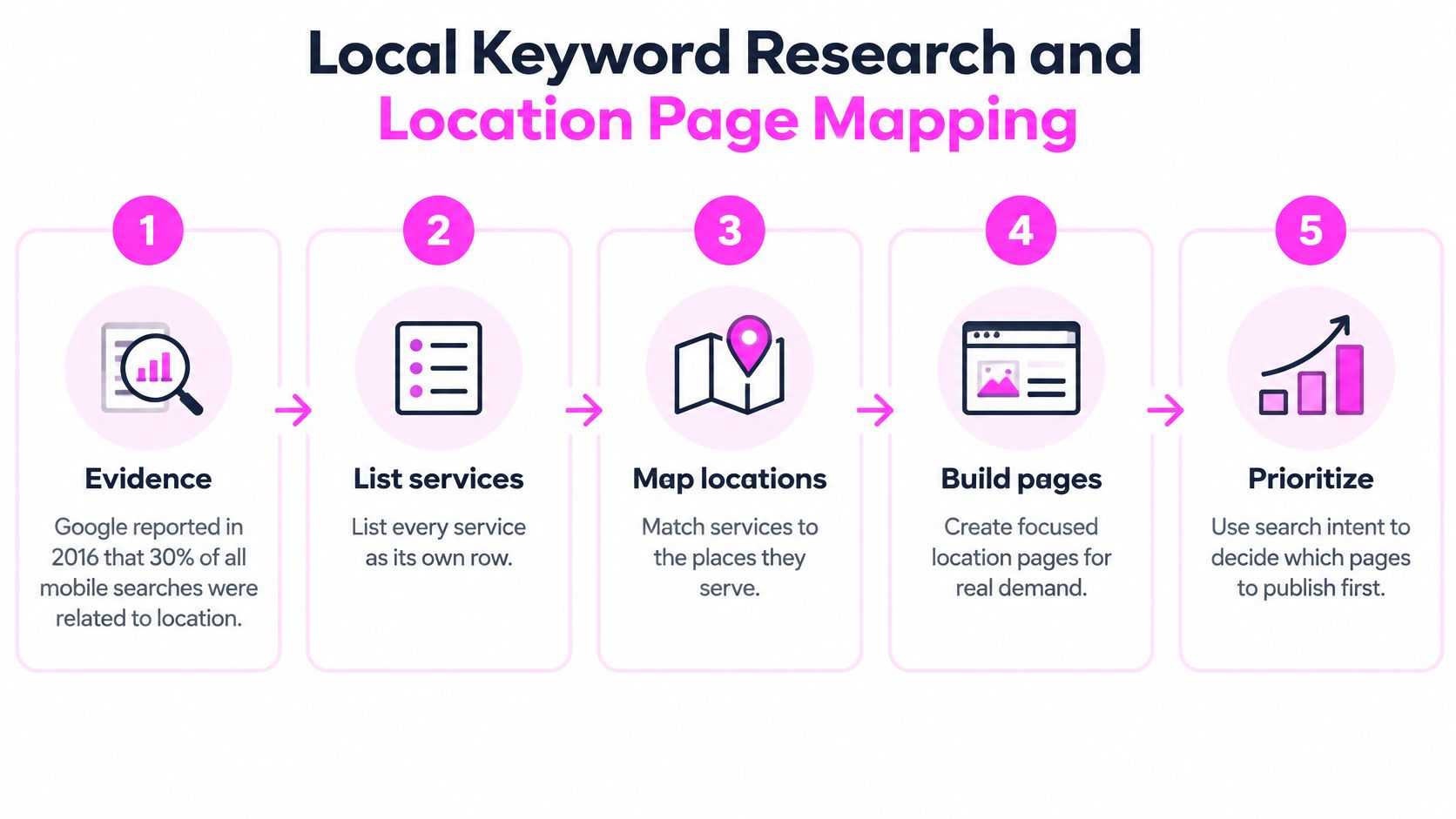
Six steps for mapping keywords to pages
- List each service as its own row, using the words customers use. “Emergency plumber repair” is a useful entry. “Plumbing solutions” is too vague to guide a page.
- Gather seed terms from call logs, chat transcripts, and review language. If customers ask for “water heater installation,” use that phrase rather than an internal label such as “tank replacement.”
- Add location modifiers only where the business serves customers. A city or neighborhood name belongs in the research only if the team can cover that area.
- Check search volume and inspect the live results. A query dominated by directories or a map pack may need a different page approach from one with mostly organic results. Use a consistent keyword research process to record seeds, modifiers, intent, and the intended URL.
- Assign each query to one URL. If two pages target “water heater installation,” their signals can compete. Give the query one clear page owner.
- Make each location page local. Include relevant service details, local photos, and information about the crew covering that area. Replacing a city name in a shared paragraph does not make a useful location page.
For example, emergency plumber repair can map to /services/emergency-plumbing when the live results are mostly a map pack. Water heater installation can map to /services/water-heaters, with a neighborhood modifier when organic results support it. Plumber in Austin belongs on /locations/austin, not the homepage.
A single-location business can keep service pages separate from its location page. For a multi-location business, create a city page when the research supports a distinct target and the team can serve that area. Then measure whether the page contributes to calls, direction requests, and bookings, not just whether it ranks.
The walkthrough below follows the same sequence, from service list to priority.
Keyword to page mapping template
| Service term | Target URL | Page type | Modifier | Live results check |
|---|---|---|---|---|
| emergency plumber repair | /services/emergency-plumbing | Service page | None | Mostly map pack |
| water heater installation | /services/water-heaters | Service page | Neighborhood | Organic results |
| plumber in Austin | /locations/austin | Location page | City | Map pack and directories |
Copy the columns into your research sheet. Keep one row, one URL, and one page owner per query. If the modifier or live results check is unclear, resolve that before publishing the page.
Citations and Local Links That Build Prominence
A citation is a listing that repeats the business name, address, and phone number. I want those three strings identical. I do not want a larger pile of half-filled directories.
A 2025 U.S. consumer study found that 53% of respondents would avoid a business because of inaccurate listings, while 59% expected a response within 24 hours, as reported in Rio SEO's local search consumer behavior study. Hours, phone numbers, and service availability are operational assets. You can win the pack and still lose the customer who hits a wrong number.
One mismatched phone number on a high-traffic directory costs more trust than ten thin listings ever add.
Tiers, from first to last
| Tier | Examples | Why it matters |
|---|---|---|
| Core data sources and maps | Apple Business Connect, Bing Places, major data aggregators | Feed many other directories, so one correct entry spreads |
| Major general directories | Facebook, Yelp and similar consumer directories | High visibility and frequent customer checks |
| Niche and industry directories | Trade associations, licensing boards, sector-specific directories | Topical relevance for the service |
| Local organizations and editorial links | Chambers of commerce, local sponsorships, local news and event pages | Editorial local links that add real prominence |
Core sources come first because other directories copy them. A correct Apple Business Connect or Bing Places record spreads. A wrong one spreads faster. Major consumer directories come next because people frequently open them. Niche directories matter for the trade, not for a domain score. Chambers, sponsorships, and local news sit last in the cleanup order and first in the link order, because an editorial link to the location page moves prominence more than another unclaimed listing. The same judgment applies when you build local links: a chamber or event page that names the location beats a directory you will never log into again.
Say a remodel left suite 200 and the old suite 110 is still on one aggregator. Scrapers copy 110 for years. The Google profile is right, the website is right, and the customer who taps Yelp still walks into the wrong hallway. I pull every listing, compare name, address, and phone character by character, and fix the top tier before I touch the long tail.
Skip paid mass submission. Those services create listings nobody verifies, then duplicates and mismatches. The version that works is narrower: show up at the local event, and ask the organizer to link the location page, not the homepage.
Reviews, Responses and Trust Signals
In 2024, 75% of U.S. consumers said they always or regularly read online reviews when researching local businesses, according to BrightLocal's Local Consumer Review Survey. Reviews feed prominence, and they also decide the click. A four-star average with no recent replies looks abandoned. A steady set of specific reviews, answered in public, looks like a business that still answers the phone.
Counting stars is the common miss. Star averages hide whether people mention the service, the neighborhood, or a named technician. That language is what helps the profile match the query. I read the sentences.
- Ask at the moment of satisfaction. When the job is signed off, send a direct link to the profile. A week later the customer has moved on.
- Do not gate reviews. Asking only happy customers breaks platform policy, and the pattern is obvious: perfect scores and no detail. Invite everyone who finished the job.
- Reply to every review within one business day, positive or negative. The reply is public proof that someone owns the profile.
- Put the specific fix in a negative reply. “We replaced the valve on Thursday and credited the call-out fee” beats a template apology.
- Log themes monthly. If three reviews mention after-hours water heaters in one neighborhood, that phrase belongs in the service description, not buried in a spreadsheet.
Once a month I check review velocity per location, not a blended brand total. If a branch drops, I look at whether the ask stopped, whether the link broke, or whether the jobs themselves slowed. I would restart the ask at sign-off before I buy a review widget. Volume without replies is just a louder silence.
On-Page Signals and LocalBusiness Schema
Structured data is a validation and entity-clarity job. It is not a shortcut to the map pack. The page has to be obvious to a person before the markup is worth testing.
On the location page I want five visible signals:
- Title and heading name the service and the place only when that location really serves it.
- Name, address, and phone appear in the footer and the contact block, matching the profile.
- An embedded map uses the same pin as the profile.
- A click-to-call button sits above the fold on mobile.
- Hours are in visible text, including the holiday hours you already entered on the profile.
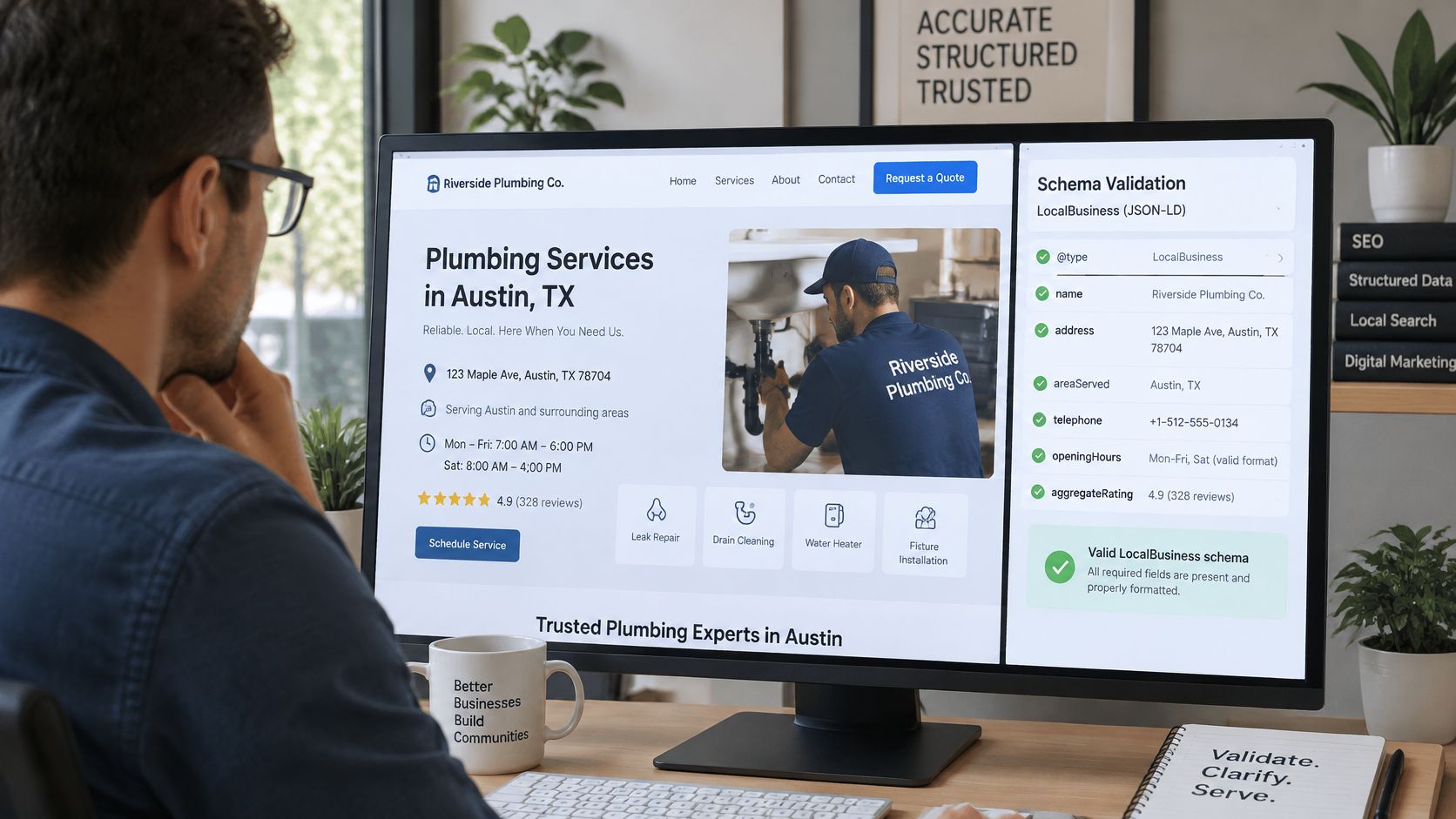
Markup I will actually ship
Google's local business structured data documentation is the spec I follow, not a plugin's default dump.
- Add LocalBusiness markup on the page that represents the actual location. The homepage of a five-city brand is the wrong host.
- Include the required properties, plus geo coordinates. Google lists geographic coordinates through the geo property as a recommended field.
- Make the name, address, telephone, opening hours, and URL match the visible content word for word. Do not invent fields to make the block look complete.
- Validate with the Rich Results Test.
- After deploy, run URL Inspection and read how Google sees that URL.
- Test several location pages. One green check does not prove the template.
The failure I keep finding is valid JSON-LD that describes a different entity from the page. Validation passes. The visitor sees Austin hours and the markup still describes the Dallas office. That does not earn enhanced treatment, and it does not override relevance, distance, or prominence. I keep markup QA in its own checklist, separate from rank checks. Schema helps a search engine read the location. It does not move the pin closer to the searcher.
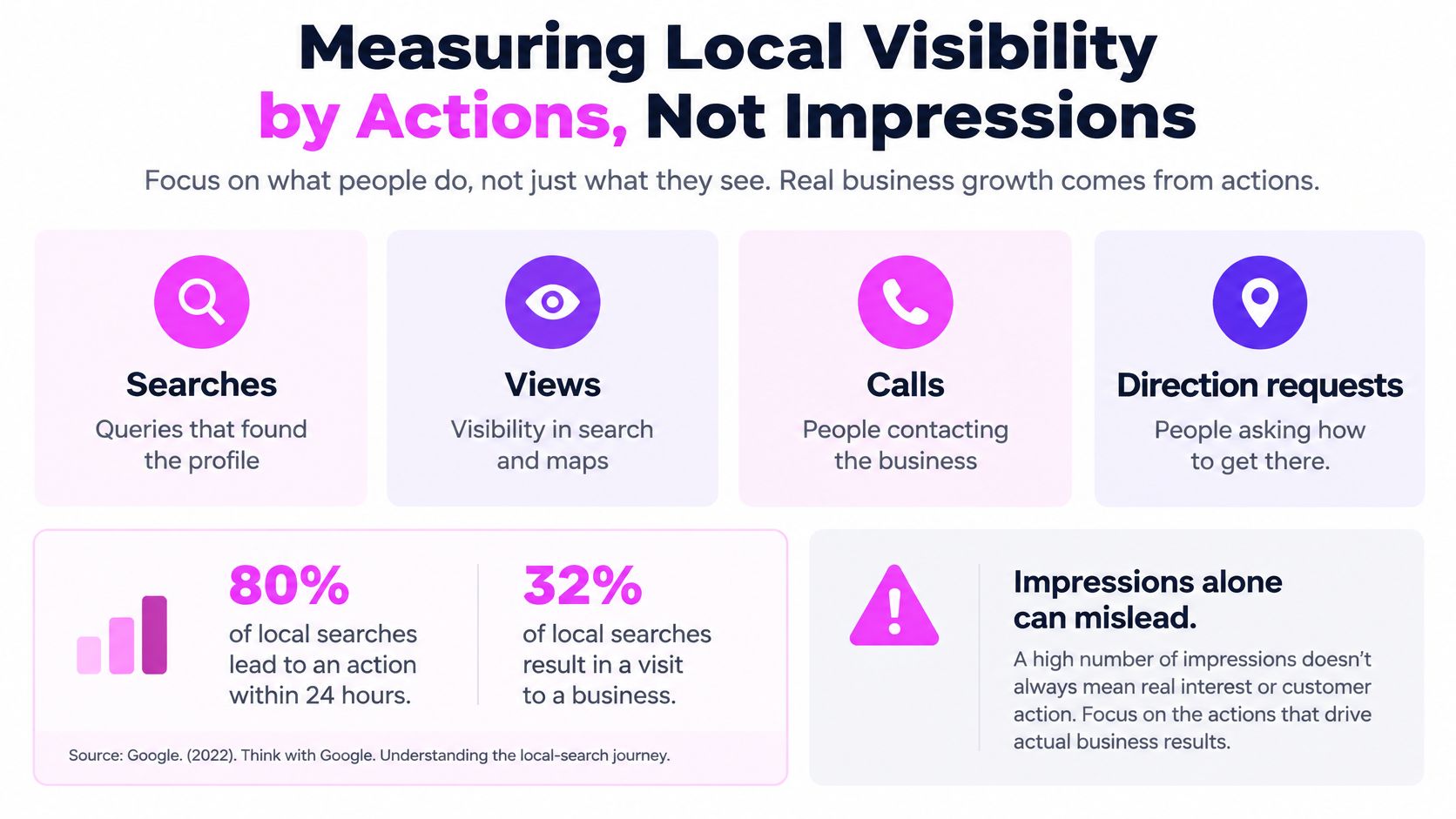
Measuring Local Visibility by Actions, Not Impressions
Impressions show exposure, not customer demand. Google's Business Profile Performance reporting separates searches, views, calls, and direction requests. Searches are the queries that surfaced the profile; views record profile visibility. Calls and direction requests are stronger signs of intent, but bookings show whether that intent turned into business.
Searches can lag behind recent profile edits. Record the date of each change and compare complete reporting periods, rather than judging results in the first few days. Partial periods can distort the comparison.
Direction-request counts account for multi-tapping, cancellations, and spam when tallying unique requests. Raw map taps are not leads; unique requests are a closer measure of customer action.
For multiple locations, report each profile on its own row. A rising brand total can hide a branch whose calls fell after an hours error. For a single-site business, separate discovery metrics from action metrics: track searches and views together, calls and direction requests together, then compare both with bookings in the calendar.
The AI answer check
A 2025 local-search study reported AI Overviews for 15% of local-intent queries and 68% of informational queries in its sample of 540 searches, as covered by Hustle Marketers' map-pack SEO analysis. To track whether AI answers may be affecting visibility, check priority queries monthly. Log the date, whether an AI answer appears, and which competitors it cites.
A flat rank with fewer calls is not a stable business. It is a report that stopped at the wrong metric.
Keep visibility, profile actions, calls, bookings, and AI citations in separate rows. A decline in site clicks can coincide with more direction requests; the booking log helps show which change matters to the business.
Pick Your First Local Fix This Week
If the profile fields are wrong, fix them first, because nothing else compounds on bad data.
If the name, address, and phone already match the profile but differ across the top listings, fix those listings next. Then start the review ask at job sign-off. Location pages and schema come after that, because both amplify whatever the profile already says. Publishing a beautiful Austin page while the pin still shows the old suite just spreads the error.
Run the test on one location. Record baseline searches, views, calls, and direction requests. Make a single change. Log the date. Read the result after a complete reporting period, not after the first weekend. Keep the change small enough that you can name what moved.
For finding gaps, such as service terms where competitors appear and you do not, any solid keyword and rank-checking software is enough. Semdash gives access to more than 20 SEO research tools, and users can get started for free. Use the gap to choose the next page, not to predict the outcome. Semdash does not guarantee specific search rankings, traffic increases or financial outcomes. The profile report and your booking records decide whether the change worked.
Three lines, then stop:
- First three actions for this location: correct the primary category, align the phone on the top listings, and turn on the sign-off review ask.
- Owner of each: one person on the profile, one on citations, one on the ask. Shared ownership means nobody logs the date.
- Review date: the first full reporting period after the edits, with calls and bookings beside the profile numbers.
SemDash brings keyword, SERP, and competitor research into one workspace so you can map service terms to the right location page and see which queries surface a local pack. We built it for the weekly local search engine optimization work in this article, from gap finding through AI answer checks, without promising a rank. Start with the free tools at SemDash and run the one-location test this week.