


The most popular advice in Surfer SEO vs Semrush comparisons is to buy Surfer for content and Semrush for everything else. I wouldn't make a buying decision on that split alone. You can optimize a draft beautifully and still target the wrong URL, miss a change in search intent, or rank without earning a citation in an AI Overview.
I'd decide which tool owns each campaign stage, then test whether the handoff produces a defensible page. The useful outcome isn't a higher score or a larger keyword export. It's knowing what to publish, why that URL should rank, and whether searchers encounter it in organic results and generated answers.
Table of Contents
- Who Wins Surfer SEO vs Semrush by Job
- Dataset Scale and the Filters I Apply
- How I Run a Page From Query to Citation
- Testing Approach and Recommended KPIs
- What the Invoice Looks Like After Add-Ons
- Who Should Own the Login
- Buy Surfer Semrush or a Split Stack
Who Wins Surfer SEO vs Semrush by Job
I would open Surfer SEO first when the query and page are already chosen and the remaining work is coverage, structure, and editorial quality. I'd open Semrush first when the unanswered question concerns the market, including competitors, keyword opportunities, links, technical issues, or ranking trends.
Which tool I open first
| Job | Open first | What I check | Why the other loses |
|---|---|---|---|
| On-page coverage of a known query | Surfer SEO | Content Score, missing subtopics, structure versus the current SERP | Semrush content tools are secondary to its research suite |
| Keyword and competitor discovery | Semrush | Country, intent, volume, position, exact ranking URL | Surfer's optimization workflow works best after choosing the page and query |
| Backlink prospecting | Semrush | Live referring domains, placement, anchor, relevance | Surfer doesn't provide a comparable outreach link index |
| SERP history and volatility | Semrush | Snapshot date, feature mix, page-type shifts | A draft score doesn't explain historical ranking changes |
| Rank tracking and site audits | Semrush | Tracked keywords, index issues, domain visibility | Draft optimization isn't a substitute for property-level diagnosis |
| AI answer visibility | Neither alone | Cited URL, brand mention, click impact by query type | A top organic rank or high score can still leave the page absent from the answer |
What I would trust a score to tell me
In a Surfer-published Content Score study, analysis of 10,000 queries and 1,000,000 organic SERP entries found a 0.28 correlation between Content Score and Google ranking position. I'd treat that moderate relationship as evidence that the score can guide edits, not predict rankings.
A separate Surfer case study reported that pages scoring 83 or higher were 43% more likely to rank in Google's top three than content below that threshold. That's vendor-published observational evidence, not a controlled test showing that raising a score causes better rankings.
I would use that threshold as a review gate, not an automatic publishing command. If reaching it requires repetitive wording, irrelevant sections, or removing useful original detail, I'd override it and document why.
Practical rule: Use the score to find omissions. Don't let it choose the page's purpose.
Before accepting any recommendation, compare the suggested addition with the reader's actual task. A missing explanation can justify an edit; a suggested phrase without a useful role cannot.
Dataset Scale and the Filters I Apply
For broad discovery, I'd choose the research platform before the editor. Semrush's data documentation describes its 2026 scale as more than 142 geographic databases, 28.8 billion keywords, 808 million domains, 43 trillion backlinks, and approximately 10 billion web pages crawled daily.
Semrush 2026 scale and how I filter it
| Dataset claim | Published figure | Filter before I act |
|---|---|---|
| Geographic databases | 142+ | Lock country before comparing volumes |
| Keywords | 28.8 billion | Intent, volume, position, and SERP date |
| Domains in the index | 808 million | Confirm the ranking URL, not just the domain |
| Backlinks | 43 trillion | Live status, placement, anchor, topical relevance |
| Crawl rate | About 10 billion pages a day | Recheck anything older than the campaign window |
Those are discovery totals, not guarantees of equal freshness or usefulness. Semrush collects ranking information from Google SERPs and backlink information through its proprietary crawler, so I'd validate those evidence types differently.
Turn a keyword export into page decisions
Start by locking the country and device. Then filter by intent, volume, ranking position, and snapshot date before deciding whether a competitor's keyword is worth pursuing.
Next, open the exact ranking URL. Say you're researching invoicing software: an invoice template, a product category, and a guide to invoice requirements can share vocabulary while serving different tasks. Combining their keywords into one article doesn't create thorough coverage. It creates an unclear page.
I'd annotate each opportunity with the winning page type and intended destination URL. If an existing page already serves the same task, update that asset rather than commissioning another post.
For historical checks, our SemDash SERP data covers 600 million SERPs, and we let you view the SERP over 12 months for any keyword. I would inspect the snapshot dates and compare the actual competing pages rather than interpret every position change as a content-quality problem.
Validate links separately
A backlink export is a prospect pool, not a mailing list. Open the referring page, confirm that the link remains live, and inspect its placement and surrounding text.
- Relevance: Would your page help the referring page's audience?
- Placement: Is the link editorial, navigational, sponsored, or buried in unrelated material?
- Anchor context: Does the surrounding passage explain why the destination deserves a link?
- Replacement value: Can you offer a stronger resource, rather than merely request the same endorsement?
A large index helps you discover candidates. Your qualification process determines whether those candidates deserve writing time or outreach effort.
How I Run a Page From Query to Citation
I would run a single sequence: research, page choice, draft, then links and measurement. Opening both products without assigning ownership encourages duplicated checks and conflicting recommendations.
Use this flow to keep each handoff explicit.
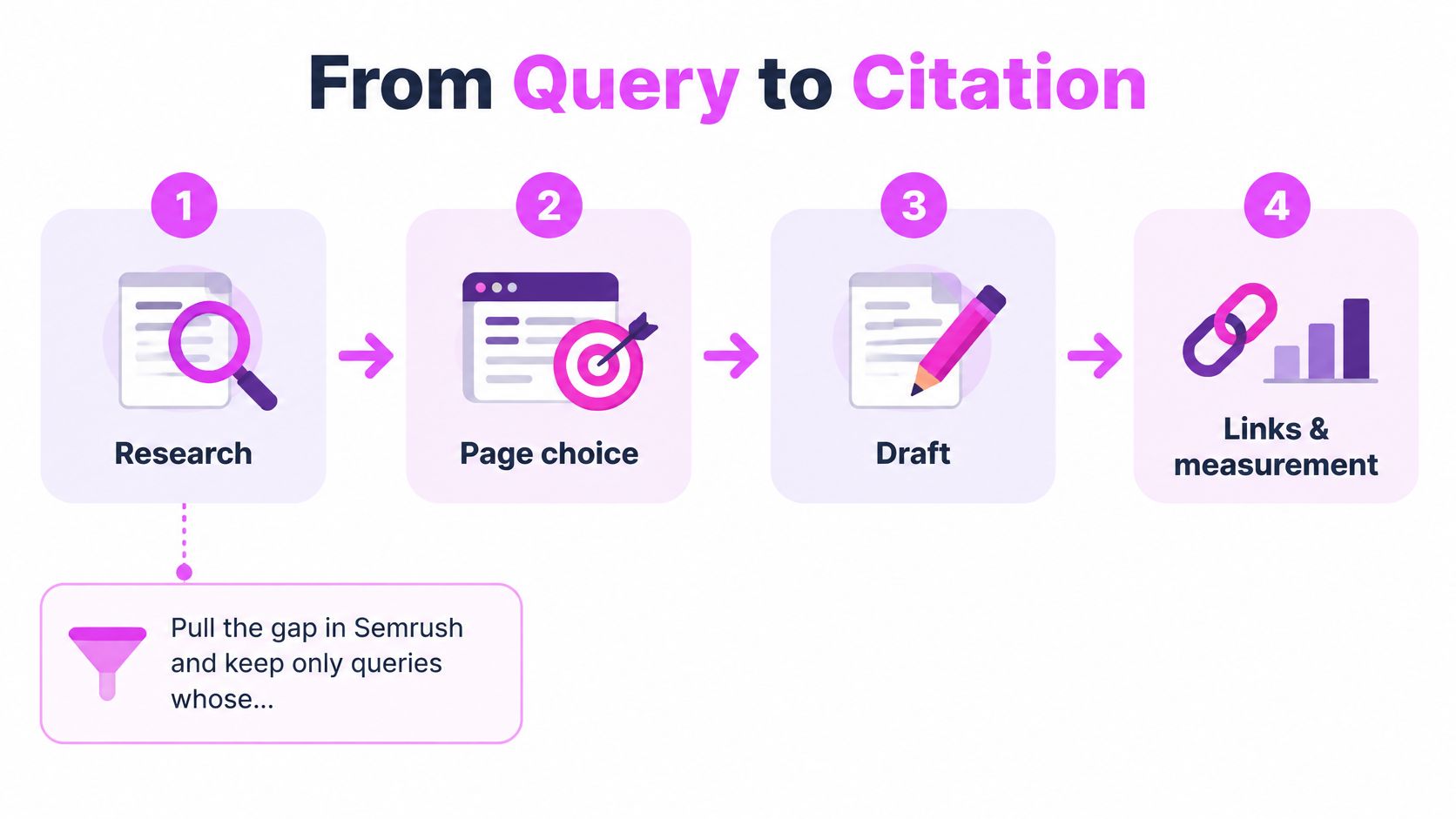
Build the page around a defensible search task
Pull the opportunity gap in Semrush. Keep queries that fit your business and a page type you can credibly produce. Exclude attractive-looking demand when you can't satisfy the underlying task.
Assign the destination URL. Record whether you're creating, updating, consolidating, or redirecting. Map related queries to the same destination only when the SERP supports a shared intent.
Inspect the answer environment. Read People Also Ask, related searches, competing pages, and visible SERP features. Note whether an AI Overview answers the query, which sources it cites, and what useful work remains for someone clicking through.
Write the brief from evidence. Include the reader's decision, necessary entities, supporting sources, and original material you can contribute. Our content brief generator workflow explains how to turn SERP evidence into an actionable outline; our integrated AI creates briefs from actual SERP data and identifies keyword intent with one click.
Optimize without flattening the page
Draft first, then use Surfer for content QA. Resolve missing subtopics, improve headings, and check whether recommendations belong on this page. Keep original examples and useful detail even when they're absent from competing articles.
Add links and measure the chosen URL. Qualify outreach prospects after you know what makes the page worth referencing. Track the destination page's rankings, citations, and clicks rather than relying on a domain-wide average.
I'd reject an optimization pass that makes the page longer without making the reader's task easier. Google's people-first content guidance explicitly emphasizes helpful, reliable content, first-hand expertise, and a satisfying experience.
For a companion walkthrough of the campaign process, use the video below.
Measure citations as a separate outcome
Search Engine Land's reporting on AI Overview coverage puts their presence at 39.4% of U.S. desktop searches in June, compared with 25.8% in July 2025. I wouldn't translate that aggregate coverage into an expected traffic loss for an individual site.
Instead, separate brand mentions from URL citations. Our AI visibility tools show which keywords trigger Google's AI to mention your site or competitors, alongside the precise URLs cited in generated answers.
My citation KPI would be whether the intended page earns a citation for its target query set. Pair that with clicks and conversions: being named, being cited, and receiving a useful visit are different outcomes.
Testing Approach and Recommended KPIs
I wouldn't buy either subscription after testing unrelated pages. Use the same topic cluster, comparable drafts, and a documented baseline so you can distinguish a helpful workflow from an attractive interface.
Before editing, save the draft, target query, intended URL, visible competitors, and SERP snapshot date. Record the current ranking page even when it isn't the URL you want Google to select.
Compare decisions, not dashboard activity
For Surfer, assess whether the recommendations reveal substantive omissions and whether an editor can implement them without damaging readability. Record rejected suggestions too. An optimizer that needs constant editorial reversal may not save your team much time.
For Semrush, assess whether the research leads to a clear page decision. A useful export should let you explain why this query belongs to this URL, what competitors offer, and what your page will do better.
| KPI | What I would record | What it helps decide |
|---|---|---|
| Time to a defensible brief | Research and briefing time, including manual validation | Whether the research tool reduces uncertainty |
| Editorial acceptance | Useful suggestions accepted and irrelevant suggestions rejected | Whether optimization improves the draft efficiently |
| Target-URL movement | Ranking changes against that page's baseline | Whether the intended asset gains visibility |
| Qualified links earned | Live referring domains from validated prospects | Whether outreach produces relevant endorsements |
| AI citation visibility | Cited destination URL for the selected queries | Whether the page appears in generated answers |
| Business response | Relevant clicks, enquiries, or conversions | Whether visibility supports the campaign's purpose |
Keep the comparison interpretable
Don't change the title, page structure, internal links, and outreach strategy simultaneously if you're trying to isolate the value of editorial edits. If the campaign requires simultaneous changes, record them and judge the combined intervention rather than attributing the result to Surfer.
Similarly, don't credit Semrush for finding opportunities that never become briefs. Measure the handoff: can the writer act without repeating the strategist's research?
A useful test ends with a better decision or a better page. More exported rows and more accepted suggestions aren't sufficient.
Recheck at a consistent interval and preserve snapshot dates. I'd keep the subscription that removes a recurring constraint, and cancel the one that adds reporting work without improving decisions.
What the Invoice Looks Like After Add-Ons
Billing mechanics matter more than a headline monthly price. According to Surfer's pricing FAQ, annual billing can reduce costs by up to 17%, or as much as $720, compared with monthly payments; new accounts receive a seven-day Pro trial with AI Visibility, content audit, keyword research, AI writing, and one-click automations.
Cost levers that change the actual price
| Cost lever | Surfer SEO | Semrush |
|---|---|---|
| Annual versus monthly | Up to 17% less, or as much as $720, on annual billing | Modular plans; compare the bundle you'll actually activate |
| Trial | Seven-day Pro with AI Visibility, content audit, keyword research, AI writing, and one-click automations | Confirm current checkout eligibility before budgeting a trial |
| What inflates the bill | Editor queries or projects once several writers are active | AI Search and other toolkits added beside core SEO |
| Cheaper path | Repeated on-page optimization is the whole job | One subscription replaces keyword, link, audit, and tracking tools |
I'd treat this visual as a reminder to itemize the configuration, not as a binding quote for a particular account.
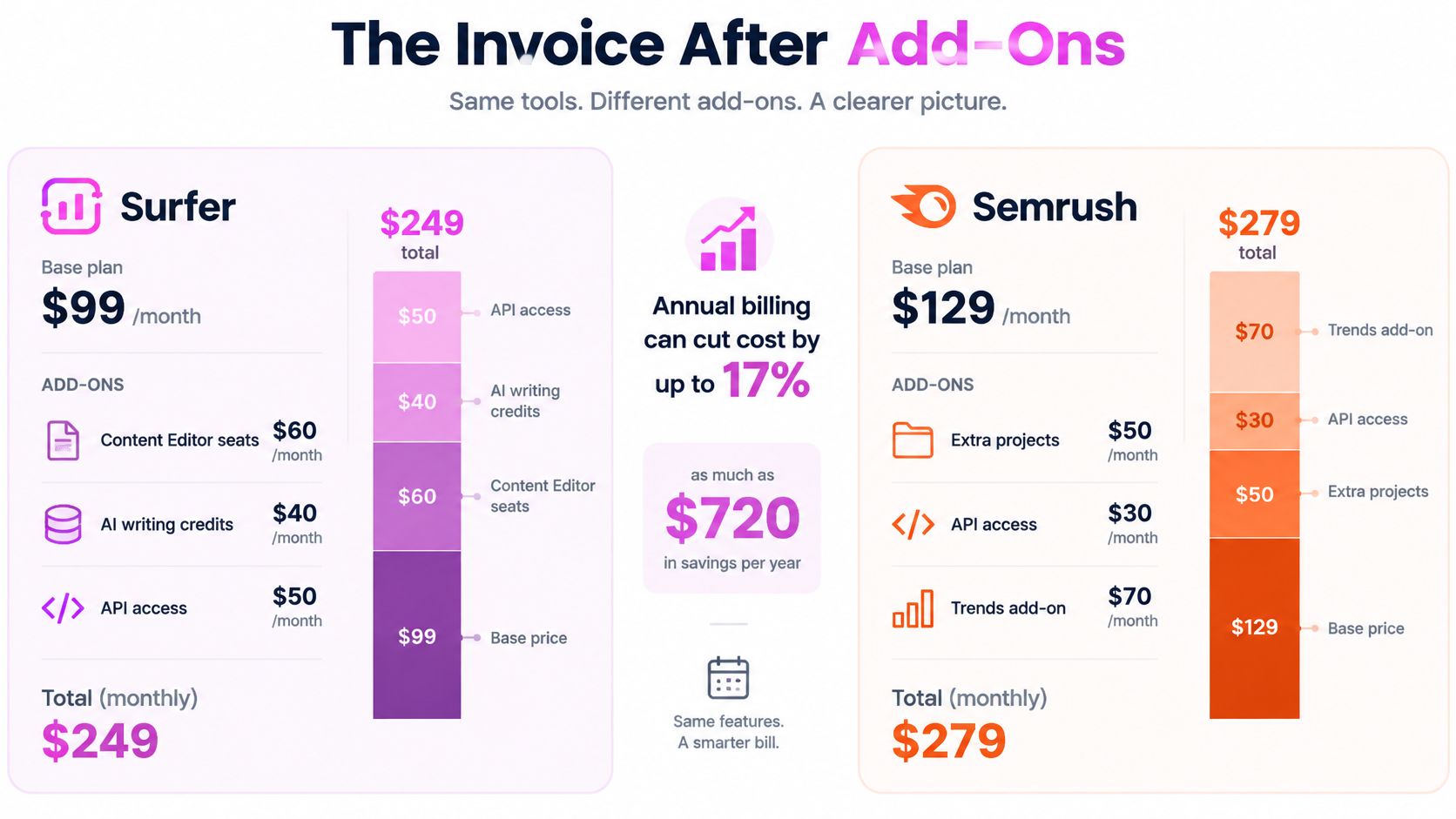
Price the working configuration
For Surfer, count the writers who need access and the briefs, drafts, and refreshes they'll process. Check how editor allowances and projects interact with that workload before committing annually.
For Semrush, start with core SEO requirements: keyword research, competitor analysis, position tracking, and site monitoring. Then itemize AI Search and any specialized toolkits separately instead of assuming everything demonstrated belongs to the base configuration.
Use our SEO tool pricing guide to organize that comparison around workflow coverage. I'd list existing subscriptions alongside the proposed purchase and mark which ones can be retired.
Avoid the second-subscription trap
The expensive mistake is buying the cheaper specialist and later discovering that nobody can confidently choose the next topic. You then retain the editor and add a research platform, even though the original budget assumed a single subscription.
The reverse mistake also matters: buying a broad suite when the team already receives reliable research and only needs drafting support. Consolidation saves money only when you use the replacement capabilities and cancel the displaced tools.
- Capacity: Price the workload you expect to complete, not the maximum allowance.
- Overlap: Remove duplicate research, tracking, or audit subscriptions only after checking their essential functions.
- Return: Calculate cost per useful published or improved page, and assess saved working time separately.
Don't subtract hours from dollars. Convert saved time into an agreed labor cost if you need a financial comparison, and keep that estimate distinct from revenue.
Who Should Own the Login
Give access to the person making the decision, not everyone touching the campaign. I'd assign research ownership and editorial ownership separately, even when the same person handles both.
Match access to the actual bottleneck
Solo blogger. I'd favor Surfer when you already know which existing pages deserve updates and need help improving them. The recommendation flips when your uncertainty is what to publish next, whether a commercial page should own the query, or why several posts compete.
In-house content team. If your SEO lead already supplies keyword research, target URLs, and ranking reports, put the optimizer with editors. Don't make every writer open domain reports to recover information that should already be available.
Agency. I'd put Semrush with the strategist responsible for discovery, competitive diagnosis, technical checks, and reporting. Add an editorial subscription only when the production queue makes repeated optimization a genuine part of delivery.
SaaS growth team. Prioritize the research layer when you need to distinguish product pages, comparison pages, templates, and educational content. The recommendation flips toward editorial tooling when the opportunity map is settled but drafts stall because writers can't translate it into useful coverage.
Diagnose the deceptive writing problem
Say a small team complains that its articles need better optimization. Before recommending an editor, inspect which URLs rank for the target queries and whether Google alternates between similar pages.
If the site has overlapping guides with indistinguishable purposes, cleaner drafts won't solve the ownership problem. I'd consolidate or reposition the pages before adding more content.
That distinction prevents a common category error: treating cannibalization as missing vocabulary. The useful intervention might be a redirect, clearer internal linking, or a narrower page purpose, not another section.
Access rule: Give writers a settled target and a usable brief. Give strategists the evidence needed to settle them.
I wouldn't reject Surfer because it doesn't replace a full research suite, or reject Semrush because writers don't need its whole interface. Judge each login against the decisions its owner must make.
A split stack is justified when both roles have recurring work. If editorial use is sporadic, I'd keep research access and handle content reviews through a documented checklist until the production workload changes.
Buy Surfer Semrush or a Split Stack
I'd make the purchase through a four-way decision, with an explicit condition for each option. Don't pay for theoretical coverage that nobody owns.
Choose the smallest stack that completes the campaign
- Buy Surfer alone when research is already reliable, target URLs are settled, and repeated content optimization is the remaining constraint. Keep a human editor responsible for accepting or rejecting recommendations.
- Buy Semrush alone when you need to discover opportunities, diagnose the site, qualify links, and measure rankings. Use a structured briefing and editorial checklist before adding another subscription.
- Run both when strategists and editors each have a recurring queue, and the handoff is documented. Price the complete configuration rather than assuming the base subscriptions cover it.
- Test a lighter research alternative when suite cost blocks necessary discovery. Compare the same gap, URL-mapping, and SERP-review tasks rather than assuming a smaller tool is automatically sufficient.
If you're comparing third-party access options, Semrush deals on AccountShare can help you understand what's being offered. I'd verify account authorization, privacy, export access, and usage restrictions before entering client domains or credentials; a lower advertised cost doesn't establish suitability.
Migrate without duplicating the work
For a Semrush-only workflow adding Surfer, hand over the selected query, destination URL, snapshot date, intent, and supporting evidence in a brief. Don't ask the writer to repeat discovery inside the editor.
For a Surfer-only workflow with unclear page ownership, add research access before expanding production. Resolve which assets should exist before making them faster to write.
If budget is the blocker, include SemDash in the same research test. Our Starter, Business, and Elite plans each include keyword research, competition analysis, backlink research, AI SEO, and lead generation.
Jared C. describes it as “It's a simple, budget-friendly alternative to the more popular and expensive seo tools”. I'd still make the decision on your own export and briefing task, not a testimonial.
Run a paired evaluation using live drafts and a matching competitor-gap analysis. Keep the setup that gets you to a defensible URL with less rework, then verify that the published page earns useful visibility.
We offer more than 20 SEO research tools, and you can get started for free. Visit SemDash to compare competitor gaps, inspect the pages behind target queries, and check AI citations before deciding whether your next purchase should be a content optimizer or a broader research platform.