


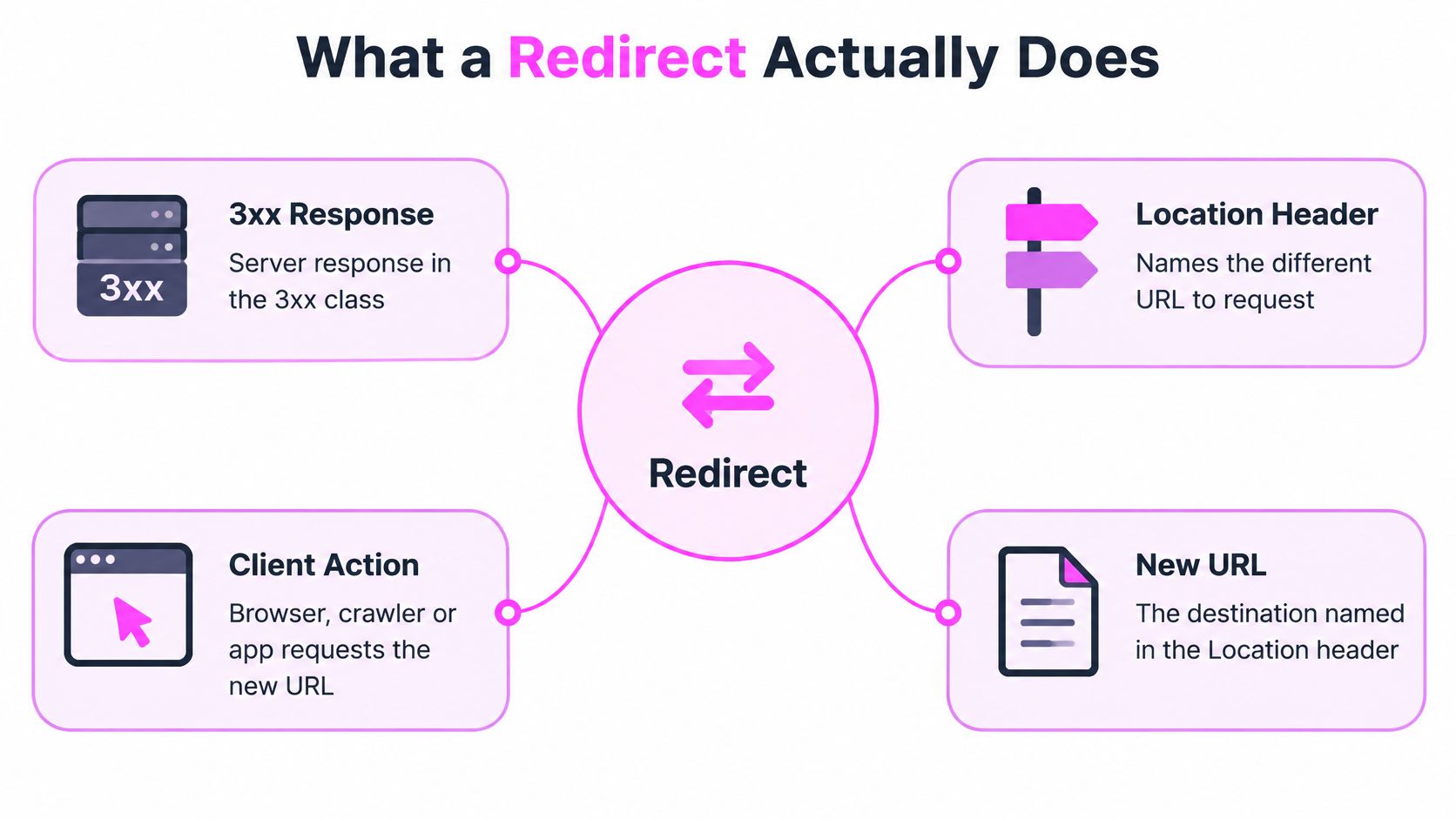
A redirect is a 3xx server response that tells the browser, crawler or app to request a different URL, named in the Location header. If that's all you need to know, why do so many migrations still pick a code that works for SEO and breaks the request behind it? I've learned to treat what is redirect as two decisions, not one. You're choosing permanence for search, and you're choosing what happens to the request method and body. Merge those choices and you'll get cases that look fine in a spreadsheet and fail in production.
Table of Contents
- What a Redirect Actually Does
- 301, 302, 303, 307 and 308 Compared Side by Side
- How a Redirect Travels From Request to Page
- Picking the Right Redirect for an SEO Move
- Keeping the Request Method Intact
- Loops and Client Side Jumps to Avoid
- Test Your Redirects Before Going Live
What a Redirect Actually Does
A redirect moves a request from one URL to another through an HTTP response. The server returns a status in the 3xx class and names the destination in the Location header. A visitor follows the handoff in their browser, while crawlers and apps can follow it too.
Say you request example.com/old-pricing. My server returns a 301 with Location: https://example.com/pricing, so your browser requests the new URL and you land there without noticing the handoff. The HTTP specification defines the behavior of these responses. Check the response itself, not just the page you eventually see.
Why I Reach for One
Redirects handle domain moves, URL restructuring, retired pages and temporary maintenance. They are routing rules, not replacement pages or general fixes for invalid addresses. If an old URL had no content, links or traffic, sending it to an unrelated destination can confuse visitors and crawlers rather than preserve value.
To check what the browser receives, inspect HTTP response headers online and confirm the status code and Location value. Host choice affects the rule too. Settle the www versus non-www decision before writing redirects that depend on which hostname is canonical.
Practical rule: A redirect's status code signals whether the move is temporary or permanent, while the Location header identifies the next URL. Those are separate decisions, and the method-handling rules also depend on the code.
301, 302, 303, 307 and 308 Compared Side by Side
I keep this lookup open when I'm reviewing a redirect map, because the code name alone doesn't tell me enough. I read every row on two axes, permanence and method handling.
| Code | Name | Intended meaning | Method behavior |
|---|---|---|---|
| 301 | Moved Permanently | Resource moved for good | May switch POST to GET |
| 302 | Found | Temporary move, original URL stays | May switch POST to GET |
| 303 | See Other | Fetch the result with GET after a POST | Follow-up request is always GET |
| 307 | Temporary Redirect | Temporary move | Keeps original method and body |
| 308 | Permanent Redirect | Permanent move | Keeps original method and body |
Reading Permanence First
For search, 301 and 308 communicate a durable URL change. 302 and 307 say the original URL remains the intended resource, so I use them when I plan to bring the old address back. The HTTP specification for redirect codes makes that operational split clear, and it's the split Google reads when it decides which URL should represent the content.
I leave 300 and 304 out of this table on purpose. They don't send a visitor to a new page in the way we mean here, and adding them only muddies a working decision.
Reading Method Behavior Second
Method handling is a separate protocol rule. 307 and 308 preserve the original method and request body, while 301 and 302 may convert a non-GET request to GET. That's why I treat 307 and 308 as the safe pair for APIs, uploads and payment callbacks, where replaying with a changed method can alter what my application does.
303 is the deliberate exception. After a form POST, I want the next request to be GET so a results page loads without resubmitting the form. For an ordinary GET page, my default is simpler. I use 301 when the replacement is permanent and 302 when I'll reverse the change.
I don't pick by habit or by what a plugin defaults to. I choose permanent or temporary first, then I choose the code in that pair that keeps the body if the request isn't a simple GET. That order has saved me from approving maps that were right for rankings and wrong for the application.
How a Redirect Travels From Request to Page
I debug redirects by walking one request in order, not by loading the page and eyeballing the result. A browser hides the exchange that matters, so I reconstruct it step by step.
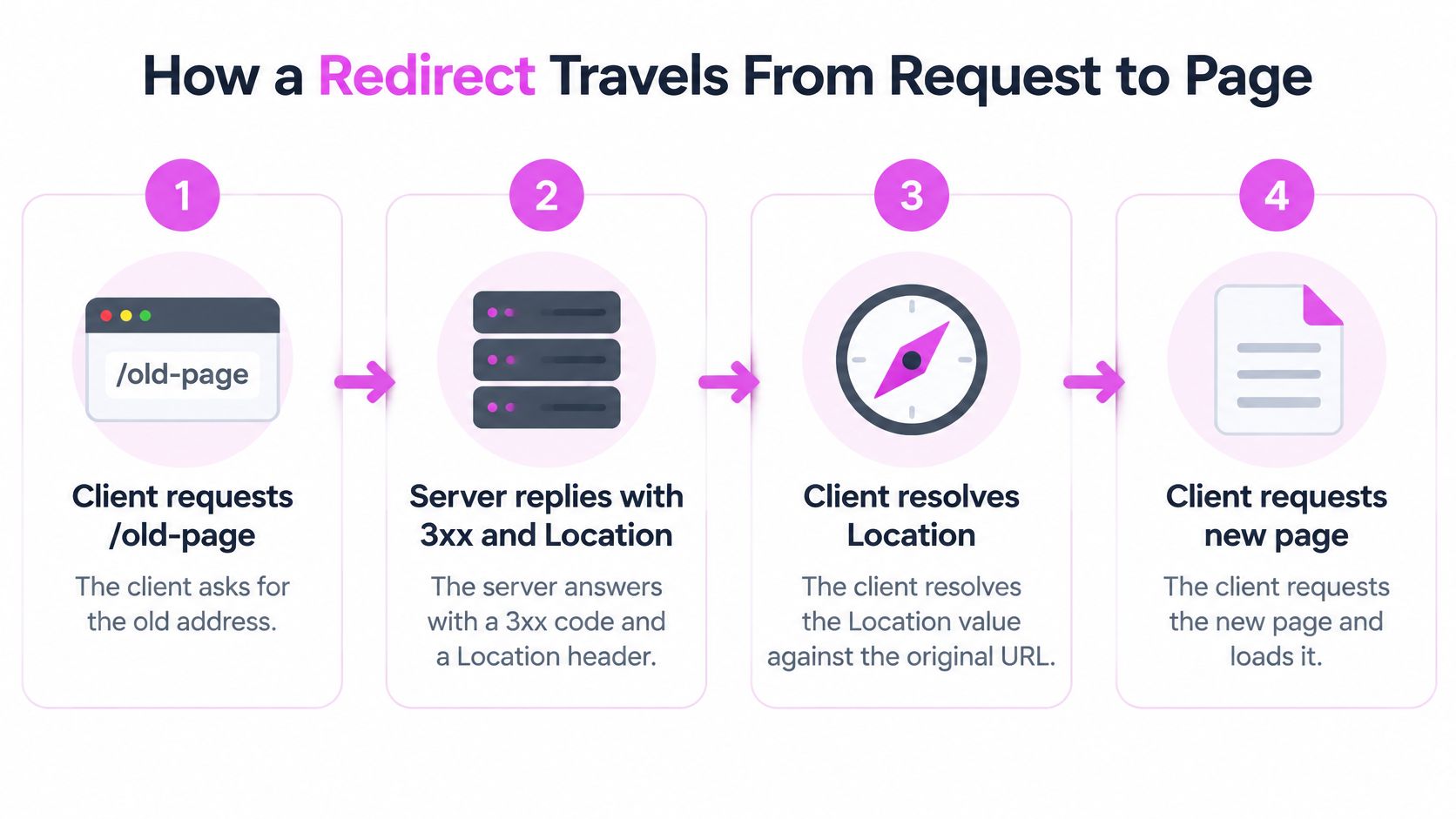
- The client asks for /old-page. That's the URL from a bookmark, a search result, an internal link or a backlink. I start here because the original request target affects how everything after it resolves.
- The server answers with a 3xx code and a Location header. No page body matters at this point. The code carries the permanence and method rules, and the Location value names the next request.
- The client resolves the Location value against the original request. This step bites when the value is relative. A value like pricing instead of /pricing can resolve against the current path and land somewhere I never intended.
- The client sends a new request to the target. It usually does this without asking the user. The HTTP semantics specification notes a user agent may automatically issue that new request even when it doesn't recognize the specific redirect status code.
- The final response arrives, typically a 200. I confirm the final URL, status and content match. A 200 on the wrong template is still a failed redirect in my book.
Where Extra Hops Creep In
I see HTTP to HTTPS rules create two hops where one would do. The client hits HTTP, gets sent to HTTPS on the old host, then gets sent again to the final host and path. Each hop adds latency and another rule that can break, and crawlers have to spend extra requests to reach content they could've reached directly.
My check is curl -I against the old URL. It shows me the status code, the Location value and, when I follow it, the final response. If I can't explain every hop in that output, I don't ship the rule.
A healthy redirect is one hop, the correct status code, and a clean final response at the intended URL.
Picking the Right Redirect for an SEO Move
I decide by the intent of the change, not by habit. Every row in my redirect map falls into one of three buckets, and I force myself to name the bucket before I name a code.
- Permanent move with a clear replacement: I use 301 or 308. Say /services/seo-audits becomes /seo-audit for good. I point the old URL straight at the new one and let the new URL represent that content in search.
- Temporary test or maintenance window: I use 302 or 307 so the original URL keeps its canonical status. When the test ends, I remove the rule and the old URL resumes its place.
- Deleted content with no equivalent: I return 404 or 410 instead of redirecting to the homepage. Sending every retired URL to a generic page creates poor user and indexing signals, and it lies about what happened to the content.
Map to the Closest Destination
I map each old URL to its closest relevant destination, not to a blanket pattern. A retired guide on redirect chains shouldn't land on a services page just because both contain the word redirect. If I'm moving a clinic site to HTTPS, I still check page by page that location, treatment and booking URLs land on their true equivalents, because scheme changes don't excuse sloppy mapping.
I also check which old URLs still attract links before I retire them. We identify broken backlinks pointing to your site so they can be fixed or redirected, and I'd rather recover that equity with a relevant target than discover the loss months later.
Stop Chains Before They Stack
Chains build. An old URL goes through an HTTP to HTTPS rule, then a non-www rule, then a trailing slash rule, then finally reaches the page. I collapse that into one direct hop to the final address.
I update internal links and canonical tags at the same time, so my own site stops pointing at old URLs. Leaving internal links on redirected paths is how you end up with competing signals, similar to the cleanup I do when I fix keyword cannibalization and consolidate pages that fight each other. My final test for every row is plain. Does the destination match what the old page was for?
Keeping the Request Method Intact
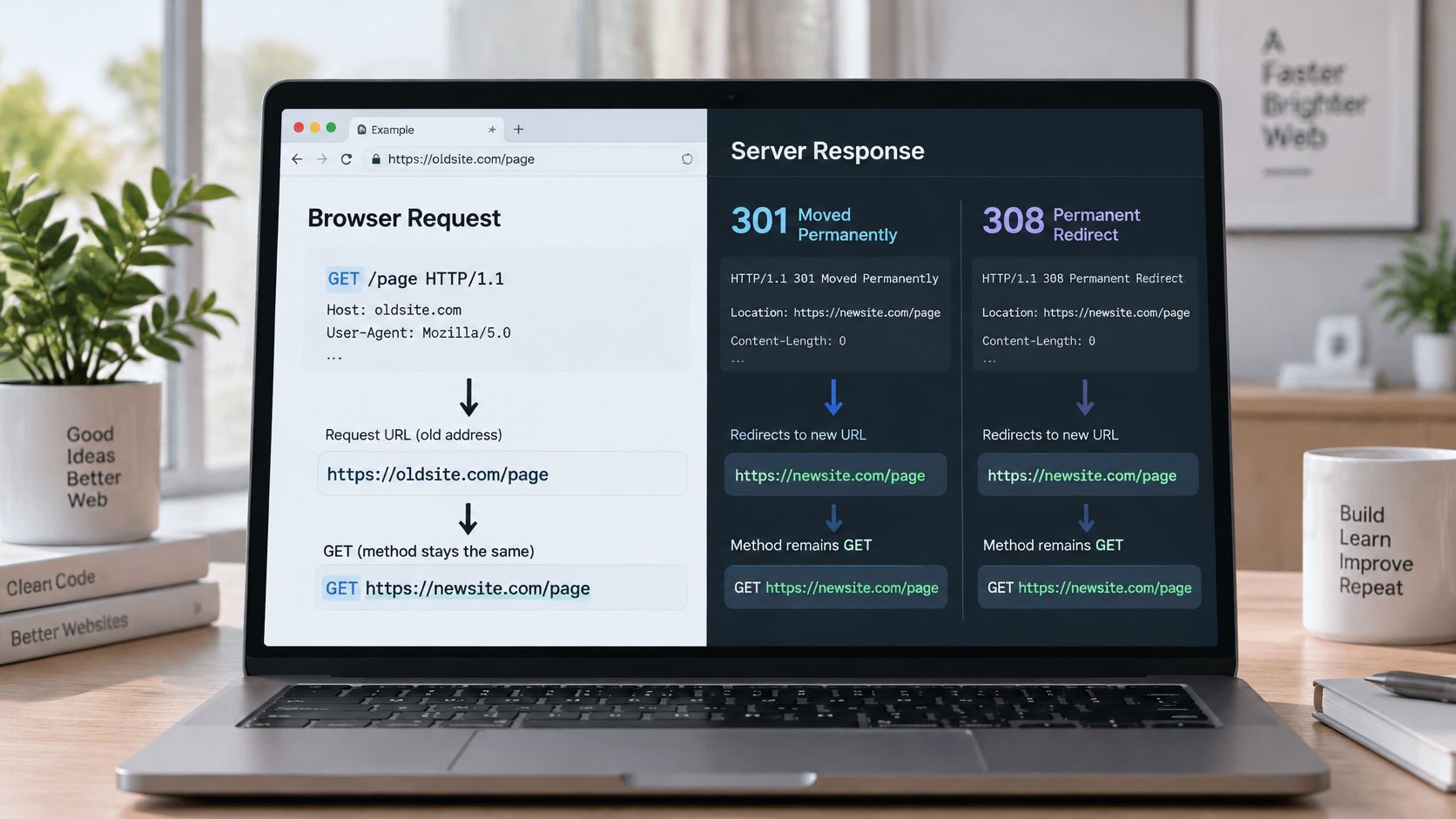
Here's where the two-decision model earns its keep. The image below is the comparison I wish more migration plans included before anyone touched an endpoint.
| Scenario | Code to use | Why it fits |
|---|---|---|
| Permanent move of a page browsed with GET | 301 or 308 | Both signal a durable move; 301 is the familiar default |
| Form POST that should show a results page | 303 | Forces the next request to GET so the result loads cleanly |
| Temporary move of a POST endpoint | 307 | Method and body replay unchanged while the original URL stays canonical |
| Permanent move of a POST or API endpoint | 308 | Method and body preserved and marked permanent |
| Temporary GET page during maintenance | 302 | Simple, widely supported, and keeps the original URL canonical |
The Lost POST Body
Walk through a payment callback with me. Your provider POSTs a payload to the old endpoint, my server replies 302, and the client reissues the request as GET. Your handler sees an empty GET, finds no payment data, and the order never reconciles. Nothing in a browser test would've shown you that failure.
The MDN guide to HTTP redirections supports the framework I use. Use 303 after a successful POST when the next page should be retrieved with GET, 307 for a temporary destination when the method must stay unchanged, and 308 for a permanent move when method and body preservation are required.
The short walkthrough below is worth watching if you want to see that method behavior demonstrated request by request.
Before release, I POST a known payload to the old endpoint and confirm the destination logs the same method and body. Google treats 301 and 308 as permanent, but only 308 keeps a non-GET request intact, and I don't let an SEO default override that protocol fact.
Loops and Client Side Jumps to Avoid
A 200 at the end of a jump does not make the jump safe. Timing, a predictable path, and preserved user state decide whether someone can finish the task.
A loop is the blunt failure. Two rules point at each other, often an HTTPS rule fighting a CDN or host rule. The browser stops with an error instead of a page. Crawlers burn requests and never reach a document.
Client-side jumps are more likely to fail without warning. A meta refresh or a JavaScript location change loads two pages in quick succession. The W3C technique for server side redirects warns that automatic client-side redirects can confuse users and may make a page inaccessible to some screen-reader users. It recommends a server-side 3xx response with a Location header instead.
That server response is where two separate decisions still have to be made, and a script never makes them. Permanence is one choice: 301 or 308 if the move should stick, 302 or 307 if it should not. Method preservation is the other: 307 or 308 if the original method and body must survive, 302 or 303 if the follow-up should be a GET. A meta refresh or location change skips both. The browser just loads another URL after the first page has already started.
An unexpected refresh mid-task is worse than a slow hop. It interrupts reading or typing and can wipe form input or keyboard focus.
Lost state sits in the same class of bug. Dropped authentication, or a landing that dumps the reader at the top of a new template, still returns a page. The person arrived. The work did not.
I use JavaScript only when a server redirect is impossible. Check the live path with the keyboard, a screen reader when one is available, and a half-filled form. If focus or input does not survive, fix the implementation. The target is one immediate server-side hop to the final URL, fired before anyone starts work on the old page.
Test Your Redirects Before Going Live
I run this checklist on staging before any rule reaches production.
- Request each old URL with curl -I. Confirm the status is the code you chose, not a generic 302 from the platform.
- Read the Location header. Confirm it's the exact final URL, including scheme and host.
- Follow the chain and count hops. One hop is the target. Two means a rule is still stacking.
- Send a test POST to body-accepting endpoints. Confirm the same method and body arrive at the destination.
- Load it in a browser. Check the address bar, page content and keyboard focus.
- Crawl the full old-URL list. Confirm no 404s and no loops remain.
- Watch after launch. I check Search Console coverage and server logs for rising 404s, and I confirm traffic lands on destination pages. We show the specific page Google sends traffic to for every keyword, which makes that landing check direct, and we offer free live calls where you can speak to an SEO specialist if a pattern looks off.
I ship the map only when every row passes steps 1 through 6. If one row fails, I hold that row, not the whole launch.
Before your next migration, use SemDash to find the broken backlinks and exact landing pages your redirect map has to protect, then build each rule around real traffic instead of guesses. You'll retire old URLs with a destination that matches their links, rankings and intent, and you'll catch the rows that deserve a 404 instead of a forced redirect.