%20(1)-B86R08ZzwhPzS6UZbG3mSxRWPCwGwn.png)


Automated Link Recovery: How to Detect and Fix Dead Links

Automated link recovery combines three automated steps, detecting broken links through scheduled crawls, generating fixes like redirects or archive replacements, and monitoring the results so your site stops bleeding SEO value from dead links. Most teams should automate detection and low-risk fixes but keep manual review for cornerstone pages and high-value referring domains.
TL;DR:
- Automated link recovery tools typically detect and fix broken links through scheduled crawls, but manual review remains essential for high-value or cornerstone pages.
- The best detection methods use headless rendering to identify links injected by JavaScript and analyze HTTP status, redirect chains, soft 404s, and Google index status for accurate results.
- Fixes rely on redirect configurations, fuzzy path matching, Wayback Machine snapshots, and AI suggestions, with manual review recommended especially for AI-generated replacements.
- Building a safe workflow involves setting appropriate scan frequencies, applying delay thresholds before fixing, and testing redirects in staging environments to prevent ranking drops.
- Most teams should treat automation as a prioritization and triage system, setting high confidence thresholds and revisiting archive replacements to ensure ongoing link integrity and SEO value.
What Is Automated Link Recovery and Which Tools Fit Your Site?
The tools in this space break into four families, and picking the wrong one wastes more time than doing nothing. Each trades speed against editorial control differently, and the right choice depends on your site’s size and how much risk you can tolerate on high-traffic pages.
- SaaS monitors (like backlink monitoring platforms) run continuous checks on donor pages and alert you when a link disappears or gets a
nofollowtag, ideal for agencies tracking client portfolios. - CMS plugins such as Archivarix Broken Links Recovery scan WordPress sites directly, offering automatic Wayback replacements alongside a manual mode and WP-CLI commands for bulk operations.
- CLI and autofix tools like site-autofix crawl with a headless browser and generate ready-to-deploy redirect configs, best for developers comfortable working in a terminal.
- Archive replacers swap dead links for Wayback Machine snapshots automatically, useful for content-heavy sites where sourcing a live replacement isn’t realistic.
A managed SaaS wins when you need alerting across dozens of domains without touching code. A plugin or CLI wins when you want the fix applied inside your own deployment pipeline.
How Does Automated Detection Find Broken Links?
Detection starts with crawling, but not all crawls see the same web. Static crawlers fetch raw HTML and miss links injected by JavaScript, which is why modern tools use headless rendering instead. Site-autofix, for example, crawls with Playwright so it sees the DOM the way a browser actually renders it, catching links that a simple HTTP fetch would never find.
Beyond rendering, solid detection layers in several checks:
- HTTP status verification flags outright 4xx and 5xx responses.
- Redirect chain analysis catches links that technically resolve but bounce through three or four hops, quietly diluting equity along the way.
- Soft 404 detection identifies pages that return a
200status but show “page not found” content, a failure mode plain status checks miss entirely. - Search Console index cross-checks show whether Google has already dropped a target page, which helps you triage: a link to a page Google still indexes is worth fixing before one to a page that vanished from the index months ago.
The urgency here is real. A significant portion of built links disappear within a year, and the faster you catch the drop, the better your odds of recovering the referring page instead of losing it for good.
What Auto-Fix Methods Actually Repair Broken Links?
Once detection flags a dead link, the fix engine decides what replaces it. Four approaches dominate, each with a different risk profile.
- Redirect generation. The tool maps the old path to a live equivalent and outputs a platform-ready config. Site-autofix produces redirect rules formatted for Next.js, Netlify, and nginx, so engineers drop the output straight into a deploy pipeline instead of hand-writing rewrite rules.
- Fuzzy path matching. The system scores candidate replacement URLs using weighted path-segment overlap combined with Levenshtein edit distance, then only auto-applies a fix above a set confidence threshold, often above 90% for canonical or high-traffic pages.
- Wayback replacements. Tools like Fixie substitute a Wayback Machine snapshot for a dead link and open a pull request rather than publishing directly, giving a human the last word before the change goes live.
- AI-suggested replacements. A model proposes a contextually relevant target page when no exact match exists, useful for orphaned content but riskier because it can misjudge intent on nuanced topics.
Pro Tip: Never let an AI-suggested replacement auto-publish on a page that drives revenue or ranks for a competitive term. Route those through a draft or pull request, the same pattern Fixie uses, so a real editor confirms the match before it goes live.
Academic work on this problem confirms the core idea works. Information-retrieval systems designed to recommend replacement links using contextual signals can surface reasonable candidates automatically, but every implementation still needs a confidence gate before it acts unsupervised.
How Do You Build a Safe Link Recovery Workflow?
A workflow that scans constantly but reviews nothing is just as dangerous as one that reviews everything and never scans. Build it in layers.
- Set scan cadence by portfolio size. Small sites (under 500 pages) can run a weekly crawl. Larger portfolios benefit from daily incremental scans focused on pages that changed or lost traffic recently.
- Apply delay thresholds before acting. A link that returns a 404 today might be a temporary server hiccup. Waiting a full day, or a week for lower-priority pages before triggering a fix avoids reacting to outages that resolve on their own.
- Route alerts to the right channel. Connect scan results to Slack, email, or your issue tracker so failures land where your team already works, not in a dashboard nobody checks.
- Test redirect configs before merging. Run generated Next.js, Netlify, or nginx rules through a staging deploy first, and keep the previous config accessible for instant rollback.
Integrations matter as much as the scan itself:
- Search Console feeds tell you whether a target page is still indexed before you route traffic to it.
- CI pipelines let redirect configs go through the same review process as code.
- Issue trackers give broken-link fixes a paper trail alongside every other engineering task.
Where Does Link Automation Go Wrong?
Automation fails quietly, and the damage usually shows up weeks later as a ranking drop nobody can explain. A few patterns cause most of the trouble.
- Auto-replacing a link on cornerstone content with a Wayback snapshot can swap in outdated pricing, discontinued products, or a stance the business no longer holds. Archivarix’s own documentation recommends manual mode specifically for these pages.
- Firing an immediate fix on an external 404 risks acting on a server that’s simply down for maintenance. A delay setting of a day or more filters out most false positives.
- Skipping logs means you can’t explain to a client, or your future self, why a URL changed six months ago.
- Treating a purchased or earned backlink the same as an internal broken link is a mistake. A redirect doesn’t recover a link a partner site removed on purpose; only outreach with a recovery template gets that relationship, and that link, back.
Pro Tip: Keep an automation audit table with the original URL, failure type, suggested fix, confidence score, reviewer, and rollback command. It turns a five-minute troubleshooting session into a thirty-second lookup.
How Semdash Supports Automated Link Recovery
That prioritization work connects directly to a few other pieces:
- Link reclamation guidance for deciding which lost links are worth an outreach email versus a quiet redirect.
- Backlink indexing checks that confirm whether a target page is still in Google’s index before you route link equity toward it.
- Anchor text audit methods for catching links worth protecting before they break in the first place.
Together, these turn recovery from a reactive scramble into a ranked, ongoing process.
What Most Teams Get Backward About Link Automation
Most advice on this topic treats automation as an all-or-nothing switch: either you let a tool run wild across your entire site, or you review every single broken link by hand. Neither extreme holds up. The sites that actually preserve their link equity treat automation as a triage system, not a fix-everything machine.
The confidence threshold matters more than the tool you pick. A fuzzy-match engine set to auto-apply anything above 60% will happily redirect a product page to the wrong category. Set that bar above 90% and reserve everything below it for a human, and the same tool becomes trustworthy. That single number does more for your rankings than switching vendors ever will.
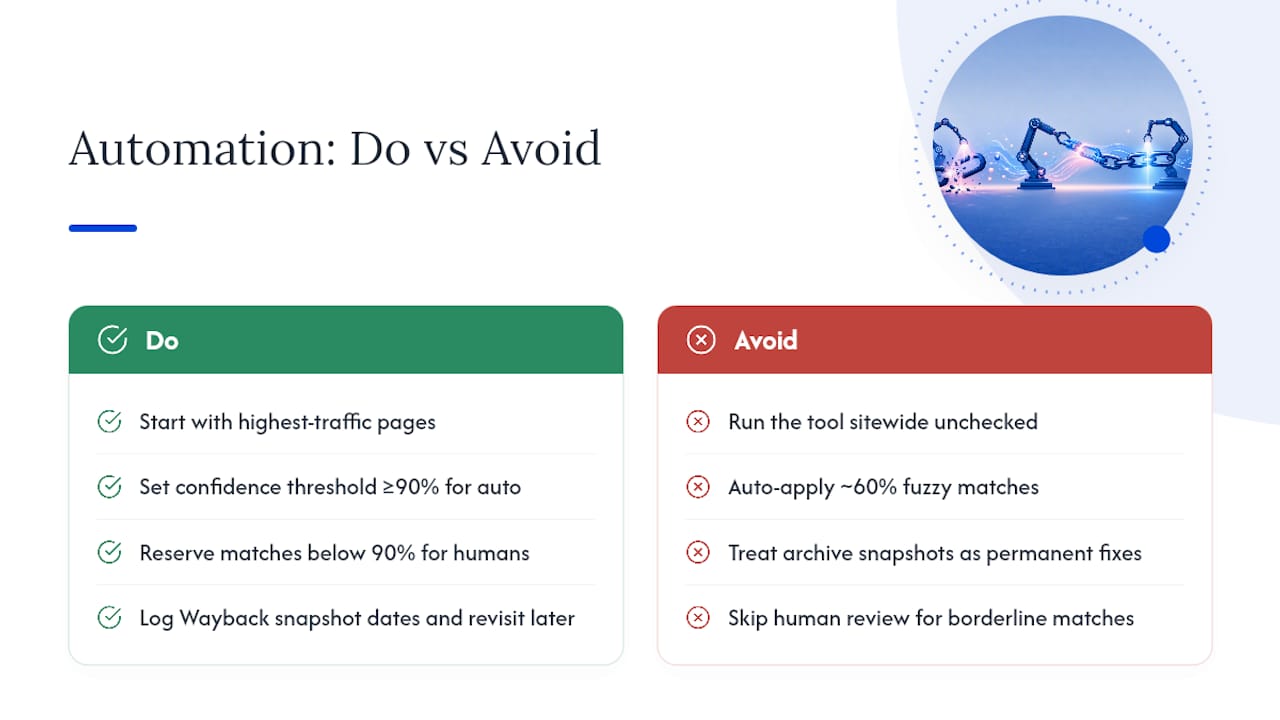
The other overlooked piece is treating archive replacements as a permanent fix rather than a placeholder. A Wayback snapshot from three years ago buys you time; it doesn’t replace the work of finding a genuinely current source. Teams that log the snapshot date and revisit it later outperform teams that consider the job done once the redirect goes live.
Start with your highest-traffic pages, set the delay thresholds conservatively, and let automation earn trust on your low-stakes content first.
— Leonid
Put Your Backlink Recovery on Autopilot With Semdash
Chasing broken links manually across a growing backlink profile eats hours you don’t have, especially when you’re also trying to figure out which links are worth saving in the first place. Semdash solves the prioritization problem before you touch a single redirect: its backlink research tool shows you exactly which referring domains carry real authority, so your recovery effort goes toward links that move rankings instead of ones that don’t.
Pair that with competitor backlink gap analysis to spot recovery opportunities you’d otherwise miss entirely, sites linking to competitors that could just as easily link to you. Import your backlink list into Semdash and run your first scan to see where you stand today. From there, the fix decisions get a lot easier to make.
Sources
- Automatic Recovery of Broken Links Using Information … (ACM)
- eliBenven/site-autofix
- Fixie (GitHub)
- Wordpress
FAQ
How Can I Restore an Old Link?
Check whether the original page still exists at a new URL, and if not, look it up on the Wayback Machine and either link to the archived snapshot or recreate the content and redirect to it. Tools like site-autofix automate this by generating a redirect config once a suitable match is found.
What Is RecoveryLink?
“RecoveryLink” isn’t a standard, widely recognized product name in this space; it’s more commonly used loosely to describe the broader category of automated link recovery and backlink monitoring tools. Semdash’s backlink research tool covers the underlying discovery and monitoring work that category name refers to.
How Do I Retrieve a Link That’s No Longer Working?
Run a crawl to confirm the failure type (404, redirect loop, or soft 404), then check the Wayback Machine or your CMS’s revision history for the original destination before deciding between a redirect, a content update, or outreach to the linking site.
How Do You Recover an Expired Link?
For internal links, a fuzzy-match tool can usually find the closest live equivalent page and generate a redirect automatically. For external links, expired usually means the domain or page is gone for good, in which case a Wayback Machine snapshot or a manual outreach email to the site owner is the more reliable path.
How Often Should I Scan for Broken Links?
Smaller sites under 500 pages hold up fine with a weekly crawl, while larger or fast-changing portfolios benefit from daily incremental scans focused on recently updated pages.