%20(1)-B86R08ZzwhPzS6UZbG3mSxRWPCwGwn.png)


Link Reclamation: The 2026 Playbook for Recovering Lost Backlinks

Link reclamation is the practice of finding backlinks your site has lost and getting that link value back. The verdict, up front: it still works, and it delivers some of the highest ROI in the entire link building toolkit because you’re not creating anything new, you’re recovering value you already earned. Your fastest win costs almost nothing. Check your site for internal 404s and broken redirect chains, then fix each one with a proper 301 or a page restore.
Technical fixes often recover 40 to 60 percent of reclaimed link value with zero outreach involved — no emails, no pitching, no waiting on someone else’s editorial calendar.
Timelines vary by task. A 301 redirect typically starts passing link equity again within 1 to 3 weeks. Outreach for removed links or unlinked mentions runs longer, usually 2 to 6 weeks before a link goes live, with ranking movement showing up weeks or months after that.
Key Takeaways
Link reclamation recovers existing link equity faster and cheaper than new link building, with technical fixes delivering measurable results within weeks.
| Point | Details |
|---|---|
| Fix technical losses first | 301 redirects and page restores recover 40 to 60 percent of reclaimed value with no outreach needed. |
| Sort by recovery odds | Your own 404s and broken redirect chains recover easily; dead referring domains rarely do. |
| Score before you email | Weight domain authority, placement, and relevance to avoid wasting outreach hours on low-value targets. |
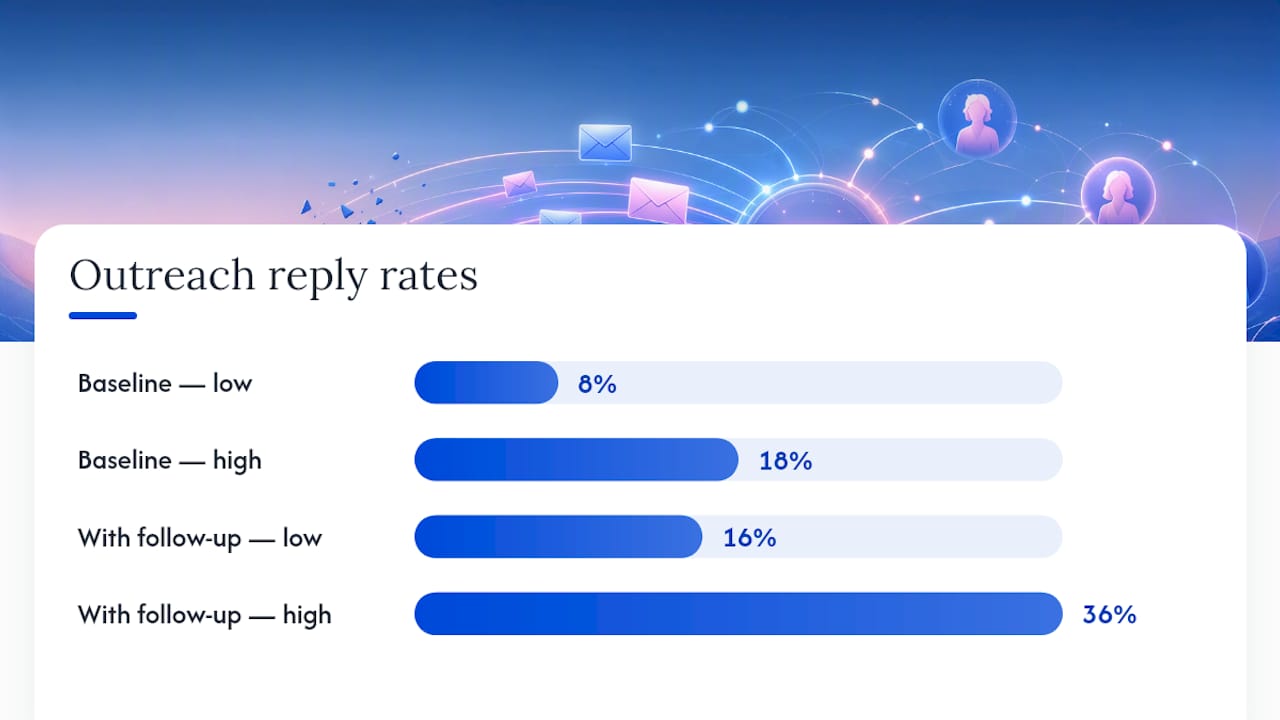
| Expect real but gradual timelines | Technical fixes show impact in 1 to 3 weeks; outreach conversions land in 8 to 18 percent of cases over 2 to 6 weeks. |
| Automate discovery with Semdash | Semdash’s Backlink Research tool and brand mention tracking surface lost links and unlinked mentions for quarterly review. |
What Is Link Reclamation and Why It Matters Now
Link reclamation covers a specific slice of link building: recovering value from links you already had, rather than earning brand-new ones. That distinction matters for how you allocate time. New link building means pitching journalists, publishing linkable assets, and running digital PR campaigns to earn placements you never had. Reclamation means going back through your existing backlink profile, finding what broke, and fixing it. Claiming unlinked mentions sits in a gray zone between the two: someone already wrote about your brand, they just forgot the link.
The economics favor reclamation heavily. Cold outreach for a fresh link often means competing against dozens of other pitches for the same journalist’s attention. A reclamation email, by contrast, references a link that already existed. You’re not asking for a favor, you’re pointing out a broken reference the publisher probably wants fixed too.
There’s a newer reason to prioritize this work: entity signals for AI-driven search. Large language models and AI Overviews lean on consistent brand mentions and citation patterns to build confidence in what a brand actually is and does. Reclaimed links and cleaned-up mentions reinforce those signals the same way they always reinforced traditional rankings, just with a wider audience of algorithms reading them now.
What you get back, concretely:
- Restored referring domain authority that was already baked into your profile
- Referral traffic from pages that once sent you real visitors
- Ranking recovery on pages that lost link equity when a source page went dark
- Cleaner brand visibility signals for AI search tools tracking entity consistency
Types of Lost Links and Your Real Odds of Recovery
Not every lost link deserves the same amount of effort. Before you write a single outreach email, sort what you’ve found into categories, because the recovery odds swing wildly between them.
- Type A: Your own page returns a 404. Someone linked to a page on your site that got deleted, moved, or renamed. Recovery odds are very high, since you control the fix entirely. A 301 or a restore solves it in minutes.
- Type B: The link was removed from a live page. The referring page still exists, but the link is gone, maybe cut during a content refresh. Recovery odds are medium. This needs outreach, and success depends on whether the removal was intentional or accidental.
- Type C: The referring page or domain is gone. The site closed, migrated, or the specific article got pulled entirely. Recovery odds are low. There’s often nobody left to email.
- Type D: Broken redirect chains. The link technically resolves, but it hops through two or three redirects before landing, or lands on a 404 at the end of the chain. Recovery odds are high, because fixing your own redirect logic solves it without any outreach.
- Type E: Unlinked brand mentions. The publisher named your brand or cited your content but never linked it. This isn’t a “lost” link technically, but it behaves like one, and it’s often the best use of your outreach hours.
Pro Tip: Run Type A and Type D fixes first, every time. They cost you zero outreach hours and recover the largest share of value fastest. Save your outreach energy for Type B and Type E, where a human actually has to say yes.
How Do You Find Your Lost Links and Mentions?
Finding lost links is a layered process. Start free, then bring in tools that surface what manual checks miss.
- Start with Google Search Console. It’s the best free starting point for spotting internal 404s and identifying your top linked pages, so you know which URLs matter most if they break.
- Run a backlink audit with a dedicated research tool. A platform like Semdash’s Backlink Research tool pulls your full referring domain list and flags links marked as lost, along with the reason (removed, 404, redirect issue). Pair this with brand monitoring to catch mentions that never carried a link in the first place.
- Try reverse image search for visual attribution. If you distribute original graphics, charts, or photos, reverse image search turns up sites using your visual assets, some of which credit you with a mention but no link.
- Validate manually before you email anyone. Visit the referring page. Inspect the source code. Confirm the anchor text, confirm where the link is supposed to point, and confirm the mention is actually about your brand and not a coincidental name match.
Once discovery is running, set a check cadence instead of doing this once and forgetting it:
- Weekly: internal 404 monitoring through Search Console
- Quarterly: full backlink and mention audit through your research tool
- Immediately after any site migration or major URL restructuring
Which Lost Links Should You Chase First?
Not every reclaimable link deserves equal attention, and treating them equally is how outreach hours get wasted on low-value targets. Score each opportunity across five dimensions before you draft a single email.
- Domain authority (30%): How much weight does the referring domain actually carry?
- Placement (25%): Was the link in the body content, or buried in a footer or sidebar?
- Topical relevance (20%): Does the referring page’s subject match your site’s niche?
- Traffic potential (15%): Did that page historically send you real visitors, based on your analytics history?
- Effort required (10%): Do you have a contact already, or are you starting from zero?
Set a minimum threshold before you pursue anything. If a lost link scores low on authority and placement, and it’s a Type C with no live contact, skip it. That time is better spent on a Type A fix.
Pull the raw numbers from Semdash’s referring domain data and cross-reference against Search Console’s historical top-pages report to see which lost links used to drive real traffic, not just theoretical authority. A shortlist of ten targets usually emerges fast once you filter for high authority plus body placement plus a live domain. Those ten deserve personalized outreach. Everything below the threshold goes into a lower-priority batch you revisit quarterly, if ever.

Technical Fixes You Can Run Today
This is the highest-leverage section in the entire playbook, because none of it requires convincing anyone else to do anything.
- Map every lost URL to its current equivalent. For each 404 or broken link, identify where that content lives now, or what page best replaces it. Never redirect everything to your homepage. A generic redirect signals low relevance to both users and crawlers, and it recovers a fraction of the equity a targeted 301 would.
- Create targeted 301 redirects. Point the old URL directly at the page that most closely matches the original content’s intent.
- Restore deleted pages where it makes sense. If a page got removed during a redesign but still holds meaningful backlinks, rebuilding it at the original slug is often faster than trying to redirect its value elsewhere.
- Collapse multi-hop redirect chains. A link that resolves through three redirects before landing is losing signal at every hop. Clean it down to a single redirect wherever you find one.
- Crawl your site and request re-indexing. After fixes go live, run a crawl to confirm every redirect resolves correctly, then submit the affected URLs for re-crawling in Search Console.
Pro Tip: Keep a running spreadsheet of every URL you redirect, the date, and the destination. When a ranking moves three weeks later, you’ll want to know exactly which fix caused it, especially if you’re running several changes in the same week.
Verification matters as much as the fix itself. A redirect that returns a soft 404, or one that a crawler can’t follow because of a JavaScript redirect instead of a server-side 301, recovers nothing. Check status codes directly, not just visually in a browser.
The Outreach Playbook: Templates and Follow-Up Cadence
Outreach only makes sense for the links that survived your prioritization filter. For everything else, keep the ask short, specific, and low-friction.
- Removed link template: Reference the exact page and the exact context where your link used to appear, explain what changed on your end (if anything), and ask if they’d consider restoring it because it still supports the same point in their content.
- Broken link (pointing to your 404) template: Tell them the link is currently dead, give them the corrected URL, and thank them for having linked to you at all. This one lands well because you’re doing them a favor by flagging a broken user experience on their own site.
- Unlinked mention template: Thank them for mentioning your brand or content, then ask, politely and briefly, if they’d be willing to add a link for readers who want to find the source directly.
Before sending any of these, run through a short personalization checklist: confirm the original anchor text, understand the surrounding context, and be ready to explain in one sentence why the link genuinely helps their readers, not just you.
Finding the right contact takes some digging. Start with the article’s byline, check the site’s editorial or contact page for a content manager, and fall back to social platforms when email addresses are impossible to find.
Reply rates respond directly to how targeted the list is. Outreach-based reclamation typically converts at 8 to 18 percent, with the higher end reserved for well-filtered, warm lists rather than mass blasts. Following up roughly doubles your response rate compared to a single unanswered email, so plan for at least one polite follow-up after 7 to 10 days.
Keep the ethics simple: never offer payment for a link, keep the ask to one URL, and don’t insist on a dofollow attribute if the publisher’s policy says otherwise. Pushing on that point kills goodwill fast.
How Do You Measure Success and Calculate ROI?
Track four numbers: links recovered, referral traffic from those links, ranking movement on affected pages, and any downstream conversions you can attribute. A fifth number worth calculating is estimated link replacement cost, what you’d have paid a link building campaign to earn an equivalent placement from scratch.
Technical fixes show impact fast, usually within 1 to 3 weeks. Outreach-based recoveries take longer: 2 to 6 weeks for the link to actually go live, then several more weeks for rankings to reflect the recovered equity.
| Metric | What to Track |
|---|---|
| Links recovered | Total count by type (technical fix vs. outreach) each quarter |
| Referral traffic | Sessions from recovered URLs, compared against their historical baseline |
| Ranking movement | Position changes on pages that regained link equity |
| Estimated replacement value | What an equivalent link would cost through a paid campaign or digital PR push |
Report on a quarterly cadence, aligned with your broader link audit schedule. Pull the raw data from Search Console for internal fixes and a backlink research dashboard for outreach-driven recoveries, so you’re comparing consistent numbers period over period.
Building a Tool Stack for Ongoing Reclamation
Reclamation stops being a one-time project once you treat it as a maintenance task, and that requires the right tools running in the background instead of manual checks every time.
You need coverage across a few categories: backlink research with lost-link alerts, brand monitoring for unlinked mentions, a crawler for redirect verification, reverse image search for visual attribution, and something to track outreach threads so nothing falls through the cracks.
Semdash’s Backlink Research tool covers the first category directly, surfacing lost links with labeled reasons so you’re not guessing why a link disappeared. Its brand mention tracking catches the unlinked-mention opportunities that pure backlink tools miss entirely, and its AI Overview visibility tracking shows whether your reclaimed links and mentions are actually feeding into how AI search tools describe your brand.
- Set alerts for newly lost links instead of waiting for a quarterly audit to catch them
- Filter mention alerts to exclude noise (false brand-name matches, unrelated contexts)
- Schedule automated crawls after any site change to catch new 404s before they compound
Pro Tip: Budget roughly two hours a quarter for the full workflow once alerts are running: thirty minutes to review flagged lost links, thirty minutes to sort unlinked mentions, and an hour for technical fixes and outreach drafting. The heavy lifting only happens once, during setup.
Preventing the Next Round of Link Loss
Most link loss is self-inflicted, caused by site migrations, redesigns, or careless editorial cleanup rather than external decay. A short governance policy prevents most of it.
- Never delete a linked URL without a mapped redirect. Before removing or renaming any page, check whether it holds backlinks, and create the 301 before the old URL goes dark, not after.
- Run a backlink inventory before any migration. Export your full backlink profile beforehand, then verify every high-value URL redirects correctly once the migration is live.
- Set editorial rules for body-copy links. When updating old posts, flag outbound and inbound link structures for review instead of stripping them during a content refresh.
- Assign clear ownership. One person owns redirect mapping, another owns outreach, and someone checks the whole system quarterly. A 90-day cadence after any migration, then quarterly after that, catches most new losses before they compound.
Running the Semdash Workflow Step by Step
A reproducible workflow beats ad hoc checking every time, and this is the sequence that holds up across most sites we’ve seen use it.
Start by exporting your lost-link list from Semdash’s Backlink Research tool, cross-referenced against Google Search Console’s internal 404 report to catch anything the backlink crawl missed. Validate each entry manually, confirming the referring page still exists and the mention context is real. Run your prioritization scoring, then split the list: technical fixes go straight to your dev queue, outreach targets go into your CRM with personalized templates attached.
- Export lost-link data alongside labeled loss reasons (404, removed, redirect issue)
- Cross-check against Search Console for anything missed on the internal side
- Prioritize by the five-dimension scoring rubric before writing a single email
- Track brand mentions separately, since they need a different template entirely
The practical payoff is time saved per reclaimed link. Manual discovery across dozens of referring domains can eat an entire afternoon; a structured export cuts that down to a focused review pass, leaving your time for the outreach and technical work that actually recovers value.
My Afternoon Quick-Play Checklist
Here’s what I’d run in a single afternoon if I inherited a site with years of accumulated link loss. Pull your top 20 lost links by priority score, and knock out every Type A and Type D fix immediately. That’s the free win.
Then send 10 personalized outreach emails against your highest-scoring Type B and Type E targets, and set up lost-link alerts so this list never balloons unmanaged again. Calendar a follow-up pass for 10 days out, and block time next quarter for the full audit cycle. Ninety minutes, real recovered equity, and a system that keeps working after you close the laptop.
Get an Integrated View of Your Lost Links and Mentions
Chasing lost links across Search Console exports, spreadsheet trackers, and manual brand searches works, but it’s slow, and slow means links stay dead longer than they need to. Semdash’s Backlink Research tool pulls your full lost-link list with labeled loss reasons in one export, paired with brand mention tracking that catches the unlinked citations a pure backlink crawl would never surface.
Agencies managing reclamation across multiple client sites benefit most, since the alerting removes the need for repeated manual audits on every account. Solo site owners get the same coverage without needing to learn a second tool for mention tracking. If you want to see your own lost-link list before committing to a subscription, start with the free SEO tools to run an initial backlink check, then move into the full Backlink Research dashboard once you see what’s waiting to be recovered.
Sources
- Link Reclamation: How to Recover Lost Backlinks (2026 Guide) - Link Building Journal
- Link reclamation: how to find and fix lost backlinks — Link Inbound
- What Is Link Reclamation & How to Regain Lost Link Value — Search Engine Journal
FAQ
Is Link Building Illegal?
No. Link building itself is not illegal in any jurisdiction; it’s a standard SEO practice. What violates Google’s guidelines is manipulative link schemes like paid links passing PageRank without disclosure, which can trigger a ranking penalty rather than a legal issue.
Are Backlinks Still Relevant in 2026?
Yes. Backlinks remain a core ranking factor, and reclaimed links carry the same weight as newly earned ones since they were never devalued, just temporarily disconnected from your site.
Are Backlinks Good or Bad for SEO?
Relevant, earned backlinks from real websites are good for SEO; spammy or manipulative links can hurt you. The distinction is quality and context, not quantity alone.
How Do I Get a Link Back After It’s Removed?
Identify why it was removed, then send a short, personalized email referencing the original context and asking if they’d restore it. Response rates for well-targeted reclamation outreach commonly fall between 8 and 18 percent, and a polite follow-up roughly doubles your odds of a reply.
What’s the Fastest Way to Recover Lost Link Value?
Fix your own internal 404s and broken redirect chains with 301 redirects first. This recovers 40 to 60 percent of reclaimable value without sending a single outreach email, and results typically show within 1 to 3 weeks.