


SpyFu pricing starts at $39 per month for Basic, $119 for Pro + AI, and $249 for Team/Agency, with annual-billing equivalents of $29, $89, and $187 and yearly savings of $120, $360, and $744, respectively. Basic's annual figure differs between pricing sources, $29 versus $33 per month, so check the live pricing page before buying.
I would price the workload before choosing the subscription. A cheap account isn't cheap if you have to split exports, rebuild client reports manually, or upgrade as soon as you add another tracked domain. Programmatic collection needs a separate budget, and stopping renewal isn't the same as requesting your money back.
Table of Contents
- SpyFu Plan Prices at a Glance
- What Each SpyFu Plan Actually Limits
- Matching a SpyFu Plan to Your Research Workload
- When SpyFu API Pricing Changes the Math
- SpyFu Against SemDash on Cost and Scope
- How to Cancel and Refund SpyFu Without Losing Money
- Pick Your SpyFu Plan Before You Buy
SpyFu Plan Prices at a Glance
The monthly and annual rates in SpyFu's pricing page put the paid plans at $39, $119, and $249 per month, or $29, $89, and $187 per month when billed annually. The table translates those advertised rates into a full-year commitment, in U.S. dollars.
SpyFu plan prices, monthly and annual billing
| Plan | Billed monthly | Annual billing (per month) | 12 months billed monthly | 12 months billed annually |
|---|---|---|---|---|
| Basic | $39 | $29 | $468 | $348 |
| Pro + AI | $119 | $89 | $1,428 | $1,068 |
| Team/Agency | $249 | $187 | $2,988 | $2,244 |
At those published rates, prepaying saves $120 on Basic, $360 on Pro + AI, and $744 on Team/Agency, approximately 25% across the tiers. The entry-to-agency gap is $210 per month on monthly billing and $158 per month on the annual equivalents.
Compare commitments, not monthly labels
An annual monthly equivalent isn't a monthly payment option. You're committing the annual amount upfront, so compare that cash outlay against the work you've booked, not the client pipeline you hope to win.
For an ongoing competitor-monitoring workflow, annual billing can make sense. For a finite audit, monthly billing buys flexibility: finish the research, deliver the recommendations, and stop paying when you no longer need access.
I would also separate promotional pricing from the recurring rate. A first-month Pro + AI offer can lower the cost of evaluating the platform, but it shouldn't become the number in your ongoing software budget.
Resolve the Basic discrepancy before checkout
The alternate SpyFu plan page lists Basic at $33 per month on annual billing, rather than the lower annual equivalent used in the table. Do not combine those presentations. Save the checkout price, billing frequency, and date when you buy, especially if you're using a comparison article to get purchase approval.
If you're deciding how much of the workflow should be automated, The SEO Agent's guide to SEO automation tools provides useful context. Compare the subscription against the work you need to automate, not just the number of features in the bundle.
Buying rule: Treat the annual saving as a reward for a confirmed ongoing need, not a reason to invent one.
The table's full-year savings comparison only applies when you're comparing a full year of use. If you expect to stop after an audit, price that shorter engagement separately before prepaying.
What Each SpyFu Plan Actually Limits
The monthly price tells you what SpyFu costs. The limits tell you whether the plan can carry the work. Before comparing tiers on price, inspect three ceilings first: export rows, live-site projects, and tracked keywords. They decide whether you finish the job inside the account you bought or pay for an upgrade mid-project.
The allowances below follow QuestTracking's SpyFu plan review: Basic caps results and exports at 10,000 rows, one project, one user and 5,000 weekly tracked keywords; Pro + AI expands to 10 projects, 15,000 tracked keywords and more than a decade of history; Team/Agency adds five users and 50,000 tracked keywords, with extra seats listed at $30 per month each.
SpyFu plan limits side by side
| Limit | Basic | Pro + AI | Team/Agency |
|---|---|---|---|
| Search results and exports | 10,000 rows | Unlimited | Unlimited |
| Live-site projects | 1 | 10 | Unlimited |
| Weekly tracked keywords | 5,000 | 15,000 | 50,000 |
| Automated reports | 10 | 100 | Unlimited |
| Site-audit crawl pages per month | 50,000 | 500,000 | 2 million |
| Users and extra seats | 1, with no add-on allowance stated | Added users at $30 per month each | 5, plus added users at $30 per month each |
Two allowances that usually sit in the fine print matter as much as the headline rows. Basic includes 250 sales leads and domain contacts, so a contact allowance by itself will not support a recurring prospecting operation. And the long history window is the Pro + AI selling point, so treat depth on the other tiers as unconfirmed until the checkout page shows it.
Translate each row into a deliverable
Start with search results and exports. For a focused competitor shortlist, a capped export can be adequate. For a broad keyword-gap analysis, check whether you can retrieve the full relevant dataset before promising a thorough opportunity map.
Next, distinguish researching a domain from maintaining a live-site project. You might investigate several competitors during an audit without needing a persistent project for each. Recurring tracking across client sites is a different workload, and it is where Basic's single project runs out fast.
For weekly tracked keywords, count the terms you'll retain after onboarding, not just the initial seed list. Include brand terms, priority product categories, and the queries needed to explain performance to clients.
Then count reports and crawl pages. Reports multiply when you separate stakeholders or deliverables. For crawling, check which site sections and URL patterns you intend to include, and verify that the advertised audit functionality is available for your account before budgeting around it.
Check the less visible Basic ceilings
Beyond the table, Basic also carries caps on domain-overview PDFs and the 250-contact sales allowance. Broad platform access is easy to mistake for unlimited client deliverables, and both assumptions get expensive once a small roster becomes recurring work.
Introductory pricing on the higher tiers belongs in the same category of caution. A discounted first month lowers the cost of testing Pro + AI, but the recurring rate is the number that has to justify the extra capacity. I would evaluate that tier on its projects, tracking volume and seat costs, not on the entry offer.
Before buying, estimate exported rows, tracked keywords, PDFs, contacts and reports for the engagement you're pricing. If a core deliverable exceeds a ceiling, a higher tier is usually cheaper than repeatedly reshaping the work to fit a plan that was never sized for it.
Matching a SpyFu Plan to Your Research Workload
I would choose the plan by the recurring job, then test whether the relevant market data supports it. The Market Intelligence Tools pricing comparison lists 10, 100, and unlimited automated reports and 50,000, 500,000, and 2 million monthly crawl pages across the tiers, but those capacity figures don't establish coverage quality for your countries or search engines.
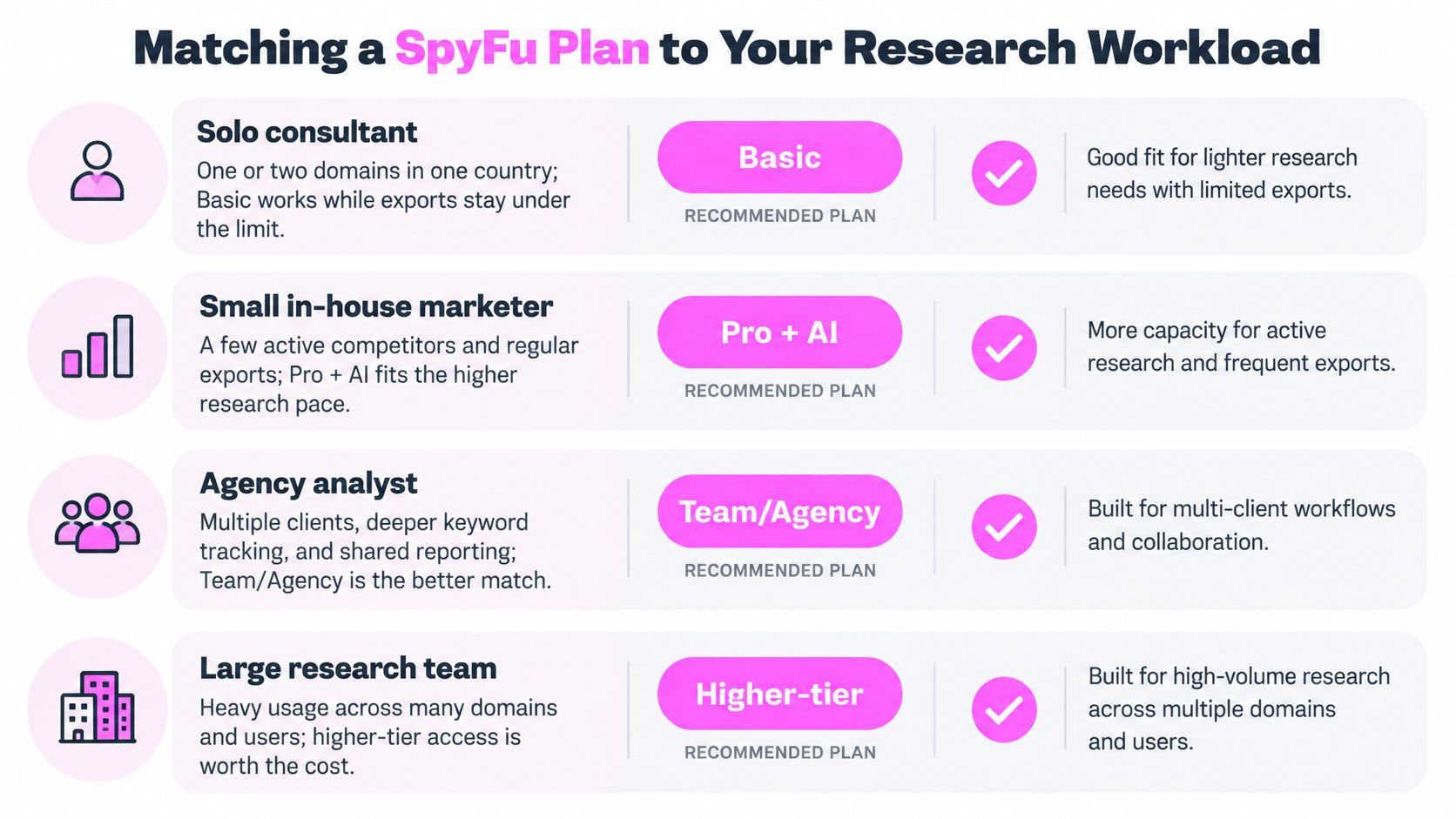
Use this workload map as a starting point, not a substitute for testing your own domains.
Choose by the job you need to finish
For a solo consultant auditing a primary site and a competitor in the same country, I would start with Basic on monthly billing. Keep the distinction between occasional domain research and persistent live-site tracking clear. If the exports fit and you don't need a recurring multi-client reporting setup, paying for agency capacity won't improve the audit.
For a consultant managing a small roster of active client domains, I would favor Pro + AI. Persistent projects matter more than the ability to run another search. Reports, tracking, and repeated exports are where a seemingly modest client list becomes a higher-volume workflow.
For an agency sharing analysis and weekly reporting, I would evaluate Team/Agency. Compare the included seats against the people who need access, then budget additional users separately. Don't buy shared capacity just because several people occasionally read a finished report.
For international e-commerce or content work, I would validate coverage before selecting any tier. Run representative product terms and competing domains in each target market. A larger allowance doesn't fix missing or unsuitable market data.
For competitor selection and interpretation, the traffic benchmarking advice from Big Moves Marketing can help frame the questions you want the tool to answer. If your required markets or workflows don't fit, compare alternative research platforms before upgrading.
Build a purchase checklist
- Domains and countries: Separate ongoing tracked sites from occasional competitor lookups.
- Keywords and exports: Record tracking requirements and the largest export you'll need.
- Reports and users: Count deliverables and people who need direct account access.
- Coverage: Test commercially meaningful queries, not just familiar brand names.
For a visual walkthrough alongside your own checks, use this video.
The cheapest tier is economical only when your normal workload fits comfortably beneath its ceilings. Leave room for onboarding and unexpected analysis rather than buying an account that's already at capacity.
When SpyFu API Pricing Changes the Math
API access starts with Pro + AI, not Basic, according to SpyFu's API pricing documentation, which lists $40 in monthly API credit for Pro + AI, $100 for Team/Agency, and examples of keyword and paid-SERP endpoints priced at $2 per thousand rows. A subscription therefore doesn't mean unlimited programmatic collection.
At that example endpoint rate, a hypothetical 100,000-row pull costs about $200 before credits, and a million-row pull costs about $2,000 before credits. Those calculations use the documented per-thousand-row rate, not a flat price for every possible API operation.
Reconcile the billing presentation first
There's a material ambiguity to resolve before building a production pipeline. Another SpyFu API presentation describes 10,000 included rows per month and $0.50 per additional thousand rows, rather than the credit-and-endpoint model described in the developer documentation.
I wouldn't choose the cheaper interpretation and assume it applies. Get written confirmation of the billing model for your account, the endpoints you'll call, how credits apply, and what happens after the included allowance is exhausted.
Also check what counts as a billable row. A successful request isn't necessarily the same unit as a returned record, and the size of the response matters when you're multiplying queries across domains.
Unlimited dashboard exports and unlimited API collection are different purchasing decisions.
Put controls in the pipeline
For an automated workflow, I would implement these controls before scheduling recurring collection:
- Cap rows per job: Set an explicit maximum so an unexpectedly broad query can't consume the budget.
- Log endpoint costs: Store the endpoint, returned rows, run identifier, and estimated charge with each job.
- Cache stable results: Reuse historical or unchanged responses instead of fetching them again on every run.
- Deduplicate inputs: Normalize domain and keyword lists before making requests, while preserving meaningful market differences.
- Control retries: Avoid re-running a completed extraction because a later processing step failed.
For a dashboard used by analysts, API spend can stay modest if the application caches results and requests only what's needed. For nightly collection across many domains, the subscription becomes only part of the bill.
I would choose the tier after estimating the production workload, not after a small development test. Test calls prove that an integration works; they don't prove that the scheduled workflow is affordable.
SpyFu Against SemDash on Cost and Scope
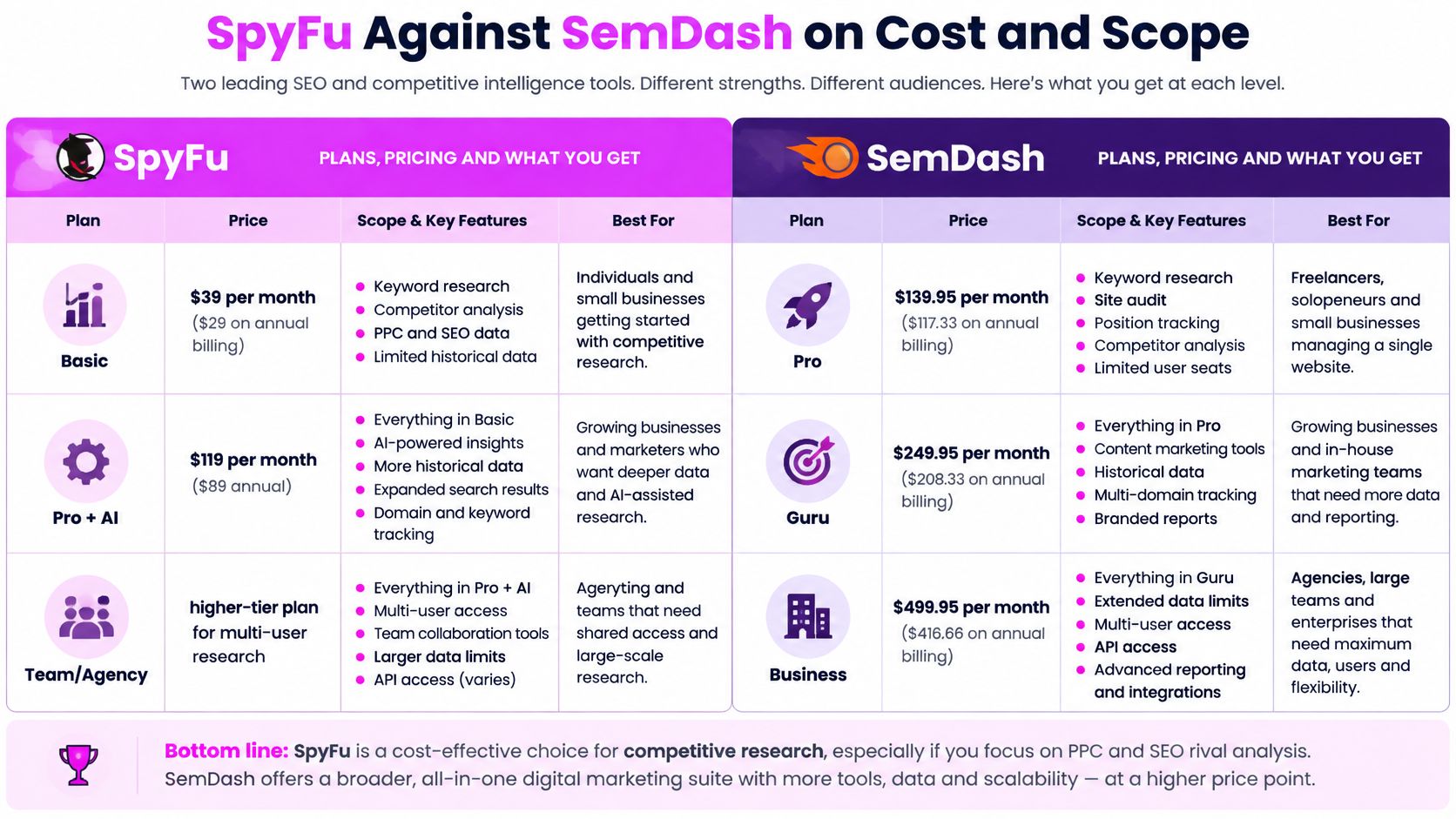
I would compare the actual output before treating similarly positioned plans as equivalents. SpyFu's published allowances emphasize historical research, exports, tracked projects, and collaboration; our paid plans combine keyword research, competition analysis, backlink research, AI SEO, and lead generation.
SpyFu and SemDash entry, middle and top plans
| Tool | Entry plan | Middle plan | Top plan | Free option |
|---|---|---|---|---|
| SpyFu | Basic $39/mo ($29/mo annual) | Pro + AI $119/mo ($89/mo annual) | Team/Agency $249/mo ($187/mo annual) | Not established by the cited pricing sources |
| Our platform | Starter $30/mo billed for 12 months ($360/yr) | Business $60/mo billed for 12 months ($720/yr) | Elite $249 (billing basis not stated) | Yes, free plan |
The SpyFu figures use its published pricing already identified, including the Basic annual-price discrepancy. Our Starter and Business prices have an explicit annual commitment; the Elite price doesn't establish a billing interval, so I wouldn't label it monthly.
Use this visual comparison to separate price from intended use.
Compare a finished research task
We offer more than 20 SEO research tools and a free plan, so I would start the evaluation without purchasing. You can review the available options on our pricing page, then run the same domain and keyword workflow in each platform.
Keep the test practical. Export the terms you'd use in a content plan, identify the competing pages, and check whether the output supports a recommendation you can explain to a client.
For outreach-led work, EmailScout's guide to researching companies before outreach helps define a different acceptance test. Finding a promising domain isn't the same as understanding the company well enough to write a relevant pitch.
Where the comparison is weak
A row-for-row price match hides differences in how the products measure consumption and scope. A tool count doesn't establish data depth, and an unlimited export label doesn't prove that every market or historical question is covered.
I haven't included Ahrefs or Semrush prices because this comparison doesn't establish their current plans on the same basis. Adding unverified competitor prices would make the table look more complete without making the decision more reliable.
For one-off keyword checks, a free or cheaper workflow may be enough. For ongoing client research, I would pay for the platform that produces the required deliverable without forcing manual workarounds, then verify the allowance needed to repeat that work.
How to Cancel and Refund SpyFu Without Losing Money
Cancellation and refunding are separate actions. SpyFu's money-back-guarantee help page says to contact support by chat or email, provide the account email, and request cancellation and a refund within the first 30 days; cancelling in the account's Subscriptions tab doesn't automatically trigger the refund.
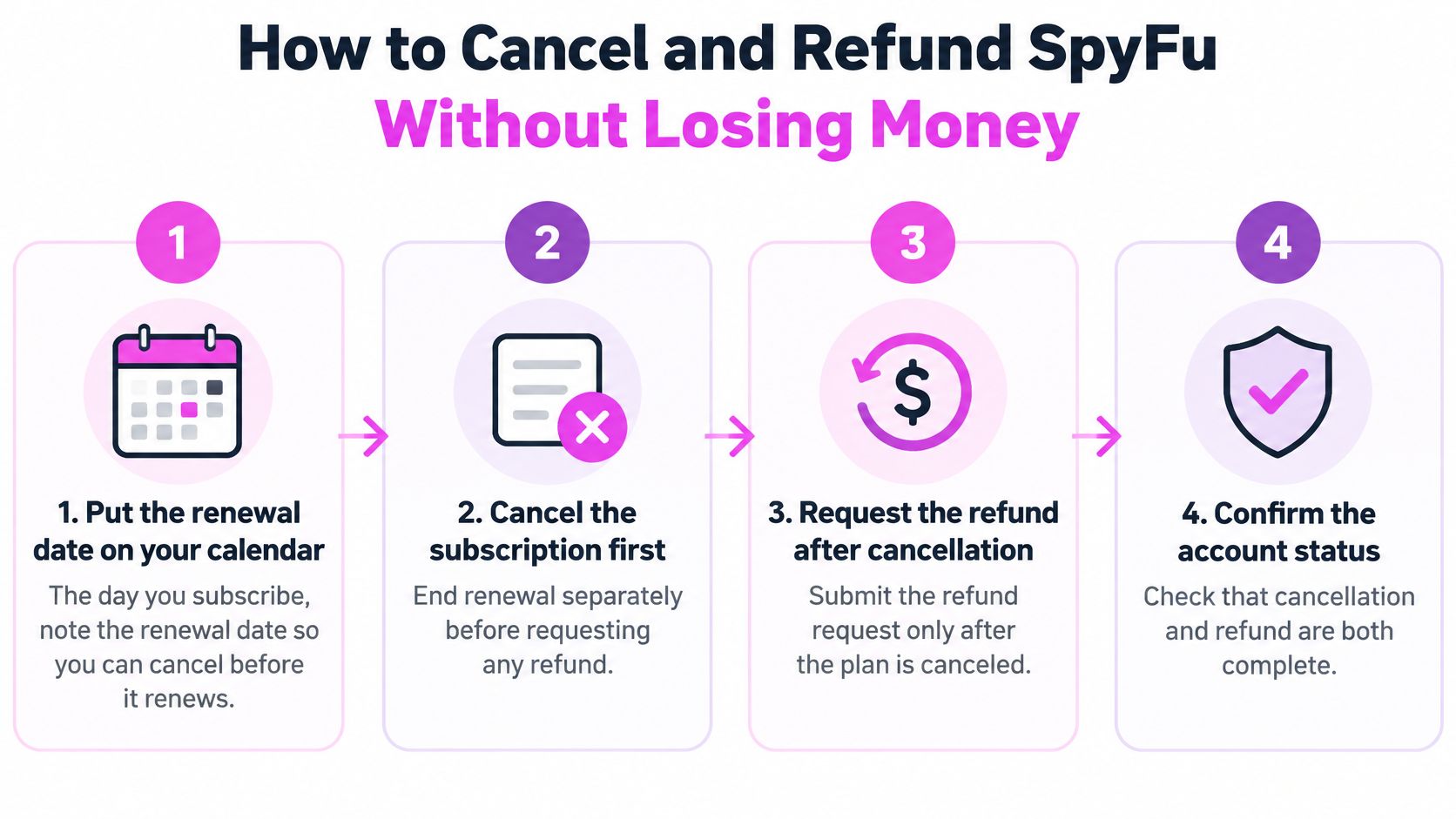
Use the sequence below so you have a record of both requests.
Complete both account actions
Calendar the renewal when you subscribe. SpyFu's subscription terms provide for automatic renewal unless you cancel before renewal, and state that fees are nonrefundable unless SpyFu elects to provide a partial or full refund. Record the renewal date immediately rather than relying on remembering when the audit ends.
Cancel through My Account's Subscriptions tab. Save the confirmation and check the account status afterward. This addresses future renewal, not the return of an existing payment.
Contact support explicitly about the refund. Use the account email and state clearly that you're requesting a refund under the published guarantee. Don't assume a cancellation confirmation means support has received that separate request.
Keep the written thread. Save the cancellation confirmation, support conversation, and any refund confirmation together. If the status is unclear, reply in the same conversation so the history stays intact.
Distinguish a refund request from a completed refund. The general terms and the advertised guarantee need to be read together. Don't mark the issue resolved until support confirms the outcome and you can verify the payment status.
Avoid the stopped-but-not-refunded mistake
The common mistake is straightforward: you cancel successfully, stop using the account, and assume the money will return automatically. You've completed only the renewal action.
I would send the refund message immediately after cancelling rather than putting it on a later task list. That keeps the account details, purchase record, and reason for the request together while you're still handling the subscription.
Account-control habit: Save evidence of cancellation and evidence of the refund separately.
Annual billing deserves extra attention because the lower equivalent rate comes with a larger prepaid commitment. For a short audit, I would prefer monthly billing and set the cancellation reminder before the next charge.
Don't treat a refund policy as a substitute for choosing the right billing term. Use it as a documented process when the tool doesn't meet the intended need.
Pick Your SpyFu Plan Before You Buy
The sticker price is rarely what SpyFu costs you. The plan sets ceilings on exports, tracked keywords, and users, and the billing term decides how much you commit before you know the workload fits.
Choose Basic for focused, short-term research when you don't need a persistent multi-client setup. Start monthly for a finite audit and confirm the largest required export fits before building the deliverable around it.
Choose Pro + AI for recurring consultant work when live-site projects, broader exports, and historical analysis are part of the service you sell. The trigger for upgrading is ongoing workload capacity, so skip feature labels you'll rarely use.
Choose Team/Agency for shared, higher-volume delivery. If an API pipeline is part of that workflow, budget collection separately; included credits don't replace estimating scheduled usage.
Make the decision with a workload sheet
Write down domains, countries, tracked keywords, exported rows, monthly reports, and users. If a requirement exceeds the intended tier, move up or choose another tool rather than shrinking the promised work. Reserve annual billing for a confirmed ongoing requirement, and confirm the live checkout price and renewal date before you pay.
The fastest check is a parallel run. Visit SemDash, start on the free plan, and schedule a demo or a free live call with an SEO specialist. Bring a client domain and your workload sheet, then compare the keywords, competing pages, and export usability against the SpyFu plan you're considering.