


The usual advice in a Semrush vs SpyFu comparison is to buy Semrush if you can afford it and SpyFu if you can't. I wouldn't make that decision on price or feature count alone. I'd ask which tool can support the decision you're about to make, whether that's approving a PPC test, commissioning a content cluster, or choosing backlink prospects.
A competitor's estimated ad spend isn't a budget recommendation. A large keyword index isn't a traffic forecast. The useful comparison starts with coverage and limits, then tests whether the numbers hold up against your own search performance.
Table of Contents
- Semrush vs SpyFu at a Glance
- Keyword and Backlink Coverage Compared
- Historical Data and Competitor Ad Archives
- Rank Tracking Limits, Reporting and the One-Day Test
- Pricing Tiers and What You Actually Pay
- Which Numbers You Can Trust for Decisions
- How to Run a Gap Analysis and Backlink Outreach
- Choose Between Semrush and SpyFu for Your Team
Semrush vs SpyFu at a Glance
Headline comparison of Semrush and SpyFu
| Criterion | Semrush | SpyFu |
|---|---|---|
| Keyword index | About 27.8–28.8 billion | About 13.1 billion |
| Domains covered | About 808 million | About 125 million |
| Backlink index | About 43 trillion | Not publicly disclosed |
| Entry tracking allowance | About 500 keywords | About 5,000 weekly keywords |
| Capterra rating | Unknown for this comparison | 4.4 out of 5 |
Treat every figure as directional, not as a like-for-like measurement. The index figures come from AyRank's comparison, the domain coverage and SpyFu rating from Style Factory's comparison, and the tracking allowances from the comparative testing discussed below. Vendors count differently, plans change, and review populations don't represent the same users.
SpyFu began in April 2005 as a scraping project for competitors' Google Ads keywords, ad copy, spending estimates, and landing pages, according to Viral Marketing Lab's historical account. Semrush followed in 2008, developing toward a broader visibility platform rather than remaining centered on competitor advertising archives.
That distinction still provides a useful buying lens. With SpyFu, I'd start by investigating a competitor's advertising behavior. With Semrush, I'd start by connecting keyword opportunities, ranking pages, technical issues, and referring domains.
Buying rule: Choose the research workflow you need to repeat, not the largest collection of features you might eventually use.
Keep the review rating in proportion. It can help you identify support or usability questions to investigate, but it can't tell you whether either database covers your niche. For that, you need a recognizable competitor and an export you can inspect.
My verdict: Semrush for breadth of coverage; SpyFu for competitor ad history and high-volume tracking.
Keyword and Backlink Coverage Compared
A bigger index helps when you don't already know what you're missing. If you're mapping a competitor across countries, additional long-tail, multilingual, and less commercial queries can reveal product categories or page types that a narrower export misses.
The reported index gap favors Semrush for that discovery work. But recall, meaning how much relevant material you retrieve, isn't the same as precision. I'd rather get a smaller export of relevant ranking pages than a huge list padded with obsolete or unrelated queries.
Test recall against a recognizable competitor
For a practical trial, I'd use this deliberately small test:
- Choose a familiar competitor. Pick a domain whose products and strongest pages you understand, rather than an unfamiliar market leader.
- Export its top 200 keywords from each tool. Keep country, device, date, and sorting method consistent.
- Inspect the top 20 by volume. Count the overlap, then examine what appears in only one export.
- Check the exceptions. Open the live results and confirm that the competitor ranks with a relevant page.
These are test settings, not performance benchmarks. Agreement between tools increases confidence that you've found a recurring opportunity, but it doesn't independently validate either volume estimate.
For backlinks, I'd compare referring-domain intersections, not total links. A sitewide footer can generate many backlinks without giving you many distinct outreach prospects. Because SpyFu doesn't publish a directly comparable backlink-index total, I'd validate link-gap completeness with another source before calling an export complete.
At SemDash, our keyword research draws from 6.6 billion keywords, and our backlink data covers 2.7 trillion backlinks. Those totals describe discovery scope, not guaranteed coverage of your particular market.
A US-focused workflow investigating a familiar rival's paid and organic history can still fit SpyFu well. I'd upgrade for broader coverage only when missing queries or domains affect actual decisions, not because a competing vendor displays a larger index.
Historical Data and Competitor Ad Archives
How far back do you need to see, and what are you trying to establish? An archive can show repeated advertising appearances. It can't reveal the competitor's conversion rate or prove that a campaign made money.
Say a competitor bought a branded phrase for two years and then stopped. I'd inspect the earliest recorded ad, compare the message across snapshots, and identify the last recorded appearance. Then I'd check current results and the landing page before deciding whether to test that phrase myself.
A disappearance could reflect a budget change, a seasonal pause, a different campaign structure, or a gap in observation. I wouldn't translate it directly into a negative keyword.
Match the archive to the market
The Semrush historical-data documentation specifies the following regional start dates and requires Guru or Semrush One Pro+ access. It also distinguishes research history from Position Tracking, which retains daily data for 60 days, then weekly data for up to 140 weeks.
Historical data access by tool and database
| Data source | Historical start | Plan needed | Check before comparing |
|---|---|---|---|
| Semrush core databases, US, UK, Canada, Australia, France, Italy, Germany, Spain, Brazil | January 2012 | Guru or Semrush One Pro+ | Confirm market start date |
| Semrush 15 regional databases | December 2013 | Guru or Semrush One Pro+ | Don't assume it matches core markets |
| Semrush 89 newer regional databases | December 2016 | Guru or Semrush One Pro+ | Shorter window than core markets |
| SpyFu archive | 10+ years advertised; 20 years of Google Ads snapshots | Higher plans; Basic covers 6 months | Check row and result limits per plan |
SpyFu's pricing and product materials advertise more than 10 years of history, alongside 20 years of Google Ads snapshots in its product messaging. The Basic history restriction makes the purchased plan, rather than the longest advertised archive, the practical constraint.
Before comparing countries, I'd align the available months and record the database used. Otherwise, you can mistake a shorter observation window for weaker competitor activity.
An archived ad supports a claim about observed advertising presence. It doesn't support a claim about profitability.
I'd choose SpyFu for long-run competitor-ad investigation and Semrush's documented regional timeline when an analyst needs to audit results country by country.
Rank Tracking Limits, Reporting and the One-Day Test
A tracking allowance matters only after you define the reporting promise. Weekly monitoring can suit a broad portfolio, but it won't support the same diagnosis as daily observations during a migration or campaign launch.
01net's comparative testing reports about 500 tracked keywords on Semrush's entry plan against approximately 5,000 weekly keywords on SpyFu Basic. It also describes SpyFu's emphasis on unlimited searches and exports, compared with tighter lower-tier project, seat, report, and tracking limits in Semrush.
Don't interpret unlimited exports as unlimited rows in every report. Check the actual download, including whether filters, pagination, or plan restrictions reduced the result set.
Run the reporting workflow, not just the search
For a one-day evaluation, I'd load the same 100 keywords into each available trial or evaluation account. That's a proposed test size, not a vendor allowance. Include brand terms, product terms, informational queries, and awkward edge cases such as local modifiers.
- Set the measurement conditions. Match country, device, search engine, and available location settings before comparing positions.
- Record refresh frequency. Separate scheduled updates from manual checks, and confirm what the purchased plan refreshes.
- Export a finished report. Preserve the keyword, ranking URL, position, date, and market fields.
- Time the handoff. Measure from finished analysis to a file or report a client can understand without a dashboard walkthrough.
- Check access constraints. Record seats, projects, export-row caps, and API availability in the same procurement sheet.
The reporting handoff deserves its own test. A dashboard can look excellent while the export requires manual cleanup, missing annotations, or repeated downloads. If you need to explain every chart on a call, you haven't yet tested a repeatable reporting process.
I'd lean toward SpyFu when the job is broad weekly monitoring on a constrained budget. I'd lean toward Semrush when tracking sits alongside recurring technical audits and multi-market competitive mapping.
Before promising a long-term trend line, confirm retention and aggregation rules. An old weekly average isn't interchangeable with an individual daily position, especially when you're diagnosing a short disruption.
Normalize by plan and billing period. A trial with expanded access can conceal the limits you'll hit after purchasing the entry subscription.
Pricing Tiers and What You Actually Pay
Entry prices tell you where billing starts, not what your team will pay. I would budget against a dated quote that includes the required users, projects, tracking capacity, history, exports, and supplementary tools.
Traffic Think Tank's 2025 comparison listed entry prices of $139.95 per month for Semrush and $39 for SpyFu. For historical context, Answer iQ's 2024 comparison reported monthly ranges of $129–$499 and $39–$299, respectively.
Published price ranges by tool
| Tool | Entry price (2025) | Monthly range (2024) | Upgrade trigger |
|---|---|---|---|
| Semrush | From $139.95 per month | $129–$499 per month | Historical data needs Guru or Pro+; lower-tier seat and project limits |
| SpyFu | From $39 per month | $39–$299 per month | Deeper history needs a higher plan; check result and row limits |
These are dated reference prices, not current quotes. Compare the year, billing cycle, plan family, and currency before treating different published prices as a contradiction.
Work through the agency's constraints
Say you're budgeting for a hypothetical three-person agency with eight clients and 2,000 tracked keywords. SpyFu's reported entry tracking capacity clears the keyword requirement, while Semrush's reported entry allowance doesn't. Neither fact establishes whether the plan supports the necessary users, client projects, or reporting access.
I'd calculate the purchase this way:
- Find the lowest qualifying plan. It must satisfy every hard limit, not just tracking capacity.
- Add required access and modules. Include extra seats and any separate technical or backlink tools.
- Annualize the complete quote. Multiply the all-in monthly charge by twelve, or use the actual annual invoice.
- Calculate commitment break-even. Divide the annual invoice by the equivalent monthly charge to find how many months of use justify prepayment.
The available published prices don't establish a defensible all-in annual total for that agency. Assigning an exact qualifying tier would require inventing seat and project entitlements.
Use our SEO tool pricing guide to structure the comparison, then save the dated checkout quote. The cheapest subscription isn't the cheapest setup if your team needs another tool or substantial manual reporting to finish the job.
Which Numbers You Can Trust for Decisions
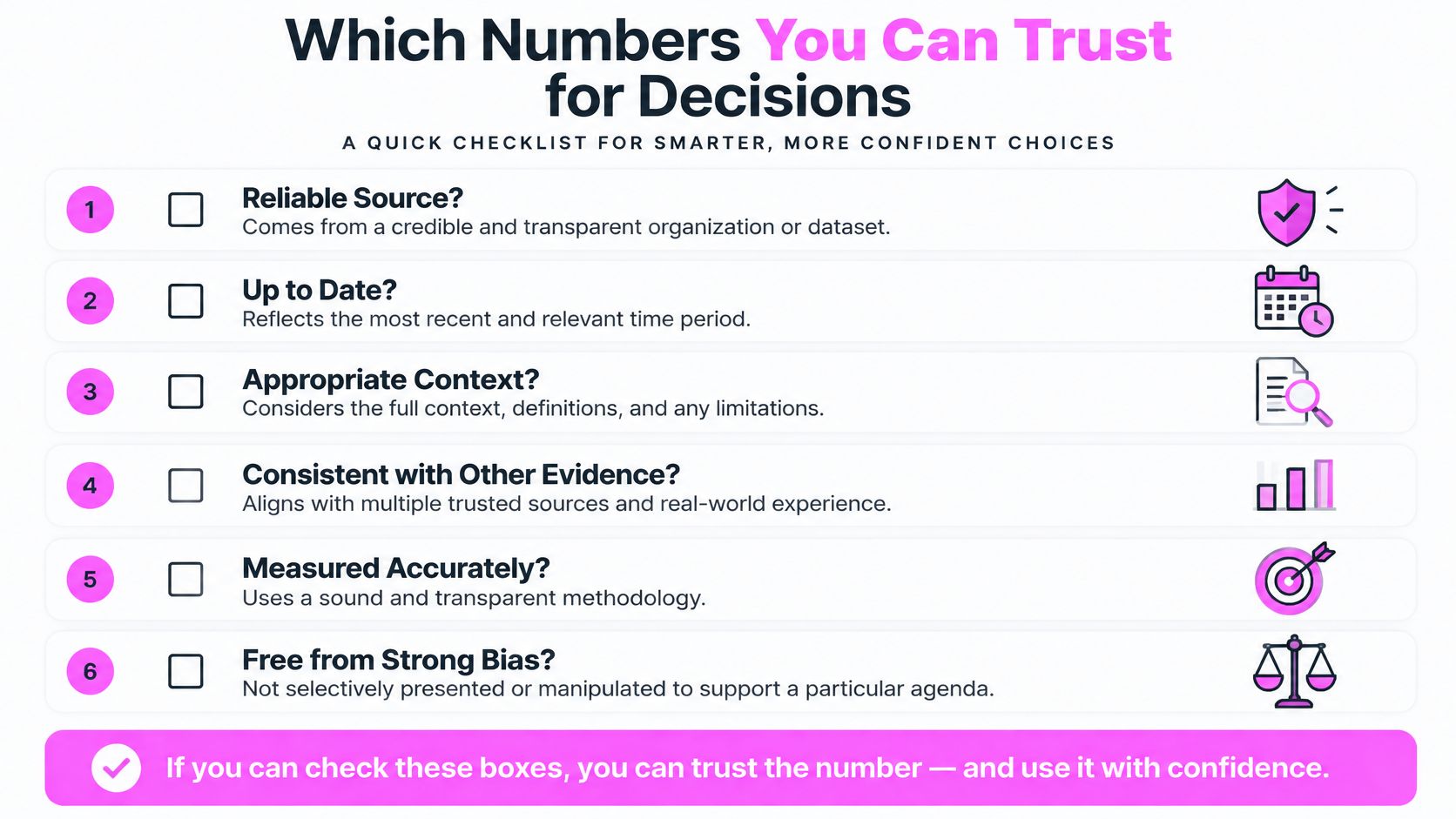
Neither platform deserves a blanket accuracy label. I'd assess each metric against the decision it needs to support, rather than declare one tool universally more accurate.
A PPC practitioner discussion highlights concerns about CPC estimates, Google's lack of complete public CPC data, and results changing with the keyword set analyzed. That's a useful warning, not a controlled accuracy study. I wouldn't approve a campaign budget from a competitor tool's CPC or spend estimate alone.
Separate measurement from estimation
| Metric type | Example | Decision it can support |
|---|---|---|
| Observed | Your Search Console clicks | Assessing your recorded organic performance |
| Modeled | Tool search volume or CPC | Comparing candidate opportunities |
| Inferred | Competitor traffic or ad-spend estimates | Forming hypotheses to investigate |
For a validation exercise, I'd select 30 keywords and compare both tools against relevant first-party observations and Keyword Planner estimates. Search Console impressions aren't total market search volume, and Keyword Planner isn't an exact observed count either. Match country, date range, device where possible, and keyword variants before calculating differences.
Record error ranges separately for PPC planning, organic opportunity sizing, and traffic estimation. You can validate a traffic model against your own domain, but you can't establish a competitor's actual traffic without access to its analytics.
Account for the results page
The Serplify analysis reported AI Overviews on 97% of sampled “best” or “vs” searches in 2026 and summarized Seer Interactive's study of 53 brands, with average organic CTR of 0.61% when an AI Overview appeared versus 1.62% without one. Those are sample-specific findings, not a forecast for your comparison page.
I'd inspect whether an Overview appears, which URLs it cites, and whether the remaining results attract a plausible click. Then I'd report conservative, base, and optimistic scenarios instead of multiplying volume by a universal CTR assumption.
Budget safeguard: Use third-party estimates to decide what to test. Use your own campaign and conversion results to decide what to scale.
How to Run a Gap Analysis and Backlink Outreach
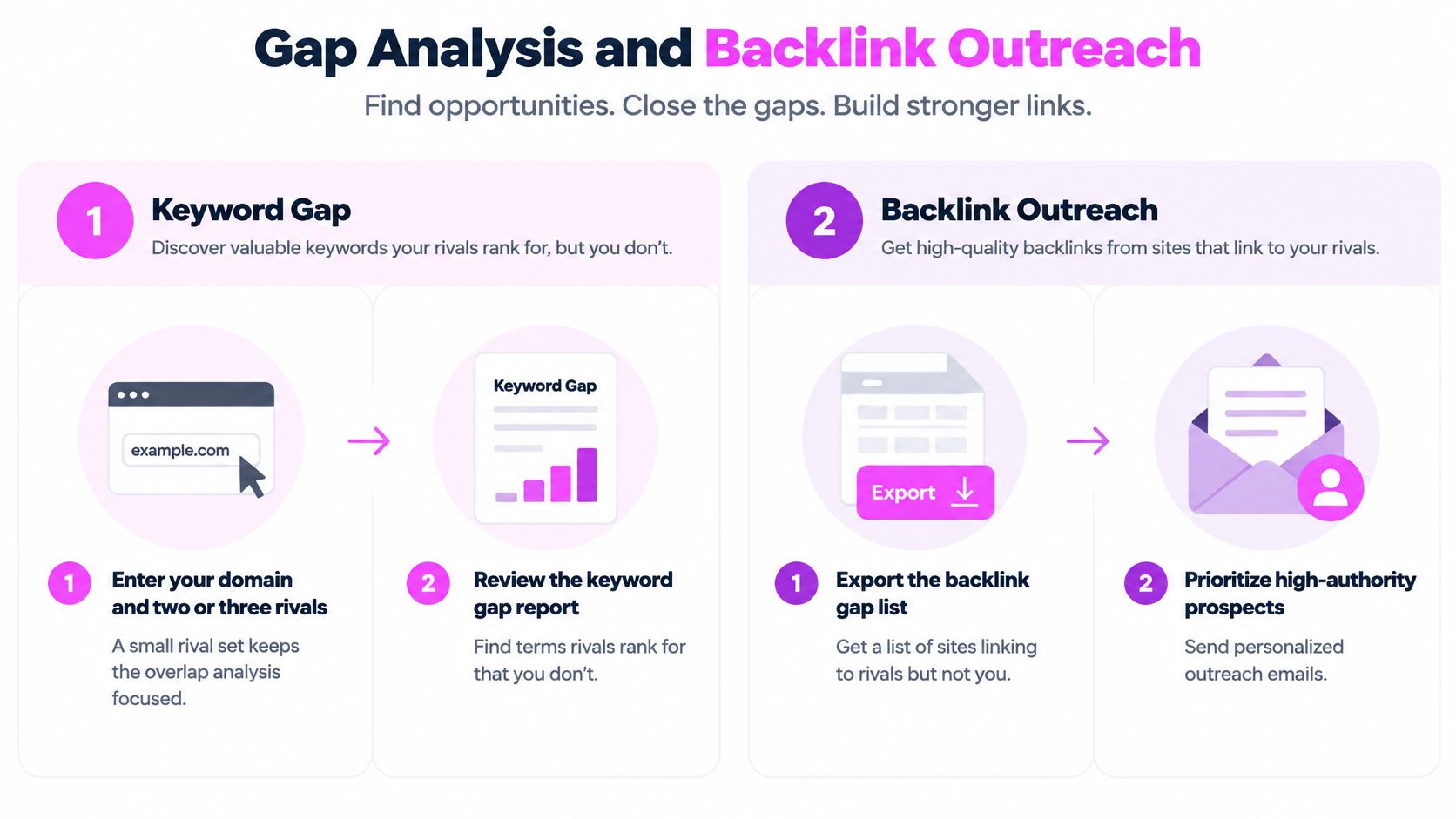
A gap export is a candidate list, not a publishing calendar or an outreach queue. I'd work from domain overlap to page relevance, then validate the shortlist before assigning production.
Keyword gap procedure
Use this gap analysis workflow to keep discovery connected to a page-level action. The numerical filters below are suggested working settings, not universal SEO thresholds.
- Enter your domain and two or three rivals. A small set keeps overlap readable and exports manageable. Don't add ten loosely related competitors and treat every missing term as relevant.
- Filter for volume above 50 and achievable difficulty. This removes some noise before manual review. Don't reject valuable specialist terms automatically or chase high volume when you can't match the ranking pages.
- Group terms into page-level topics. Queries with the same intent may belong on one page. Don't commission separate articles for near-identical keywords and create internal competition.
- Inspect each rival's ranking URL. The winning page type helps you choose between updating a category, product, comparison, or guide. Don't assume a blog post can replace a product page.
- Confirm the priority gaps in live results and Search Console. You may already have a relevant page receiving impressions. Don't create a new URL before checking whether an existing page needs improvement.
Backlink gap outreach procedure
- Pull referring domains for each rival. Domain-level deduplication keeps repeated sitewide links from dominating the list. Don't confuse backlink count with prospect count.
- Keep domains linking to two or more rivals but not you. That overlap provides a relevance hypothesis. Don't assume every shared link is editorial or obtainable.
- Review anchors and surrounding page context. Check why the citation exists and whether your resource fits. Don't pitch a site because its authority score looks attractive.
- Build the pitch around the specific linking page. Explain the useful addition, replacement, or correction. Don't send a generic request to add your homepage.
- Log replies and recheck after 30 days. This suggested follow-up interval gives you a repeatable review point. Don't mark a prospect successful merely because someone replied.
SemDash includes Keyword Gap, Backlink Gap, Referring Domains, Top Pages, SERP Checker, and Keyword Clustering. Our Backlink Gap identifies domains linking to competitors but not your site.
Before outreach, compare the export's row count with the report total. A capped download can look complete, leading you to prioritize only the first visible slice of prospects.
Choose Between Semrush and SpyFu for Your Team
I'd choose by the constraint most likely to block delivery. For an international agency, that may be market coverage. For a small PPC team, it may be affordable monitoring capacity. For a content team, it may be getting from a keyword list to the correct page brief.
Which tool fits which team
| Team | Lean toward | Deciding criterion | Watch for |
|---|---|---|---|
| Multi-market SEO agency | Semrush | Country coverage and domain breadth | Start date of each market's database |
| Small PPC team tracking many terms | SpyFu | Weekly tracking allowance and exports | Historical depth on the purchased plan |
| E-commerce growth team | Test both | Keyword and backlink gap breadth | Seat, project, and report limits |
| Content team planning topics | Test both or our platform | Clustering and intent accuracy | Whether intent labels match live results |
| Solo operator or small business | SpyFu or our platform | Lowest qualifying entry cost | Limits that force an early upgrade |
For a multi-market agency, I'd lean Semrush because country-level research needs consistent coverage and an auditable timeline. For a small PPC team, I'd lean SpyFu when the recurring job is investigating competitor ads and monitoring a broad keyword set. I wouldn't pay for a wider research environment unless the team will use it.

Make the trial produce a decision
For an e-commerce team, I'd test category-level keyword discovery alongside referring-domain gaps. Include an established category and a newer product area so the evaluation doesn't favor only mature, well-indexed terms.
For content planning, inspect clustering and intent against the actual ranking pages. A commercial-intent label isn't enough if the results favor category pages and your proposed deliverable is an informational article.
At SemDash, we provide more than 20 SEO research tools, and you can get started for free. We also offer free live calls with an SEO specialist, which can help you work through the evaluation rather than guessing which report fits the task.
I'd run a hypothetical trial using the same three competitors and 50 keywords in each candidate tool:
- Log actionable findings. Record the page update, campaign test, or outreach prospect you would approve.
- Capture friction. Note missing markets, incomplete exports, unclear URLs, and manual cleanup.
- Keep the evidence. Save exports with dates, filters, and database settings so you retain context if you migrate.
Don't award points for findings you won't act on. A useful trial ends with a short execution queue, a qualifying plan quote, and a clear explanation of what remains uncertain.
Run a two-week evaluation, write down the three criteria that decided your choice, and buy the lowest plan that satisfies them. Those are proposed evaluation settings, not vendor trial terms. Confirm access before scheduling the work.
Visit SemDash to get started free and test keyword gaps, backlink opportunities, and ranking-page research against the competitors you're evaluating. Bring a shortlist of keywords and a real content or budget decision, then use a free live call with an SEO specialist to work through the findings.