%20(1)-B86R08ZzwhPzS6UZbG3mSxRWPCwGwn.png)


SERP Volatility: How to Measure and Respond to It

SERP volatility is short-term movement in search rankings across a tracked keyword set, and the single most important thing you can do when you spot a spike is monitor it without editing your best-performing pages. That instinct to rewrite immediately is the most common mistake SEO teams make. Many swings self-correct within days, and mid-swing edits obscure what the algorithm actually did, making post-event analysis nearly impossible.
Your first day or few days should follow this sequence:
- Check a volatility index (such as the DataForSEO SERP Volatility Index, which uses a normalized 1–10 scale based on sampled keyword position shifts) to confirm whether the movement is broad or isolated.
- Open the Google Search Status Dashboard to verify whether Google has confirmed an update.
- Pull Google Search Console performance data segmented by page type and compare 7-day vs. 30-day windows.
- Log the event with timestamps, affected keyword groups, and device splits. Do not guess yet.
- Check community sources like Search Engine Roundtable for corroborating chatter, but treat that as a signal, not a confirmation.
Pro Tip: Wait for several days before making major content changes during unconfirmed volatility. If no technical fault surfaces in that window, the movement is likely routine churn.
Key Takeaways
Volatility indexes, diagnostic segmentation, and a disciplined wait-before-editing rule are the three pillars of effective SERP volatility management.
| Point | Details |
|---|---|
| Wait before editing | Hold off on major content changes for at least one week during unconfirmed volatility. |
| Check official sources first | The Google Search Status Dashboard is the only canonical source for confirmed update dates. |
| Track click displacement | Monitor CTR and impressions alongside position; SERP feature churn moves clicks without moving ranks. |
| Segment by page type | Isolating drops to a page group is the fastest way to distinguish technical faults from algorithmic shifts. |
| Use Semdash for daily monitoring | Semdash’s historical charts, anomaly detection, and AI Overview tracking map directly to the daily and weekly playbook above. |
What actually causes SERP volatility in your tracked keywords
Search engine ranking fluctuations rarely have a single cause. Most spikes trace back to one of five categories, and knowing which one you’re dealing with determines your response:
- Algorithm updates and experiments. Google runs thousands of experiments annually. Confirmed updates (logged on the Search Status Dashboard) have clear start and end dates. Unconfirmed experiments produce the same ranking movement with no official acknowledgment, which is why broad, jagged, self-correcting swings are the tell.
- Search personalization and geo/device splits. A keyword that looks stable in your desktop tracker may be moving significantly on mobile or in a different metro. Apparent volatility is sometimes just a device or location split surfacing in aggregate data.
- SERP feature churn. When Google adds, removes, or repositions AI Overviews, featured snippets, video carousels, or local packs, click-through rates shift even when organic positions stay flat. This is click displacement: same rank, fewer clicks. Tracking impressions and CTR alongside position is the only way to catch it.
- News, seasonality, and competitor publishing. A competitor publishing a high-authority piece on your target topic, or a news cycle flooding the SERP with fresh content, can push established pages down temporarily without any algorithmic change.
- Technical regressions. A template change that accidentally noindexes a page group, a robots.txt update that blocks crawling, or a server error that spikes 5xx responses will produce persistent drops that look like volatility but are actually a crawl or indexing fault. Google’s ranking systems operate at the page level, using many signals and site-wide classifiers, so a technical regression affecting a page template can hit dozens of URLs simultaneously while leaving others untouched.
Search Engine Journal’s analysis adds mediocre quality signals to this list: pages that sit in a gray zone for E-E-A-T are more exposed to any algorithmic recalibration, confirmed or not.
How volatility indexes are built and what their numbers actually mean
A volatility index is only as useful as its methodology. Before you treat a score as a signal, you need to understand what it measures.
Sample selection is the foundation. An index built on a few hundred keywords in a single category will spike on news events that a broader sample would absorb. Well-designed indexes use tens of thousands of keywords segmented into category buckets (news, shopping, local, informational) because each category has different baseline churn rates. A local SERP moves differently from a national informational query, and mixing them without weighting distorts the aggregate.
Position-change metrics vary by provider, but the most informative indexes track three things: absolute rank shifts (how many positions a keyword moved), entry/exit events (keywords that entered or left the top 10), and weighted movement across position ranges (a drop from position 1 to 3 is weighted more heavily than a drop from 8 to 10 because the traffic impact is larger).
Device and location splits matter because Google’s mobile and desktop indexes can diverge during updates. An index that reports a single blended score may hide a mobile-specific spike that’s actually the signal you need.
Normalization converts raw position-change data to a bounded scale, typically 1–10, so you can compare today’s movement to historical baselines without recalibrating your interpretation every time the sample changes. The DataForSEO SERP Volatility Index uses this approach, making it straightforward to spot when current movement is statistically unusual versus routine background noise.
| Parameter | What to look for | Why it matters |
|---|---|---|
| Sample size | Tens of thousands of keywords | Small samples spike on category-specific events |
| Metric measured | Rank shifts + entry/exit events | Captures both magnitude and breadth of movement |
| Device split | Separate desktop and mobile scores | Reveals device-specific update patterns |
| Normalized scale | 1–10 bounded index | Enables consistent historical comparison |
How to detect and continuously track ranking instability
Monitoring search results instability requires more than a daily rank check. The metrics that matter most are:
- Position movement distribution: not just average position, but the percentage of tracked keywords moving more than 3 positions in a day. A spike in that percentage is a stronger signal than a single keyword’s movement.
- Impressions and CTR changes: a drop in CTR with stable positions is a SERP feature displacement event, not a ranking problem.
- SERP feature churn: track which keywords gain or lose featured snippets, People Also Ask boxes, and AI Overviews. Semdash’s AI Overview monitoring surfaces when your tracked keywords shift in or out of AI-generated answer blocks, which is increasingly where click displacement originates.
- Device and location divergence: if mobile and desktop indexes diverge by more than a few points on the same day, treat that as a device-specific signal worth investigating separately.
For alert thresholds, a practical starting point is: trigger a review when your normalized volatility index is notably high, when a significant portion of tracked keywords move several positions in a single day, or when impressions drop substantially week-over-week while positions remain steady.
Before diagnosing your own site, check the Google Search status summary for any platform-level issues. A confirmed infrastructure problem changes your entire response protocol.
Pro Tip: Segment your tracked keywords by page type (blog posts, product pages, landing pages) before reviewing daily movers. A spike concentrated in one page type almost always points to a template-level technical issue rather than a broad algorithmic shift.
Community sources like Search Engine Roundtable often flag broad synchronized spikes hours before official confirmation. Use them to corroborate your own data, not to replace it.
Step-by-step diagnostic flow for interpreting a volatility spike
When your index spikes or your rank tracker shows unusual movement, work through this sequence before touching any content:
- Confirm signal breadth. Cross-reference your internal rank data against an independent volatility index. If both show movement in the same direction and timeframe, the signal is real. If only your tracker shows it, check for a tracking configuration issue first.
- Check official sources. Open the Google Search Status Dashboard for confirmed updates. A confirmed update with a clear start date changes your response from “investigate” to “wait and assess post-settling.”
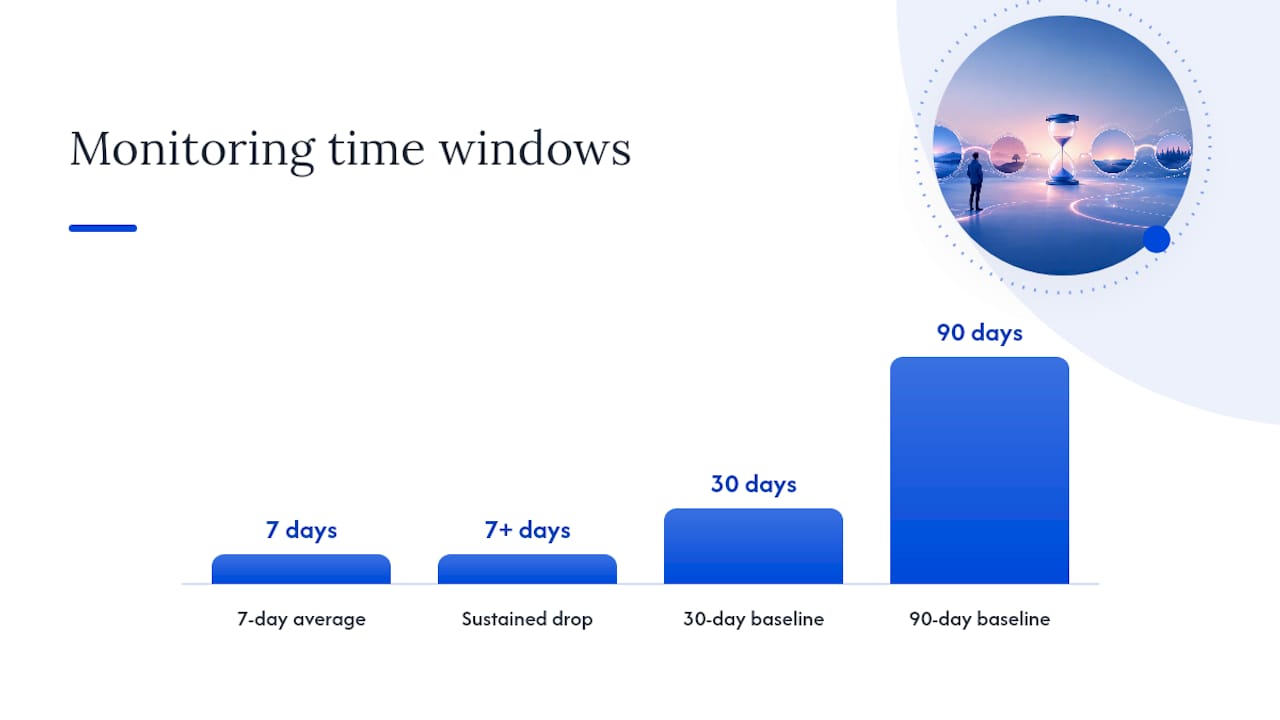
- Segment in Search Console. Filter by page type and compare clicks, impressions, and average position across 7/30/90-day windows. A drop concentrated in one page group is a different problem from a site-wide decline.
- Run a quick technical scan. Check robots.txt, canonical tags, noindex directives, and server error rates. Because Google’s ranking systems evaluate pages individually, a template-level error can hit a large page group while leaving others unaffected. This is the fastest way to rule out a technical cause.
- Run a content-quality triage. For pages with sustained drops, compare your content against the current top-ranked pages for topical precision, E-E-A-T signals, and structured data coverage. Use a SERP analysis workflow that checks intent alignment, content type, and feature presence before drawing conclusions.
Decision rules:
- Wait and monitor when movement is broad, jagged, and affects many unrelated keyword groups simultaneously. This pattern matches unconfirmed experiments that typically self-correct.
- Act immediately when the drop is isolated to a specific page group, sustained beyond 7 days, or accompanied by a confirmed technical fault (crawl errors, indexing drops, server errors).
How long volatility windows last and when to escalate
Most SEOs underestimate how long normal churn lasts and overestimate how quickly they need to respond. Here’s a practical timeline:
- Short churn (1–4 days): broad, multi-category movement with no confirmed update. Typically self-corrects. Document and monitor.
- Update window (several days to 2+ weeks): confirmed updates like the May 2026 core update and June 2026 spam update logged on the Google Search Status Dashboard have defined rollout periods. Rankings often continue shifting for days after the rollout ends as the index settles.
- Persistent impact (2+ weeks): if a page group shows sustained decline beyond two weeks with no recovery, this is no longer churn. It requires a structured content and technical audit.
Escalation triggers — act when you see any of these:
- A sustained drop across a page group lasting more than 7 days with no sign of recovery.
- A sharp simultaneous decline in impressions and average position (not just CTR).
- A confirmed update whose signals (quality, spam, helpful content) clearly match known weaknesses in your site’s content or link profile.
- Any technical fault (crawl block, noindex regression, server errors) confirmed in Search Console.
The practitioner consensus is clear: wait roughly one week before large content changes unless a technical fault is confirmed. Editing during unconfirmed churn obscures the algorithm’s actual signal and makes recovery harder to attribute.
Your daily and weekly monitoring playbook
Operationalizing volatility monitoring means building a repeatable cadence, not reacting ad hoc to every rank tracker notification.
Daily checklist:
- Pull the volatility index score and compare it to the prior 7-day average.
- Review the top 10 keyword movers in your tracked set, segmented by page type.
- Check Search Console coverage and performance for any new errors or impression drops.
- Note any SERP feature changes on your highest-traffic keywords.
- Log a brief entry: date, index score, notable movers, any confirmed updates.
Weekly checklist:
- Compare current performance against 30-day and 90-day baselines by segment.
- Identify the top SERP feature losers and gainers in your keyword set.
- Review AI Overview presence for tracked keywords using Semdash’s AI Overview checker, since AI feature placements are increasingly where click displacement originates. For a broader look at how AI Overviews affect business visibility, the TouchZen guide on AI Overviews is worth reviewing.
- Build a prioritized action list using this ladder:
| Priority | Trigger | Action |
|---|---|---|
| Immediate | Technical fault confirmed | Fix crawl/index error before any content work |
| High | Sustained drop 7+ days, content cause | Content precision audit, E-E-A-T review |
| Medium | Moderate drop, unclear cause | A/B test content changes on affected pages |
| Low | Broad churn, self-correcting | Monitor only, document for post-update analysis |
Sample alert messages for fast triage:
- Index spike alert: “Volatility index reached [score] on [date]. Broad movement across [X] keyword categories. Check Google Search Status Dashboard. No action on content yet.”
- Isolated category drop: “Product page group down [X]% impressions over 7 days. No confirmed update. Initiating content and technical audit.”
- Technical regression detected: “Coverage errors spiked in Search Console on [date]. [X] URLs affected. Crawl block or noindex regression suspected. Immediate technical review required.”
Translate the Medium and High priority items directly into tickets with a clear hypothesis, affected URL list, and a proposed change. For content A/B tests, document the original and variant clearly so you can attribute any recovery to the specific change.
The volatility picture is changing faster than most teams realize
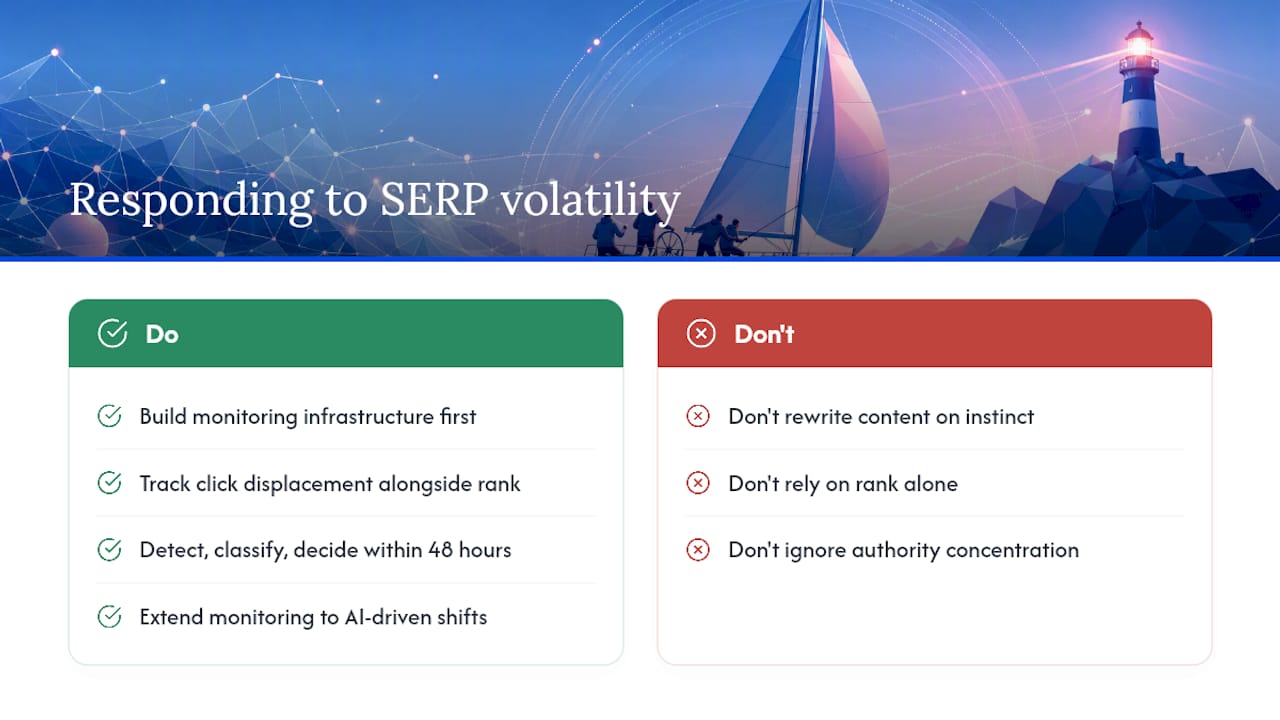
The honest observation here is that ranking position is becoming a less complete proxy for organic performance. Google’s increasing allocation of SERP real estate to AI Overviews, video carousels, and rich features means a page can hold its position while losing a meaningful share of clicks to features that sit above it. Industry observers note that ranking movement is increasingly background noise as Google shifts traffic toward its own features, which makes click displacement tracking as important as rank tracking.
The second shift worth watching is authority concentration. As Google’s quality signals mature, the gap between pages with strong E-E-A-T signals and those without is widening. Volatility events that once redistributed traffic broadly now tend to consolidate it toward a smaller set of authoritative sources. That makes volatility feel more damaging than it used to, even when the absolute position movement is similar to historical norms.
My practical advice: resist the reflex to rewrite. Build monitoring infrastructure first. An SEO team that can detect a spike, classify it correctly, and decide within 48 hours whether to act or wait is more resilient than one that rewrites content on instinct and can’t explain why rankings recovered or didn’t. The AI search visibility guide on the Semdash blog covers the feature-displacement angle in more depth if you want to extend your monitoring to cover AI-driven traffic shifts.
Semdash gives you the monitoring infrastructure to act with confidence
Volatility monitoring only works when your data is fast, segmented, and connected to a clear action path. Semdash’s SERP tracking delivers historical volatility charts with daily snapshots so you can see exactly when movement started, not just that it happened. Keyword segmentation by page type means your daily review takes minutes rather than hours. The AI Overview checker surfaces click displacement from AI feature placements, the signal most rank trackers miss entirely.
Google Search Console integration pulls coverage and performance data into the same workspace, so your diagnostic flow from index spike to technical triage runs without switching tools. Anomaly detection flags unusual movement against your 90-day baseline automatically, and the alert system generates the kind of structured notifications that translate directly into team tickets. If you’re ready to build a monitoring setup that matches the playbook in this article, start with Semdash and pair it with the keyword research tool to make sure your tracked set is representative enough to catch real signals.
Sources
The sources below are the primary references for verifying confirmed updates, understanding index methodology, and corroborating community signals.
- A Guide to Google Search Ranking Systems | Google Search Central | Documentation | Google for Developers
- Ranking Swings With No Confirmed Google Update
- SERP Volatility: What Do You Do About It?
FAQ
What is SERP volatility?
SERP volatility is the degree of short-term movement in search rankings across a tracked keyword set, measured by how many keywords shift positions within a given period. It can reflect routine algorithmic churn, a confirmed Google update, or a technical issue on your site.
How do you analyze a SERP volatility spike?
Cross-reference an independent volatility index against your internal rank data, check the Google Search Status Dashboard for confirmed updates, then segment Google Search Console data by page type to isolate where the movement is concentrated.
Does Google still use RankBrain?
Yes. RankBrain remains part of Google’s ranking systems as a machine-learning component that helps interpret queries, though Google has since introduced additional systems. The Google Ranking Systems Guide documents the full set of active ranking systems.
Is PageRank still used by Google?
PageRank remains a component of Google’s ranking infrastructure, though it is one signal among many. Google’s ranking systems evaluate pages using a combination of link signals, content quality, and behavioral data rather than any single metric.
When should you act on ranking fluctuations instead of waiting?
Act immediately when a technical fault is confirmed in Search Console, when a page group shows a sustained drop beyond 7 days with no recovery, or when a confirmed update’s focus areas clearly match known weaknesses in your content or link profile.