%20(1)-B86R08ZzwhPzS6UZbG3mSxRWPCwGwn.png)


90 Day Plan to Find Low Competition Keywords for Small Sites

Find low competition keywords by pairing a demand signal (what people actually type) with a top SERP that’s weak enough to beat. Start with Google autocomplete, People Also Ask, and a tool like Semdash to check both sides at once. Skip either check and you’ll either chase a dead keyword or a fight you can’t win. Calibrate keyword difficulty to your own domain, not a universal number.
TL;DR:
- Low competition keywords emerge from demand signals like autocomplete and forums, so verifying both demand and weak SERPs is essential.
- Using Google features such as autocomplete and People Also Ask provides reliable cues for actual search behavior, not just estimated volume.
- Target keywords with around 200 to 500 monthly searches and a keyword difficulty under 20 to maximize chances for small sites.
- Validate keywords by analyzing top-ranking pages’ backlink profiles and content quality before investing time in creation.
- Consistently applying demand and competition checks ensures focus on keywords with real search intent and achievable rankings.
How Do You Find Low Competition Keywords Step by Step?
Before you touch a keyword tool, build a raw list of candidates worth checking. This is the ideation phase, and it’s where most small sites either strike gold or waste hours chasing phrases nobody searches for.
Start with topics you already know cold, then translate them into the language your customers actually use, not the language you use internally. A landscaper might think “xeriscaping,” but customers type “low water yard ideas.”
Here’s the sequence that works:
- List 10 to 15 seed topics tied to your core services or niche.
- Run each seed through Google autocomplete, People Also Ask, and Reddit or niche forums.
- Ask an AI tool like ChatGPT or Perplexity to generate conversational variations on the same seed. These tools often surface phrasing that hasn’t been tracked yet by traditional keyword databases, which means less competition simply because fewer sites have written about it.
- Drop every phrase into a spreadsheet with four columns: the phrase, where you found it, the likely intent, and a quick note on relevance.
Once you have 50 to 100 raw candidates, triage fast:
- Cut anything with no clear commercial or informational intent tied to your business.
- Flag longer, more specific phrases first. They tend to convert better and face less competition than short head terms.
- Keep a “maybe” column for phrases you’re unsure about instead of deleting them outright.
This checklist takes less than an hour and gives you a working pool to validate in the next stage.
Which Free Tools Reveal Demand-Verified Keyword Phrases?
Google itself is still the best free keyword research tool available, and most people only scratch its surface. Type a seed phrase into the search bar and stop. The autocomplete dropdown shows real queries people type right now, ranked roughly by frequency. Capture every row, then add a modifier (“best,” “how to,” “vs,” “for beginners”) and run it again. Each pass surfaces new branches.
Scroll to the People Also Ask box next and click into two or three entries. New questions load underneath each click, so you can chain your way through a dozen related queries in a couple of minutes. Scroll to the bottom of the results page and copy the “related searches” list too. Together, these three features are reliable free demand signals because they reflect actual search behavior, not modeled estimates.
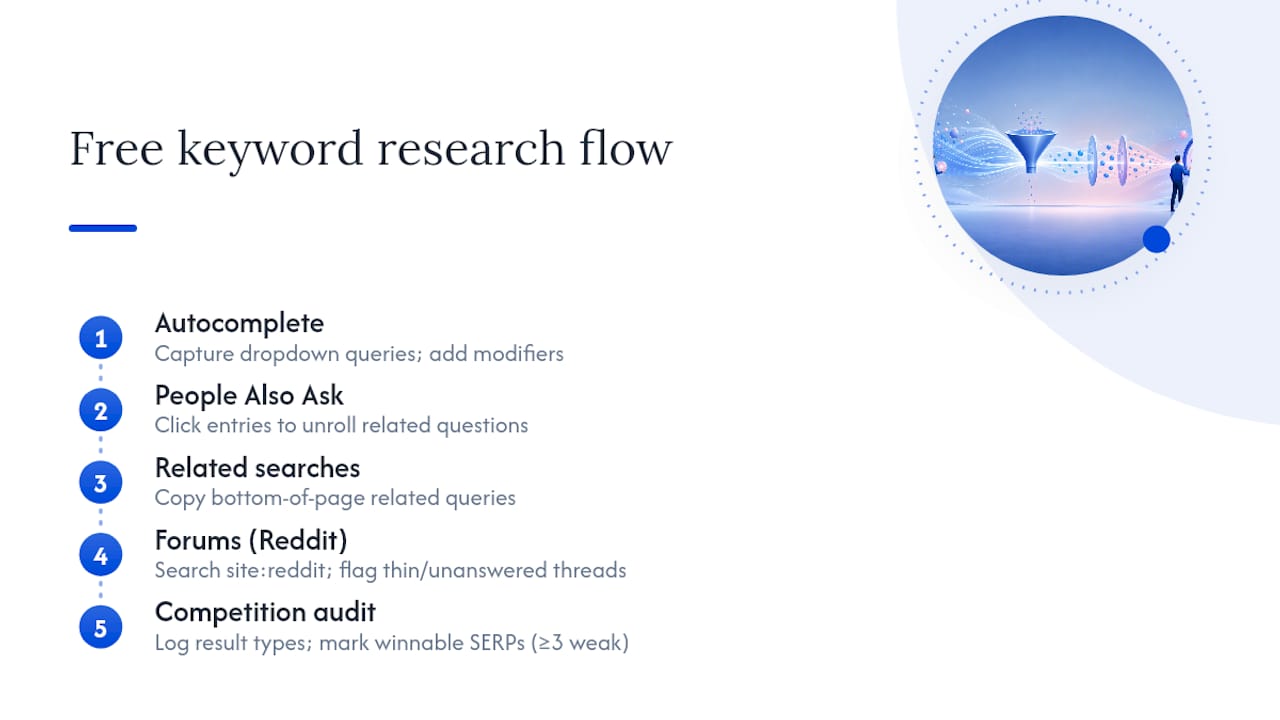
Forums deserve their own pass. Search “[your topic] site:reddit.com” or browse a niche subreddit directly. Threads full of unanswered or thinly answered questions are gold. If a forum thread ranks on page one for a query, that’s a strong signal the competition is weak, because forums rarely have the structured, comprehensive content that outranks them easily. Practitioners on Reddit itself often point to this exact pattern when hunting for niche phrasing.
As you go, log which results are forum posts, which are FAQ pages, and which have genuinely weak titles or thin content. That log becomes your competition audit.
Pro Tip: If three or more of the top five results are forum threads, outdated blog posts, or generic FAQ pages, you’re probably looking at a winnable SERP without spending a single credit.
Free signals are enough to decide whether a phrase is worth writing about. They’re not enough to decide priority across dozens of candidates. That’s where a paid workflow earns its keep.
Which Metrics Actually Matter in a Keyword Tool?
Running your candidate list through a keyword tool works best when you filter on a small set of metrics rather than eyeballing every column. In Semdash, the filters that matter most for a small site are keyword difficulty, minimum search volume, and SERP feature flags.
Set your filters like this:
- KD ceiling: relative to your domain’s current authority, not a fixed number across the board.
- Minimum volume: low enough to include long-tail phrases, but not so low you’re drowning in zero-volume noise.
- SERP features: flag results with featured snippets, People Also Ask boxes, or shopping results, since these often signal either strong intent match or extra competition from Google itself.
Reported search volume of zero doesn’t always mean zero demand. Search tools bundle close variants together, and a phrase showing “0” might still get real traffic once published, especially for conversational, AI-sourced queries that haven’t been indexed by volume estimators yet.
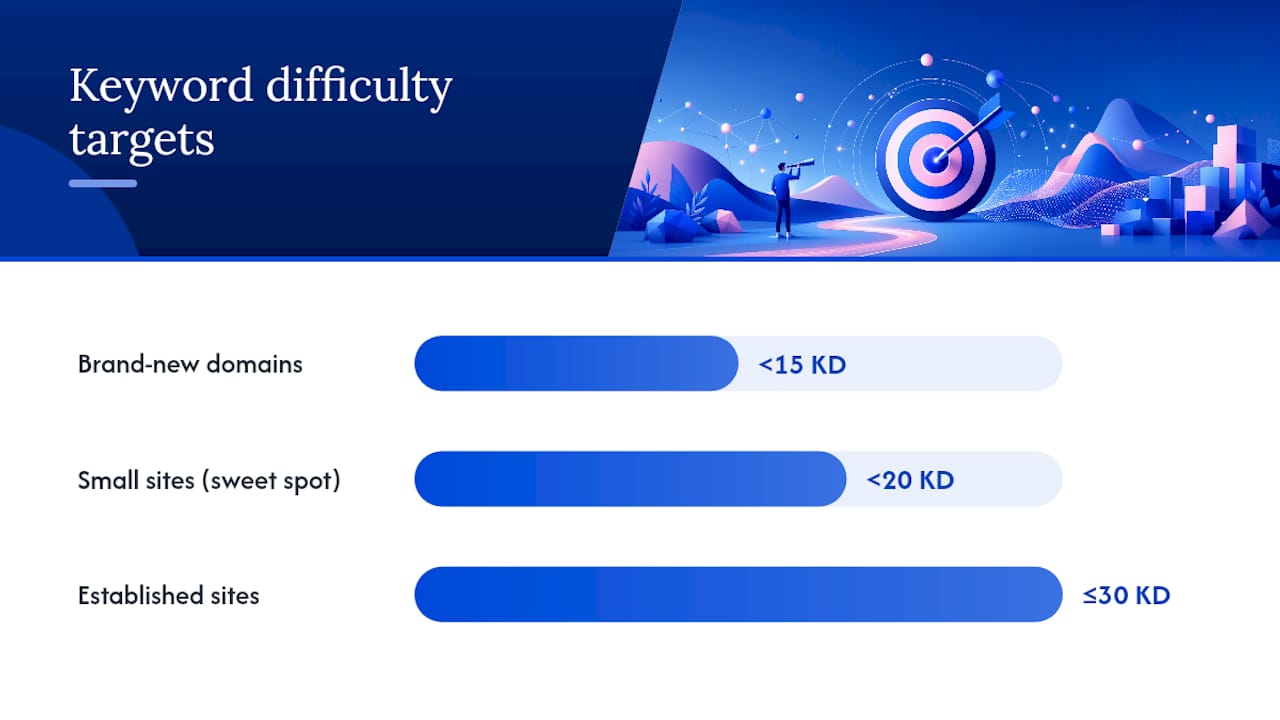
A practical sweet spot for many small sites is a keyword with roughly 200 to 500 monthly searches and a KD under 20. Brand-new domains should aim lower still, targeting KD under 15 until they build some authority.
Established sites with real backlink profiles can push toward KD 30 or higher and still win. Once you’ve filtered, export the results and sort by a blended score of volume, keyword difficulty, and topical fit. That export becomes your working priority list for the next stage.
How Do You Know a Keyword Is Actually Worth Targeting?
A keyword only qualifies as low competition if it clears two separate bars: real demand and beatable competition. Miss either one and you’ve found a dead keyword, not an opportunity.
Run this validation routine before you commit any writing time:
- Confirm demand exists. Check autocomplete, Google Trends, and your own Search Console query data if you have any history in the niche. AI tools can surface conversational phrasing worth testing too.
- Audit the top five results. Look at their backlink profiles, publish dates, and how comprehensive each page actually is. A tool like Semdash’s competition analysis feature speeds this up by surfacing referring domains and content gaps at once.
- Apply the abandon rule. If demand is flat at zero across every signal, drop it. If the top three results are recent, well-linked, and thorough, drop it too, unless you can genuinely say something they missed.
- Bundle the leftovers. Several related low-volume or zero-volume questions can often live on one comprehensive page instead of five thin ones, aggregating their combined traffic into a single target worth the effort.
Pro Tip: Publish the bundled page with a minimal first draft, answer-first sections for each sub-question, and watch Search Console for two to three weeks before expanding it further. Impressions with zero clicks tell you the query matched but the snippet didn’t; that’s useful data on its own.
The two failure modes to watch for are mirror images of each other: high demand paired with saturated competition, and low competition paired with zero demand. Both waste your time equally.
Which Keyword Patterns Tend to Stay Low Competition?
Certain keyword shapes show up as winnable again and again, and recognizing them speeds up your entire ideation process.
- Question keywords (“how do I fix a running toilet without a plumber”) tend to stay low competition because they’re too specific for most sites to bother writing a dedicated answer.
- Audience-specific long tail (“SEO for veterinary clinics” instead of “local SEO”) narrows the field to competitors who actually serve that audience.
- Alternative and comparison phrases (“X alternative for small teams,” “X vs Y for freelancers”) catch buyers actively evaluating options, often with thinner competition than the brand names themselves.
- Situational modifiers (“keyword research on a tight budget,” “SEO for a one-person shop”) filter out generic, high-authority competitors automatically.
Match each pattern to the right page type. A single sharp question usually deserves its own dedicated page if the volume supports it. A cluster of related questions on the same subtopic works better as sections within one comprehensive guide, linked internally so Google understands they’re part of the same topic. Semdash’s guidance on search intent and page type is worth a read if you’re unsure which structure fits a given phrase.
Write your title and first heading to mirror the exact query where it’s natural. If people type “how to find low competition keywords for a new blog,” your H1 or first H2 should echo that phrasing closely, not paraphrase it into something vaguer. Place your strongest internal link or conversion element after the answer, not before it. Readers who get value first are far more likely to click deeper into your site.
How Do You Turn Keyword Research Into Ranking Traffic?
Research without a production schedule just becomes a spreadsheet nobody opens again. Here’s a 90-day framework for turning your validated list into actual traffic.
- Score every keyword on four factors: intent fit, KD relative to your domain, estimated traffic, and conversion potential. Weight intent fit heaviest for a small site.
- Sort into three tiers: publish this month, publish next month, and revisit once your domain gains authority.
- Write minimum viable content for each target: an answer-first opening, clear H2s that mirror real queries, and two or three internal links to related pages.
- Publish on a fixed cadence, even if it’s just two pieces a week. Consistency beats bursts followed by silence.
- Track rankings and impressions weekly for the first month, then move to monthly checks once patterns settle.
| Week | Action | KPI to watch |
|---|---|---|
| 1 to 2 | Finalize scored list, draft top 5 targets | Candidate count validated |
| 3 to 6 | Publish first batch, submit to Search Console | Indexing rate |
| 7 to 10 | Publish second batch, begin internal linking pass | Impressions per query |
| 11 to 13 | Review rankings, bundle weak performers | Average position movement |
Most fresh content on a low-authority site takes six to twelve weeks to show meaningful position movement, so judge the plan on impressions and indexing first, rankings second. Once a pattern works, repeat it on the next cluster of related queries rather than starting ideation from scratch each time.
How Does Semdash Support This Keyword Workflow?
Every step in this playbook maps directly onto a feature inside Semdash, which is exactly why the platform exists as a single workspace rather than five separate subscriptions.
- Discovery: the keyword research tool expands your seed list with related terms and questions, similar to the autocomplete and PAA mining described earlier, but at scale.
- KD calibration: Semdash’s difficulty score is designed to be read against your own domain authority, following the same calibrate to your site logic covered in the KD section above.
- SERP analysis: see which top-ranking pages are thin, outdated, or forum-driven before you commit writing time.
- Clustering: group related long-tail questions into a single page structure automatically, supporting the bundling strategy from the validation checklist.
- Monitoring: track ranking movement and AI Overview mentions over time so you know when a tier-two target is worth promoting to tier one.
Use free manual checks for quick gut checks on a handful of phrases. Switch to Semdash once your candidate list runs past 20 or 30 terms, since manually checking backlink profiles and SERP composition for that many queries eats an entire afternoon otherwise. Start with one seed topic, run it through the tool, and compare the reported KD against your own domain rating before writing a single word.
The One Habit That Matters More Than Any Tool
The tactic that actually moves the needle isn’t finding a magic keyword. It’s running the same demand-plus-competition check every single time, without exception, until it becomes automatic.
Most rookie mistakes trace back to skipping one side of that check: chasing a low KD score without confirming anyone searches for the phrase, or ignoring search intent entirely because the volume number looked good. A third common error is treating every keyword as its own island instead of clustering related questions into one stronger page.
Adopt this habit this month: before you write anything, write down the demand signal and the competition weakness on the same line. If you can’t fill in both blanks, don’t publish yet.
— Leonid
Try This Workflow Inside Semdash Before You Write Your Next Post
Manually checking autocomplete, forums, and SERP strength works, but it’s slow once your candidate list grows past a couple dozen phrases. Semdash puts the entire demand-and-competition check in one screen, so you’re not tab-switching between Google, Reddit, and a spreadsheet every time you want to test a new seed topic.
Start with one topic you already know well. Run it through the keyword research tool, pull the related questions and long-tail variants it surfaces, then check the reported KD against your own domain rating. If a phrase clears both bars, you have a genuine candidate. Pair it with the competition analysis tool to see exactly what the top five results are missing before you draft a single paragraph. New to the platform? The free tools page lets you test parts of this workflow without committing to a plan first. Still validate manually where a result looks close. No tool replaces a quick look at the actual SERP.
Sources
- How to find low-competition keywords with Google Search | Zapier
- How to Find Low-Competition Keywords (Without Guessing) · Trendlytic
- How to Find Low-Competition Keywords in 2026 (6 Steps)
- How to find low competition keywords and topics with good … — Reddit
FAQ
How Do I Find a Competitor’s Keywords for Free?
Search a competitor’s domain directly in Google using “site:theirdomain.com” combined with a topic word to see which pages they’ve built around it, and check their published blog titles and headings for the queries they’re already targeting. For deeper competitor keyword data, a tool with a competition analysis feature can pull their full ranking list at once.
What Is the 80/20 Rule in SEO?
In SEO, the 80/20 rule generally refers to the idea that roughly 20% of your keywords, pages, or backlinks drive a majority of your organic results, so prioritizing your highest-potential targets first tends to matter more than covering every possible phrase.
How Can I Find Competitor Keywords for Free?
Beyond site: searches, check a competitor’s sitemap.xml file for their full page list, review their meta titles for exact phrasing, and search their brand name plus “vs” or “alternative” to see what comparison queries already exist. These free checks won’t show search volume, but they reveal which topics a competitor considers important enough to write about.
How Do I Check Keyword Difficulty?
Keyword difficulty is typically checked inside a keyword research tool that scores how hard a phrase is to rank for based on the backlink strength and authority of the current top-ranking pages. Read the score relative to your own domain’s authority rather than as an absolute number, since a KD of 30 might be easy for an established site and out of reach for a brand-new one.
What Counts as a Genuinely Low Competition Keyword?
A genuinely low competition keyword pairs confirmed search demand, visible in autocomplete, PAA, or Trends data, with a top SERP made up of thin, outdated, or forum-driven pages you can realistically outrank. A phrase with low competition but zero real demand is not a low competition keyword; it’s a dead keyword with nothing behind it.